Finding prospect contact details on LinkedIn manually can take a lot of time. You may spend hours searching profiles, checking whether they match your ICP, and then trying to find their business email or phone number. And even after finding the right prospects, their contact details may not be available.
A LinkedIn contact finder extension can automate this process at scale. Instead of manually searching for prospects and looking up their contact information one by one, you can find the right people on LinkedIn, identify the profiles that match your requirements, and enrich them with business contact details in one workflow.
With Pintel.ai, you can search for prospects using your ICP criteria and profile context, prioritize the best-fit contacts, and automatically enrich them with business emails and phone numbers — helping your team build targeted prospect lists faster and at scale.
What Is a LinkedIn Contact Finder Extension?
A LinkedIn contact finder extension retrieves business contact data from LinkedIn profiles, including verified business emails and phone numbers where available. Most tools stop there. Pintel.ai adds what comes before enrichment: searching LinkedIn profiles by ICP and context to surface the right contacts first, then surfacing profile signals to qualify them before any enrichment begins.
The result is a four-stage workflow in one platform:
- Find prospects that match your ICP criteria
- Search their LinkedIn profiles by context, not just job title
- Review profile signals and prioritize the strongest matches
- Enrich only the contacts that have passed qualification with verified business contact data
The Missing Step Between LinkedIn Search and Contact Enrichment
B2B sales teams approaching LinkedIn contact enrichment typically follow the same path: filter by job title, company size, and seniority, then enrich the resulting list in bulk. This skips the step that determines whether the list was worth enriching: qualifying whether those contacts actually match your ICP before committing enrichment spend to them.
- Job title alone does not tell you whether someone actually owns the problem your product solves, or whether they are a peripheral stakeholder with no buying influence
- Seniority and company size are starting points, not reliable indicators of genuine ICP fit for what you are selling
- LinkedIn’s native search has limited ability to filter by deeper profile context or the content signals that reveal real role scope
- Enriching the wrong contacts wastes budget and fills your pipeline with prospects who are less likely to be relevant, inflating volume while depressing quality
Pintel.ai adds the qualification step that sits between LinkedIn search and contact enrichment. Discovery, qualification, and enrichment run inside one workflow rather than across three separate tools, so the contacts that reach your outreach sequences are qualified before enrichment spend is committed.

How Pintel.ai Helps You Find and Enrich Your Ideal Prospects on LinkedIn
Six steps. One platform. No manual switching between separate prospecting tools, enrichment data vendors, or qualification layers.
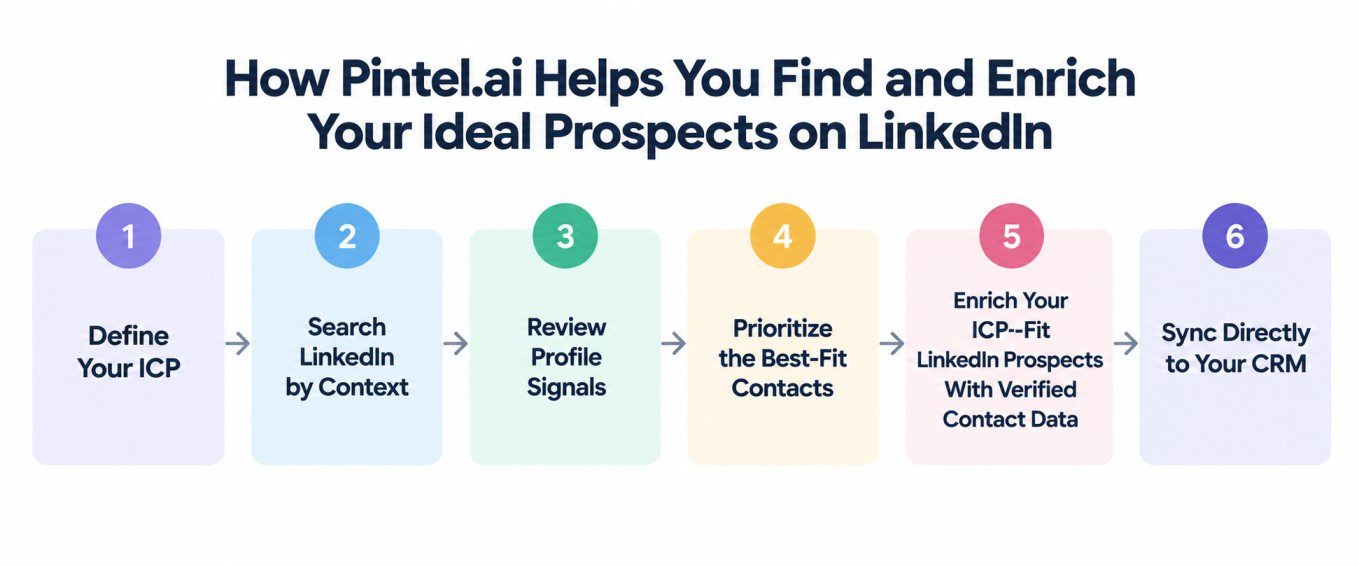
Step 1: Define Your ICP
- Set target industries, company sizes, seniority levels, and geographies
- Pintel.ai uses these criteria to frame every search and prioritization step automatically
- ICP criteria carry through the full workflow automatically, so every subsequent step stays focused on the right profile type
Step 2: Search LinkedIn by Context
- Pintel.ai searches LinkedIn profile content, not just job titles and seniority fields
- Surfaces contacts who mention specific tools, processes, or responsibilities in their profiles
- Finds prospects that a standard title filter would miss
Step 3: Review Profile Signals
- Pintel.ai surfaces role-specific profile content alongside each result automatically
- Evaluate ICP fit without opening each LinkedIn profile in a separate tab
- Compare stated responsibilities against your ICP criteria before committing any enrichment spend
Step 4: Prioritize the Best-Fit Contacts
- Pintel.ai surfaces ICP-fit signals from each result so you can prioritize the contacts that best match your criteria
- Review which contacts are worth enriching based on profile content, not just title and seniority
- Enrichment spend goes only to contacts that have passed qualification
Step 5: Enrich Your ICP-Fit LinkedIn Prospects With Verified Contact Data
- Retrieves business emails and phone numbers where available, cross-referenced from 30+ data sources
- Every email is validated via real-time SMTP check before it reaches you
- Only validated contact records are returned, so what enters your outreach tool is ready to use
Step 6: Export Your LinkedIn Contact List and Sync to Your CRM
- Export enriched contacts to your CRM, sequencing tool, or outreach platform of choice
- Direct sync with HubSpot and Salesforce, no manual reformatting needed
- Every contact in the export was discovered, qualified, and enriched inside the same workflow
The result is a contact list built on ICP fit signals, not just a title filter match. Every contact that reaches your outreach sequence was discovered by profile context, reviewed for ICP fit before enrichment began, and validated before the data was returned. The six steps run inside one platform, so the process from ICP definition to a ready-to-use enriched contact list does not require switching between tools or running a separate qualification pass at any stage.
How Pintel.ai Automates Context-Based LinkedIn Prospecting
Standard LinkedIn prospecting tools query structured fields: job title, industry, seniority, and company size. These fields are easy to filter but do not reveal whether someone actually owns the problem your product solves. Pintel.ai searches the content of LinkedIn profiles themselves, including summary sections, experience descriptions, and skills fields, to surface contacts that match your ICP based on what they do, not just what their title implies about them.
What Pintel.ai Searches on Your Behalf
- Profile summaries, experience descriptions, and skills fields: these are the parts of LinkedIn that contain the most useful signals about what someone actually does in their role, rather than just what their job title says they do
- Keywords and phrases that indicate actual role scope: specific tools mentioned, processes described, projects listed, and responsibilities stated in the prospect’s own words rather than inferred from their seniority level
- Signals that reveal buying influence and decision-making scope in a role, which are often documented in profile content but invisible to a search that only filters by job title, seniority, and company size
- Contacts that a standard title filter would miss entirely, because their relevance to your product shows up in what they describe doing rather than in how their employer has titled the role
Example: QA Engineers
- Standard title search: QA Engineer at target companies
- Pintel.ai context search: QA professionals whose profiles mention test automation, CI/CD pipeline, or tool evaluation in their experience or summary
- Why it matters: The contacts that surface have a documented connection to the tools and processes your product addresses, not just a matching job title
Example: Procurement Managers
- Standard title search: Procurement Manager at target company sizes
- Pintel.ai context search: Procurement professionals whose profiles mention vendor onboarding, supplier risk management, or contract lifecycle in their experience
- Why it matters: The contacts that surface have stated responsibilities that align with your solution, not just a title that overlaps with your target persona
Example: Sales Professionals With Specific Vertical Experience
- Standard title search: Account Executive or Sales Manager at companies in your target size range
- Pintel.ai context search: Sales professionals whose profiles mention “manufacturing,” “supply chain,” or “enterprise implementation” alongside their sales experience, regardless of current company industry
- Why it matters: A standard filter returns every sales professional at the right company size. Pintel.ai’s context search surfaces the ones whose professional background includes the industry knowledge or deal-type experience directly relevant to what you are selling, and that specificity shows up in their LinkedIn profile content, not in their job title
What Context Search Produces for Your Pipeline
- Every contact Pintel.ai surfaces was found for a specific reason beyond title and employer headcount, which means the context for outreach is already established at the list-building stage
- The search terms that surface strong ICP matches can be refined over time as you learn which profile keywords consistently correlate with the contacts your team actually wants to reach
- Outreach begins from a contextually qualified list rather than a volume-based export that relies on response rate to filter out poor-fit contacts after enrichment spend has already been committed
Once You Have Found the Right Prospects, Enrich Their Contacts
After identifying and prioritizing your best-fit prospects from LinkedIn, Pintel.ai retrieves business contact data from across 30+ cross-referenced data sources. Business emails are SMTP-validated in real time before being returned. Phone numbers are sourced and cross-referenced where available. What you receive is contact data you can act on immediately rather than records that need a separate verification pass before entering your outreach tool.
| Data type | What you get |
|---|---|
| Business email | Verified business email address where available, validated via real-time SMTP check before delivery to ensure deliverability before it enters your outreach sequence |
| Phone number | Direct business phone number or mobile number where available, cross-referenced across Pintel.ai’s provider network for coverage and recency |
| Company details | Company name, size range, industry classification, and LinkedIn company profile link for context alongside enriched contact data |
| Role context | Job title, seniority level, and relevant profile keywords from the contact’s LinkedIn page to support personalized and contextually relevant outreach |
Contact data availability varies by prospect. Pintel.ai prioritizes accuracy over volume, returning only validated contact records rather than unverified bulk matches. Not every profile will return both an email and a phone number, and availability depends on what Pintel.ai’s data providers hold for that contact at the time of the enrichment request. What is returned has been cross-referenced and, in the case of email addresses, SMTP-validated before delivery. Because only verified contacts enter your outreach tool, the proportion of unreachable addresses in your sequences stays low from the point of enrichment forward rather than requiring a cleanup step after sending begins.
Why Sales Teams Choose Pintel.ai
Four things that distinguish Pintel.ai from using a separate tool for each stage of the LinkedIn prospecting workflow. Each one addresses a gap that appears when prospecting, qualification, and enrichment are handled by tools that were not built to work together.
| What you get | What it means in practice |
|---|---|
| Search beyond job titles | Find prospects based on LinkedIn profile content and context, not just title and seniority fields |
| Qualify before enrichment | Review ICP-fit signals from each profile before spending enrichment credits on any contact |
| Verified contact data | Business emails SMTP-validated before delivery; phone numbers where available across 30+ cross-referenced sources |
| One connected workflow | From ICP definition to enriched contact export without switching between prospecting tools, enrichment vendors, or qualification layers |
How Pintel.ai Fits Into Your LinkedIn Prospecting Stack
LinkedIn prospecting and contact enrichment are typically handled by separate tools: a platform for finding prospects, a tool for qualifying them, and an enrichment vendor for contact data. Using three separate tools means managing three logins, three data exports, and three handoff points where contact quality can degrade. Pintel.ai combines all three into one workflow. The table below shows where each tool type fits across the process from prospect discovery to enriched contact export.
| Capability | Pintel.ai | LinkedIn Sales Navigator | Standard enrichment tools |
|---|---|---|---|
| LinkedIn prospect discovery | ✓ Context-based search by profile content | ✓ Title and filter-based search | — |
| Context-based qualification | ✓ Profile signals surfaced before enrichment | Limited | — |
| Contact enrichment | ✓ Business email and phone where available | Limited | ✓ Email and phone enrichment |
| Phone number enrichment | ✓ Where available across 30+ sources | Limited | ✓ Where available |
| ICP to enriched contact list | ✓ Unified workflow in one platform | — | — |
Who Uses Pintel.ai for LinkedIn Prospecting and Enrichment
Pintel.ai is used by sales teams, growth teams, and agencies who need qualified prospect lists with verified contact data attached, built on LinkedIn profile context signals rather than title filter assumptions. The common thread is needing to know the contact is the right fit before committing enrichment spend to them, not after. Qualification that happens before enrichment rather than after it changes the economics of outreach at scale.
SDR and BDR Teams
Find and qualify prospects before outreach begins. Pintel.ai surfaces profile signals so reps review ICP fit at the list-building stage, and every sequence starts from contacts whose profiles match the pitch, not just the job title.
RevOps and Growth Teams
Build qualified prospect lists that integrate directly into your CRM and sequencing tools without manual hygiene work between export and import. The qualification step reduces unqualified contacts entering the top of the funnel from the point of enrichment forward.
Founders and Growth Leaders
Run a full prospecting workflow from ICP definition to enriched contact export in a single platform, without managing separate tools or vendors at each stage. Outreach spend goes to contacts identified by profile context before enrichment budget is committed.
Lead Generation Agencies
Deliver prospect lists built on contextual qualification signals with verified contact data attached. Prospect quality is demonstrated by ICP fit evidence from profile content, not just a demographic match count from a standard filter search.
Built on a Compliant Data Infrastructure
Pintel.ai holds ISO 27001 certification, which covers the management of information security across data handling and infrastructure, and has completed the SOC 2 (AICPA) audit, which assesses security controls relevant to data processing and access. Pintel.ai has also completed VAPT security testing across its platform and data infrastructure. The platform is designed to operate in alignment with GDPR and CCPA data protection requirements across its prospecting and enrichment infrastructure. For regulated industries or specific compliance requirements, contact Pintel.ai directly to confirm applicability to your use case.
Frequently Asked Questions
How can I find contact information for LinkedIn profiles?
Finding contact details manually for every LinkedIn profile can take time, and some profiles may not have contact information available. Pintel.ai lets you enrich selected LinkedIn prospects with available business emails and phone numbers.
How can I get contact details for my target LinkedIn profiles?
Start by finding LinkedIn profiles that match your ICP. Pintel.ai then helps you enrich those profiles with available business contact data, so you can build a targeted contact list without researching each prospect separately.
How can I find LinkedIn prospects at scale for B2B outreach?
Instead of finding and researching prospects one by one, you can search LinkedIn based on your ICP, identify relevant profiles, and enrich their contact details in bulk with Pintel.ai.
How can I find B2B leads on LinkedIn and get their email addresses?
Find prospects that match your target roles, companies, and other ICP criteria on LinkedIn, then enrich those profiles with available business email addresses using Pintel.ai.
How can I find the right LinkedIn prospects for my ICP?
Use standard LinkedIn filters along with profile context such as experience, skills, responsibilities, and keywords. Pintel.ai helps you identify and prioritize profiles that are more closely aligned with your ICP.
How can I find LinkedIn prospects based on their experience?
Instead of relying only on job titles, search for relevant experience, skills, responsibilities, and keywords within LinkedIn profiles. For example, you can find QA professionals with experience in test automation or CI/CD, even when their job titles differ.
How do I qualify LinkedIn leads before enriching them?
First review LinkedIn profiles against your ICP and prioritize the strongest matches. You can then enrich those selected prospects instead of spending enrichment credits on every profile you find.
Can I export LinkedIn leads and sync them to my CRM?
Yes. Once your LinkedIn prospects are identified and enriched, you can export the contact list and sync it with your CRM for sales and B2B outreach.