There are more than 50 LinkedIn prospecting tools for B2B sales, and most look similar at a glance. Differences in ICP filtering accuracy, contact data coverage outside the US, buying signal depth, and outreach automation only become visible when you compare tools directly. This page reviews 10 of them: Pintel.ai, LinkedIn Sales Navigator, Apollo.io, ZoomInfo, Clay, Lusha, Cognism, PhantomBuster, Expandi, and Hunter.io.
Each review covers what the tool does well, where it falls short, and which outbound teams it fits best. A four-stage workflow framework, a buying signal coverage table, and a side-by-side feature comparison give you enough context to match the right tool to your specific workflow gap, without reading every review in full.
What Is the Best LinkedIn Prospecting Tool?
The right tool depends on your use case:
- Complex ICP where title filters return too much noise: Pintel.ai reads the full work profile, not just job title keywords, so irrelevant contacts are filtered without manual review.
- One tool for database, sequences, and signals: Pintel.ai and Apollo.io both cover this use case. Apollo.io pairs contact data, email outreach, and basic intent signals in a single subscription.
- Phone-first outbound into European markets: Pintel.ai and Cognism are both options here.
- Custom enrichment workflow across multiple data sources: Pintel.ai and Clay both support multi-source enrichment.
- Tracking company-level buying signals such as funding rounds and leadership changes: Pintel.ai and Lusha both monitor these signals at the account level.
- Tracking prospect-level signals such as job changes and promotions: Pintel.ai and Sales Navigator both surface these triggers natively.
What Are LinkedIn Prospecting Tools for B2B Sales?
LinkedIn prospecting tools for B2B sales are software platforms that connect revenue teams to verified decision-maker contact data from LinkedIn. They range from single-function tools (contact lookup or outreach automation) to full-funnel platforms covering ICP discovery, multi-source enrichment, buying signal scoring, and CRM sync in one workflow.
The Four Stages of a LinkedIn Prospecting Workflow
Effective LinkedIn prospecting runs through four distinct stages before a contact becomes a booked meeting. Most tools address one or two stages natively. Teams that try to cover all four with a single tool often find gaps where manual work creeps back in.
- Discover the right prospects. Pintel.ai and Sales Navigator are the main tools for this stage. Sales Navigator filters by title, company size, and location, making it the fastest starting point for most teams.
- Enrich contact records. Pintel.ai and Apollo.io both cover contact enrichment. Apollo.io pulls from its own database, which covers US and English-speaking markets well.
- Prioritize accounts by buying signals. Pintel.ai and ZoomInfo are the primary tools for signal tracking. ZoomInfo offers signal data through its Surge add-on. Most other tools surface one signal type at most, typically only at higher pricing tiers.
- Activate prospects through outreach. Move qualified contacts into email sequences or LinkedIn campaigns. Apollo.io offers built-in email sequencing, while Pintel.ai delivers enriched, prioritized contacts to your existing outreach tools.
If SDRs spend more than two hours daily on list research, the problem is Stage 1 or Stage 2. If reply rates sit below 5%, the problem is usually Stage 3: outreach is reaching the right titles at the wrong time. Matching the tool to the broken stage is faster than replacing the entire stack.
How to Choose the Right LinkedIn Prospecting Tool for Your Team
Start with the workflow stage that is failing, not the feature list. Six criteria determine which tool fits.
- ICP complexity. If title filters return noise because your ICP requires context beyond a job title, use Pintel.ai, the only tool here that reads the full work profile, not just keywords.
- Contact data quality. If bounce rates are high, use a waterfall enrichment tool. Pintel.ai and Clay query 20+ providers in sequence and hold match accuracy above 95%. Every other tool on this list pulls from a single database.
- Buying signal depth. Pintel.ai scores four signal types simultaneously (funding, hiring volume, leadership changes, job changes). Lusha and ZoomInfo typically cover one or two. More signal types means fewer false positives.
- Geographic coverage. US-first platforms lose fill rates quickly outside North America. For EMEA or APAC ICPs, use Pintel.ai or Cognism. Always request a sample list against your actual ICP geography before committing.
- Total workflow cost. Price the full stack: enrichment credits at real volume, an outreach sequencer if the tool does not include one, and any manual research time not automated. Three point solutions at $99 to $150 each become a $350 to $450 monthly stack.
- Stack complexity. Every tool handoff adds sync lag and CRM mapping overhead. If you are running more than two tools for prospecting, price the integration cost, not just the subscriptions.
How Each LinkedIn Prospecting Tool Performs Across Discovery, Enrichment, and Signals
The table below maps each tool across four stages of the LinkedIn prospecting workflow. Each cell describes the actual level of support: full native coverage, partial or add-on only, or none.
| Tool | Profile Discovery | Contact Enrichment | Buying Signals | CRM Sync | Starting Price | Key Limitation |
|---|---|---|---|---|---|---|
| Pintel.ai | Reads full work profile, not just title | 20+ provider waterfall | Funding, hiring, leadership change, job change | CRM push | $49/user/mo | No native outreach sequencer |
| Sales Navigator | Native LinkedIn filters | LinkedIn data only | Job changes, news alerts | CRM sync on Advanced Plus only | $89.99/mo (annual) | No email or phone data at any tier |
| Apollo.io | Title and firmographic filters | Apollo database only | Basic intent signals | Salesforce, HubSpot | $49/user/mo (annual) | Monthly credits expire with no rollover |
| ZoomInfo | Title and firmographic filters | ZoomInfo database only | Included in higher-tier plans | Enterprise CRM integrations | Custom | Advanced features sit in higher-tier plans |
| Clay | Find People/Companies (native) | Multi-source waterfall enrichment | Depends on connected source | Via integrations | $167/mo (annual) | Requires significant setup; not plug-and-play |
| Lusha | LinkedIn extension lookup | Lusha database only | 26 buying signals (growth, intent, events, risk) | Salesforce, HubSpot, Dynamics | $37.45/mo billed annually (Starter) | Single-source database |
| Cognism | Title filters, European focus | Cognism and Diamond verify | Included in Pro plan (Bombora) | Salesforce, HubSpot | Custom | Europe-first data provider; verify coverage for your ICP |
| PhantomBuster | LinkedIn scraping workflows | Email credits included in each plan | None | Native HubSpot | $56/mo billed annually | Risk of LinkedIn account restriction at high volume |
| Expandi | Works from imported lists | No enrichment database | None | Native HubSpot, Salesforce, Pipedrive | $79/mo billed annually, $99/mo monthly | No contact database; list quality drives results |
| Hunter.io | Domain lookup only | Email pattern only | None | Basic export | $34/mo | Email only; no phone numbers or LinkedIn data |
Starting prices shown are entry-level paid plans on annual billing. Monthly billing rates are higher. Free plans available for Pintel.ai, Apollo.io, Clay, Lusha, PhantomBuster, and Hunter.io. ZoomInfo and Cognism are quote-based. Verify current pricing directly with each vendor.
Top LinkedIn Prospecting Tools: Reviews and Real World Performance
Let’s look at how each platform handles prospect discovery, contact enrichment, buying signals, lead prioritization, and outreach automation, starting with Pintel.ai.
Pintel.ai: Full LinkedIn Enrichment Automation, Without a Native Outreach Sequencer
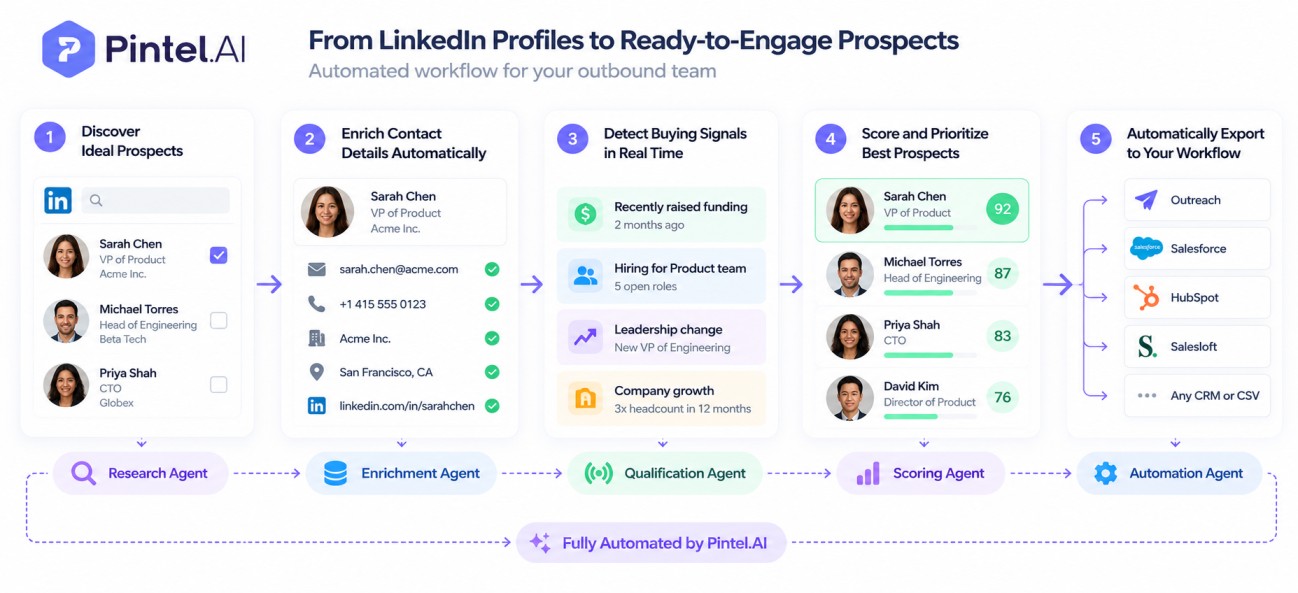
Pintel.ai is a B2B prospecting platform that combines profile-level contact discovery, multi-source enrichment across 20+ data providers, and multi-signal buying scores into a single workflow running from ICP definition through to CRM delivery. It is built for revenue teams whose ICPs cannot be described using standard keyword filters alone.
Key features for LinkedIn prospecting:
- Profile-level discovery reads the full work profile rather than the job title alone: a “QA Engineer” could be running quality control at a food manufacturer or leading software testing at a SaaS company, and Pintel.ai distinguishes between them without any manual review or keyword gymnastics
- From a single platform, revenue teams get ICP-matched companies, decision-maker contacts with verified email, phone, and LinkedIn, buying signals to prioritize outreach, and CRM sync to push everything downstream without manual exports
- Chrome extension sends a LinkedIn profile to the Pintel.ai prospecting sheet for enrichment, pulling from a 20+ provider waterfall to return verified email and direct dial without a separate enrichment job
- API access lets revenue operations teams pipe enriched contact data directly into CRM records, data warehouses, or custom outreach workflows without manual CSV exports
- Waterfall enrichment across 20+ data providers maintains match accuracy above 95% for emails and direct dials, with stronger EMEA, APAC, and GCC coverage than single-source tools deliver
- Multi-signal buying scores combine funding events, job changes, leadership changes, and hiring volume to automatically rank accounts by purchase readiness, so SDRs prioritize the right accounts without manual triage
Limitations:
- No native outreach sequencer: emails and LinkedIn messages must be sent through your existing outreach tool, so Pintel.ai sits upstream of rather than replacing platforms like Outreach, Salesloft, or Expandi
Pricing: Starts at $49 per user per month.
Bottom line: The right choice for teams with complex ICPs that title-keyword filters cannot build accurately.
2. LinkedIn Sales Navigator: LinkedIn’s Own Search and Tracking Layer. No Email or Phone Data, No Enrichment, No Outreach Automation.
LinkedIn Sales Navigator is LinkedIn’s own paid search and relationship management layer, used as the discovery starting point for most B2B outbound workflows. It identifies ICP-fit profiles using LinkedIn’s own network data but does not provide contact details, enrichment, or outreach automation.
Key features for LinkedIn prospecting:
- Lead and account filters covering function, seniority, company growth rate, and headcount change, applied within LinkedIn’s own network data
- Saved search alerts deliver new contacts matching ICP criteria as they appear on LinkedIn, removing the need to re-run searches manually
- Alerts surface job changes, company news, and leadership updates for contacts in saved lists, providing natural warm outreach timing signals
- TeamLink shows second-degree connection paths to target contacts through colleagues’ LinkedIn networks, identifying potential warm introductions before cold outreach
Limitations:
- Sales Navigator contains no email addresses or phone numbers at any subscription tier: every workflow that requires verified contact data needs a separate enrichment tool connected downstream
Pricing: $89.99 per user per month on annual billing; $119.99 billed monthly (Core plan). Advanced plan available at higher price points.
Bottom line: The standard starting point for LinkedIn-based discovery; requires a separate enrichment and outreach tool to complete the workflow. Teams that need verified contact data, buying signals, and CRM delivery in a single platform use Pintel.ai to cover the three workflow stages Sales Navigator leaves open.
3. Apollo.io: One Invoice for Contact Database and Outreach Sequences. Monthly Credits Don’t Roll Over.
Apollo.io is a sales intelligence and sequencing platform that combines contact database access with outbound email and task automation in one subscription. Teams use it to move from a LinkedIn search result to an active outreach sequence without switching tools.
Key features for LinkedIn prospecting:
- Chrome extension surfaces email addresses and phone numbers from Apollo’s database when viewing a LinkedIn profile, without leaving the browser
- Contact database filterable by job title, industry, company size, annual revenue, and technology stack
- Sequences automate email steps, call task assignments, and LinkedIn touchpoints from within the same platform used for list-building, reducing tool switching for outbound teams
- Intent data identifies accounts researching solutions in your category based on third-party behavioral signals, enabling timing-based prioritization
Limitations:
- Contact exports consume monthly credits that reset on a fixed cycle: teams running high-volume campaigns can exhaust their allowance mid-month, and unused credits do not roll over on standard plans
Pricing: Starts at $49 per user per month. A free plan is available with limited monthly credits.
Bottom line: Well-suited to teams that want contact data and outreach sequencing on a single subscription. Teams that need higher fill rates outside North America, or ICP filtering that goes beyond title keywords, typically compare Apollo.io against Pintel.ai before committing.
4. ZoomInfo: B2B Contact Database with CRM Integrations. Title Filters Return Noise for Complex ICPs.
ZoomInfo is an enterprise sales intelligence platform with extensive contact and company data coverage, primarily used by revenue teams with established CRM infrastructure. It covers multi-stakeholder deal research and consistent data delivery across US-heavy ICPs.
Key features for LinkedIn prospecting:
- Company org charts map buying committee members and reporting structures at target accounts, enabling multi-threaded deal coverage
- Job change alerts notify teams when tracked contacts change companies or roles, providing a warm outreach trigger without manual monitoring
- Technographic filters identify companies using specific technology categories, enabling solution-fit targeting without manual company research
- Native CRM sync with Salesforce and HubSpot, with one-way contact push to Outreach and Salesloft, maintains data consistency across the sales tech stack
Limitations:
- Intent data and website visitor tracking are included in higher-tier plans rather than the base tier: teams starting on a standard contract and expecting bundled signal features often find the full cost higher than the initial quote
Pricing: Quote-based. Enterprise contracts typically require annual commitments.
Bottom line: Strong for enterprise teams with established CRM stacks and primarily US or North American target markets. Teams with complex sub-industry ICPs that ZoomInfo’s title filters cannot build accurately use Pintel.ai for profile-level discovery that removes the manual cleanup step after export.
5. Clay: Enrichment Workflow Across Multiple Data Providers. Technical Setup Required Before Any List Ships.
Clay is an enrichment workflow builder that connects multiple data providers and LinkedIn in a table-based interface, giving RevOps teams control over enrichment logic, provider selection, and AI-assisted scoring that no single vendor’s native tool provides.
Key features for LinkedIn prospecting:
- Find People and Find Companies are native discovery features that let teams source prospects directly inside Clay without importing from an external list, covering LinkedIn profiles and web-scraped company data
- Connects to multiple contact enrichment providers and LinkedIn simultaneously, letting teams select sources by ICP geography, coverage type, or field priority
- Waterfall enrichment logic queries the highest-accuracy source first, falls back automatically for missing fields, and applies additional sources for remaining gaps without writing code
- AI enrichment steps classify job titles, score contact relevance against an ICP description, or draft personalized outreach lines directly from profile data
- Native integrations with Salesforce, HubSpot, and Outreach sync enriched records directly after enrichment runs complete (Salesforce and HubSpot integrations require the Growth plan)
Limitations:
- Clay requires significant workflow configuration before producing results: teams without a dedicated RevOps resource typically need several days of setup to get enrichment logic, provider connections, and CRM sync working correctly
Pricing: Starts at $167 per month on annual billing (Launch plan). Credit costs vary by provider and field type.
Bottom line: Best for RevOps teams building custom enrichment pipelines that require provider combinations or logic a single vendor does not support natively. Teams that want the same multi-source waterfall enrichment without the configuration overhead use Pintel.ai, which runs it as a native workflow.
6. Lusha: Browser Extension Lookup with Built-In Buying Signals. Coverage Drops for Non-US ICPs.
Lusha is a B2B data platform that combines browser-extension contact lookup with buying signal tracking and email sequencing, giving SDRs contact data, outreach triggers, and sequence management in one subscription.
Key features for LinkedIn prospecting:
- Chrome extension displays email addresses and phone numbers from Lusha’s database directly on a LinkedIn profile page, with no workflow configuration required
- Native integrations with Salesforce, HubSpot, and Microsoft Dynamics export contact records directly from the browser extension without a manual export step
- Buying signal tracking covers 26 buying signals across growth, intent, events and risk, surfaced inside the Lusha platform for account prioritization without a separate signal tool
- Lusha Engage provides email sequencing directly within the platform, removing the need for a separate outreach tool for teams running email-first prospecting
- LinkedIn email finder Chrome extensions like Lusha’s are the fastest path from a profile page to a verified email; Lusha’s prospecting list adds bulk filtering and export for teams building lists at scale
Limitations:
- Single-source database: unlike waterfall enrichment tools that query multiple providers in sequence, Lusha draws from its own database only, which means fill rates depend on Lusha’s own coverage for your specific ICP geography and industry
Pricing: Starts at $37.45 per user per month on annual billing; $49.90 billed monthly (Starter plan).
Bottom line: A practical all-in-one choice for SDRs running email-first outbound; request a sample list against your real ICP before committing to verify coverage for your specific target market. Teams that also need buying signal scoring or stronger global fill rates compare Lusha directly against Pintel.ai before deciding.
7. Cognism: Verified Phone Data for European Outbound. Coverage Falls Sharply Outside Europe.
Cognism is a European-first B2B data platform built around verified contact data, used primarily by sales teams running phone-first outbound across European markets. Cognism publicly claims 90% coverage in both Europe and the US.
Key features for LinkedIn prospecting:
- Diamond Data provides phone-verified numbers: Cognism calls each number to confirm the right person answers, rather than relying on algorithmically inferred data, resulting in higher connection rates for cold calling workflows
- GDPR compliance documentation covers lawful basis, consent records, and data processing agreements in a format enterprise legal and compliance teams can review before any outreach begins
- Contact coverage is strongest across European markets, where Cognism’s phone-verification infrastructure and regional data sourcing give it an advantage over US-headquartered databases
- Bombora intent data is available on the Pro plan, covering topic-based behavioral signals (content consumption patterns across B2B sites); event-based signals such as job changes, hiring, and funding are a separate feature available on the Elevate tier
- Native integrations with Salesforce, HubSpot, Outreach, and Salesloft export verified contact records directly into the outreach workflow
Limitations:
- As a European-first data provider, coverage strength varies by market: request a sample list against your specific ICP geography before committing, particularly for APAC or niche industry segments
Pricing: Quote-based.
Bottom line: The right call for phone-first outbound into European markets; verify coverage for your specific ICP geography before committing. Teams selling globally or needing multi-signal account scoring that goes beyond Cognism’s Elevate-tier signals compare Cognism against Pintel.ai before committing to a full contract.
8. PhantomBuster: LinkedIn Workflow Automation. LinkedIn Flags High-Volume Accounts.
PhantomBuster is a LinkedIn automation platform that uses pre-built workflow scripts to automate repetitive actions at scale. It extracts publicly visible profile data and runs connection and message sequences without requiring a dedicated outreach platform subscription.
Key features for LinkedIn prospecting:
- LinkedIn profile scraper extracts names, titles, companies, LinkedIn URLs, and publicly visible profile data from search results and group member lists at scale
- Connection request automation sends personalized connection invites to a defined list of LinkedIn profiles on a configurable daily schedule
- Message sender delivers personalized LinkedIn messages to first-degree connections automatically based on imported contact lists
- Email credits are included in each plan, enabling verified email lookup beyond publicly visible LinkedIn data without a separate enrichment subscription
- Native HubSpot integration pushes extracted contact data and campaign activity directly without a Zapier connector
Limitations:
- LinkedIn’s User Agreement prohibits automated data collection and scripted interaction; teams using PhantomBuster accept the risk of account restriction or permanent suspension, and workflow scripts require ongoing maintenance when LinkedIn updates its page structure
Pricing: Starts at $56 per month, billed annually.
Bottom line: Viable for teams comfortable with LinkedIn automation risk; volume must stay within LinkedIn’s daily limits to avoid account restriction. Teams that prioritize verified contact data and buying signal scoring over automation workflows use Pintel.ai to cover what PhantomBuster does not address.
9. Expandi: LinkedIn Outreach Sequences Without InMail Volume Limits. Cannot Build Its Own Prospect Lists.
Expandi is a cloud-based LinkedIn outreach automation tool that runs connection request campaigns and multi-step message sequences from its own infrastructure rather than a browser extension, which reduces the account detection pattern associated with local automation tools.
Key features for LinkedIn prospecting:
- Cloud-based operation means sequences run from Expandi’s servers rather than a browser extension, reducing the detection signals that LinkedIn associates with local automation
- Multi-step sequences combine connection requests, follow-up messages, InMails, and email steps in one campaign flow without switching platforms
- Smart sequence variables pull from imported contact fields such as job title, company name, and recent post content to personalize opening messages at scale
- Native integrations with HubSpot, Salesforce, and Pipedrive sync campaign activity and conversation data directly without a Zapier workflow
- Step-level analytics report connection acceptance rates, reply rates, and drop-off points per campaign step, showing where sequences lose engagement
Limitations:
- Expandi requires an imported prospect list before any campaign can begin: it has no native discovery or enrichment layer, and list quality directly determines campaign output. LinkedIn’s User Agreement prohibits automated messaging at scale; teams should review current limits and risk policies before deploying high-volume sequences
Pricing: Starts at $79 per user per month on annual billing; $99 billed monthly.
Bottom line: A capable outreach automation layer for LinkedIn-first outbound; its output depends entirely on the quality of the imported prospect list. Pintel.ai is commonly used upstream: it handles ICP discovery, enrichment, and signal scoring so the list Expandi sequences is already qualified before the first message sends.
10. Hunter.io: Email Lookup by Domain. Not a Full LinkedIn Prospecting Workflow Tool.
Hunter.io is a domain-based email lookup tool that finds and verifies email addresses associated with a company domain. SDRs use it after identifying a target contact from LinkedIn, to confirm email format before outreach without running a full enrichment job.
Key features for LinkedIn prospecting:
- Domain search returns the email format pattern a company uses and specific verified addresses indexed for that domain
- Email verifier checks whether a found address is deliverable before adding it to an outreach sequence, reducing bounce rates at point of entry
- Campaigns (email sequences) let teams send multi-step cold email sequences from Hunter.io directly, without a separate outreach tool for email-only workflows
- Chrome extension surfaces domain-based email data when browsing a company’s LinkedIn page or website
Limitations:
- Hunter.io does not identify ICP-fit contacts, does not provide phone numbers or buying signals, and does not connect to LinkedIn profiles: it covers email lookup by domain only, so contact discovery must happen elsewhere
Pricing: Starts at $34 per month. A free plan is available for limited monthly lookups.
Bottom line: Useful as a supplementary email lookup tool for teams that have already identified target contacts from another source. Teams that need ICP discovery, enrichment, and buying signals before email lookup use Pintel.ai for the full upstream workflow that Hunter.io does not cover.
Buying Signal Coverage: Which Tool Tracks What in 2026?
Buying signals tell you when an account is likely in a purchase window, not just whether it fits your ICP. Contact data tells you who to reach. Signal coverage tells you when to reach them. Most tools on this list provide the former. Fewer provide the latter natively.
The table below shows signal coverage across four key event types. “Native” means the signal is tracked inside the platform at no additional cost. “Partial” means some coverage exists but scope is limited. “Add-on” means signal data requires a higher-tier plan or a third-party integration. “Configurable” means the tool can track the signal via connected data sources but requires setup.
| Tool | Job Changes | Leadership Changes | Hiring Volume | Funding Events | Multi-Signal Score |
|---|---|---|---|---|---|
| Pintel.ai | Native | Native | Native | Native | Yes |
| Lusha | Native | Native | Partial | Partial | No |
| ZoomInfo | Native | Native | Add-on (Surge) | Native | No |
| Sales Navigator | Native | Native | Partial | Partial | No |
| Apollo.io | Native | None | Partial | Partial | No |
| Cognism | Add-on (Elevate) | None | Add-on (Elevate) | Add-on (Elevate) | No |
| Clay | Configurable | Configurable | Configurable | Configurable | No |
| PhantomBuster | None | None | None | None | No |
| Expandi | None | None | None | None | No |
| Hunter.io | None | None | None | None | No |
Signal coverage reflects each vendor’s documented feature set as of October 2026. Specific signal availability varies by pricing tier. Verify current coverage directly with each vendor before purchasing.
Multi-signal scoring means the platform combines all available signals into a composite account priority ranking, so outreach goes to the accounts most likely to convert this week, not just accounts that triggered one signal. Of the ten tools reviewed here, Pintel.ai is the only one that generates this composite score natively.
Which LinkedIn Prospecting Tool Should You Buy in 2026?
Before committing, run three checks against any tool on this list. First, pull a sample list using your actual ICP criteria, not a generic demo. Coverage gaps show up immediately when you use your own geography and industry. Second, identify which workflow stage you are buying for: discovery, enrichment, signals, or all three. A tool that scores well on average benchmarks but underperforms on your specific ICP criteria will disappoint. Third, map your current stack: if you already have Sales Navigator, you do not need another discovery layer. You need the enrichment or signal layer that Sales Navigator does not cover.
The right choice depends on which stage of your prospecting workflow is actually failing. If SDRs spend more than two hours daily on list research, the problem is discovery and enrichment depth. If reply rates sit below 5%, the problem is usually signal timing or ICP fit accuracy. Match the tool to the failure point, not to the feature count on a vendor’s marketing page.
For teams that need to fix more than one stage, a full-funnel platform like Pintel.ai covers discovery, enrichment, signals, and scoring in one system. This eliminates the data handoff errors that accumulate in multi-tool stacks and removes the overhead of reconciling coverage gaps across separate vendors. For teams with a single-layer gap, the right specialist tool is more cost-efficient than a full suite.
Whatever the choice, verify the tool’s actual coverage against your specific ICP before committing. A tool that scores well on average coverage benchmarks but carries weak data for your target geography or industry will underperform relative to what the vendor quotes. A sample list built from your real ICP criteria is the most reliable pre-purchase validation available, and any serious vendor should provide one on request.
Frequently Asked Questions
How do I find the right prospects on LinkedIn?
Use ICP filters that go beyond job titles to full profile context. Tools that read seniority indicators, company type, and work history surface the right contacts even when their title uses non-standard keywords. Title-only filtering consistently misses a significant share of relevant people in a given ICP, particularly when decision-maker titles vary by company size or industry.
How do I find decision-makers at a company on LinkedIn?
Search by function and seniority, not just title. Decision-maker titles vary by company size and industry, and title-only search misses people who own the budget but carry non-standard titles. Profile-level tools that read full work context are more accurate for this use case.
How can I find someone’s email address or phone number from LinkedIn?
Export the contact via a LinkedIn prospecting tool that connects to a contact enrichment database. Tools like Pintel.ai, Apollo.io, Lusha, and Cognism run a lookup against verified databases when you view a LinkedIn profile.
Which LinkedIn prospecting tool has a Chrome extension?
Several tools offer Chrome extensions: Lusha, Apollo.io, Cognism, and Hunter.io all surface contact data directly on LinkedIn profiles. Pintel.ai also offers browser integration for profile-level prospecting and multi-source contact enrichment.
How should I prioritize LinkedIn prospects?
Score prospects using multi-signal criteria: company fit, seniority, recent activity, and buying signals such as new funding, hiring trends, or tech stack changes. Pintel.ai’s signal scoring combines these indicators to surface accounts in active buying windows automatically.
How do I personalize LinkedIn outreach at scale?
Use enrichment data to find a contact-specific hook before writing the message. Job changes, company announcements, shared connections, and recent posts each produce a relevant opening line. Tools that enrich and score contacts before outreach reduce research time per contact substantially.
Do I need multiple tools for LinkedIn prospecting?
Most teams do, because no single tool covers every stage. Discovery, enrichment, signal tracking, and outreach automation are often handled by different tools. Pintel.ai covers discovery, enrichment, signals and scoring in one platform, and pushes contacts into your existing outreach tool, reducing integration overhead for teams running full-funnel outbound.
How can I manually find someone’s contact details from LinkedIn?
Use LinkedIn’s People search to find the profile, then use a browser-extension tool like Lusha or Apollo.io to surface the email address. For verified mobile numbers, Cognism’s Diamond Data provides phone-verified numbers rather than algorithmically inferred data, making it a strong choice for cold calling workflows, particularly in European markets.
What should I look for in a LinkedIn prospecting tool?
Evaluate which workflow stage the tool addresses: discovery, enrichment, signals, scoring, or outreach. Teams with high contact bounce rates need multi-source enrichment. Teams with low reply rates need buying signal data to time outreach correctly. Match the tool to your specific bottleneck.
How can LinkedIn prospecting tools help with lead generation?
LinkedIn prospecting tools reduce the time between identifying an ICP-fit account and having a complete, deliverable contact record. Teams using enriched, signal-scored prospect lists report significantly higher reply rates than teams working from unverified LinkedIn exports.