If you’re reaching out to businesses through email, one question comes up sooner or later: How do you find the right email address for the right person? That’s where email enrichment comes in.
Email enrichment is the process of finding, verifying, and updating business email addresses so sales and marketing teams can reach the right people with accurate contact data. It helps turn incomplete contact records into usable leads for outreach.
This guide explains what email enrichment is, how it works, why it matters for B2B sales, and how it differs from related tools like email finders and email verification.
What Is Email Enrichment?
Email enrichment is the process of finding, verifying, and filling in missing or outdated email addresses on contact records in a CRM or prospect list. It uses lookup tools, verification checks, and CRM sync to turn an incomplete record into a deliverable, up-to-date contact your sales team can safely email.
Some teams call this business email enrichment, since the goal is always a verified work address, not a personal inbox. RevOps usually owns the workflow, while SDRs see the result as a contact record that is finally ready to work.
The next section covers why this matters beyond simply having a full CRM field.
What Are the Benefits of Email Enrichment for B2B Sales Teams?
Email enrichment benefits show up first in the CRM, then in the pipeline. A record with a verified email is a record a rep can actually work, and it feeds into broader account intelligence research once other fields are layered on top.
Email enrichment turns a name and a company into a message that actually lands. Without it, sequences run on guesses, and guesses bounce.
The practical benefits break down into four areas:
- Fewer bounces: a verified email protects your sending domain’s reputation, which affects every future campaign.
- More usable pipeline: records with a working email are records reps can sequence today, instead of sitting idle waiting on manual research.
- Better segmentation: enrichment often pulls in job title and company data alongside the email, so B2B email enrichment improves targeting too.
- Faster speed to lead: for inbound forms, enrichment at the point of entry means a rep can reach out within minutes, not hours.
Those four gains only show up when the underlying process is built correctly. Here is how that process actually works.
How Does Email Enrichment Work?
Email enrichment works by matching a contact to a likely email address, confirming that address will actually deliver, then writing the verified result back to the CRM without overwriting good data already there. Most tools compress this into one workflow, but each stage solves a different problem.
The Match-Verify-Sync Framework is the three-step process that finds, verifies, and syncs a contact’s email without breaking existing CRM data. Skipping any one step is where most email enrichment process failures start.
What Data Do You Need Before Running Email Enrichment?
Email enrichment needs at least one anchor already in the record: a piece of known data the tool can match against. Without one, there is nothing to search for and the match step returns nothing.
- Name and company domain: the most common anchor, used for both database lookups and pattern-based generation like first.last@company.com.
- A LinkedIn profile URL: some tools resolve the email directly from the profile, skipping the name-and-domain guesswork.
- An existing email or phone number: used for reverse enrichment, where the tool builds the rest of the profile out from one confirmed value.
A common first name at a large company is not unique enough on its own. A second anchor, usually title or department, narrows the search to the right person.
A record missing its one anchor value is why enrichment fails, not the tool being bad. Once that anchor exists, matching works the way Step 1 below describes.
Step 1: Match. Using that anchor, the tool searches stored records, queries a live mail server, or applies a company’s known naming pattern to produce a likely email.
What most teams get wrong at this stage: they treat any full email field as a good match. A pattern-guessed address deserves far less trust than a real-time server confirmation.
Step 2: Verify. The candidate address gets checked for format, a valid domain mail server, and whether the specific mailbox exists. This step also flags catch-all domains, which accept every address sent to them and can make a bad match look valid.
Skipping verification does not just risk a bounce. Repeated bounces on the same sending domain can hurt future inbox placement across every list that domain touches afterward, which is why Gmail’s sender guidelines treat bounce rate as a signal worth monitoring, not an afterthought.
Step 3: Sync. The verified email writes back to the CRM along with its source and confidence score, and existing non-empty fields are preserved rather than overwritten. A rep-confirmed number or title should never get replaced by a lower-confidence guess during a bulk enrichment run, the same discipline covered in this guide to CRM hygiene tools.
Match without Verify produces a full CRM field that still bounces. Verify without Sync produces a clean result that never reaches the rep. For the detailed mechanics of the verification stage, including catch-all detection and role-based filtering, this walkthrough on finding business emails that actually reach the inbox covers it step by step.
Knowing the three-step shape of the process makes it easier to see why not every enrichment setup runs the same way. That is where the different types of email enrichment come in.

What Are the Types of Email Enrichment?
Email enrichment is not one workflow. Teams run it differently depending on when the enrichment happens relative to when a contact enters the system, and most B2B teams end up running more than one type side by side rather than picking just one.
One-Time List Email Enrichment
A team uploads a CSV or exports a segment, and every record in that batch gets enriched in a single pass. This fits outbound list preparation, where a static list of target accounts needs verified emails before a sequence launches.
Point-of-Entry Email Enrichment
A new contact triggers enrichment the moment they enter the CRM, usually from a form fill or an inbound signup. Speed matters here more than volume, since a rep may reach out within minutes of the fill.
Continuous CRM Email Enrichment
Existing records get re-checked on a recurring schedule, catching contacts who changed roles or companies since the last enrichment pass. This type addresses the fact that even a perfectly enriched record starts decaying the moment it is saved.
The table below lines up these three approaches against what they are actually built for.
| Approach | Best For | Update Cadence | Where It Falls Short |
|---|---|---|---|
| One-time list enrichment | Outbound list prep before a campaign launch | Single pass, on demand | Records go stale again once the campaign ends and no refresh is scheduled |
| Point-of-entry enrichment | Inbound forms and signups needing fast follow-up | Instant, triggered per record | Does nothing for the thousands of older records already sitting in the CRM |
| Continuous CRM enrichment | Keeping an entire database current over time | Scheduled, ongoing | Needs a preserve-existing-data rule, or good manually verified fields get overwritten |
Most B2B teams eventually need at least two of these running at once, one for new records and one for the backlog already sitting in the CRM. That mix only matters if the term itself is not being confused with a related, narrower tool, which is a common mix-up worth clearing up directly.
What Is the Difference Between Email Enrichment and an Email Finder?
An email finder locates a single unknown email for one contact. Email enrichment is the broader, ongoing process of finding, verifying, and maintaining email data across an entire database. Here is how the four most-confused terms actually split apart.
Email Enrichment vs. Email Finder
A finder answers one question at a time: what is this person’s email. Enrichment answers a standing question across thousands of records: are these emails still correct. A finder is often one component inside a broader enrichment workflow.
Email Enrichment vs. Email Verification
Verification only checks whether an existing address will deliver. It does not find a missing address or write anything back to a CRM record, which is why verification is Step 2 inside the process rather than the whole process.
Email Enrichment vs. Contact Data Enrichment
Contact data enrichment fills in every field on a record: email, phone, job title, and company details. Email enrichment focuses specifically on the email field. Teams building a full record-completion workflow can see the wider set of methods in this breakdown of contact data enrichment techniques for B2B teams.
Email Enrichment vs. Lead Enrichment and CRM Enrichment
Lead enrichment and CRM enrichment describe scope, not a different method. Lead enrichment means enriching new leads entering a pipeline; CRM enrichment means cleaning records already in the database. Email enrichment can happen inside either.
With the boundaries between these terms clear, the next question is what actually goes wrong when B2B email enrichment is set up carelessly.
Why Does B2B Email Enrichment Fail at Scale?
Most email enrichment failures are process failures, not tool failures. The same five mistakes show up across teams of every size.
- No verification step. A tool returns a match and the team treats a full field as a working field. Database and pattern-based matches both need a verification pass before they enter a sequence.
- Coverage measured instead of deliverability. A provider claiming 90 percent coverage with a high bounce rate is worse than one covering 70 percent that actually delivers.
- Single-source enrichment. One provider never has full coverage across every region and industry, so gaps get treated as dead ends instead of getting a second lookup.
- Overwriting good data. A bulk enrichment run without a preserve-existing-data rule replaces a rep-verified email with a stale, lower-confidence match.
- No refresh cadence. A contact enriched in January may have changed jobs by June, and reused list segments quietly climb in bounce rate without anyone noticing why.
Pattern-guessed emails that bounce cost more in sender reputation than the leads they replace. A single-source setup usually catches somewhere between 60 and 80 percent of a mixed contact list, which is the exact gap that pushes teams toward querying more than one data source.
One B2B team found 37 percent of its contact records were wrong or missing. After it moved to a multi-source enrichment setup, its match rate crossed 95 percent, according to Pintel.ai’s own outreach case data.
The cost shows up in rep time, not just bounce reports. A rep working 50 leads a day who spends 10 minutes checking an address instead of 2 minutes loses more than 6 hours a week to research enrichment that should have removed.
That single change, moving from one data source to several, is also what separates teams that enrich reliably from teams that keep re-running the same broken workflow at a larger scale.
How Do High-Performing Teams Handle Email Enrichment at Scale?
High-performing teams handle email enrichment at scale by automating the Match-Verify-Sync process across two patterns: querying multiple data sources instead of one, and validating every result before it reaches the CRM. Manual enrichment breaks down once a list passes a few hundred contacts a week, because checking a source, then a server, then a CRM field by hand does not scale with headcount alone.
Multi-Source Waterfall Lookups
- Problem: a single source typically covers 60 to 80 percent of a mixed list.
- Fix: query one provider first, and any miss falls through to the next instead of leaving the field blank.
- In practice: Pintel.ai’s waterfall contact enrichment runs this across 30 or more providers.
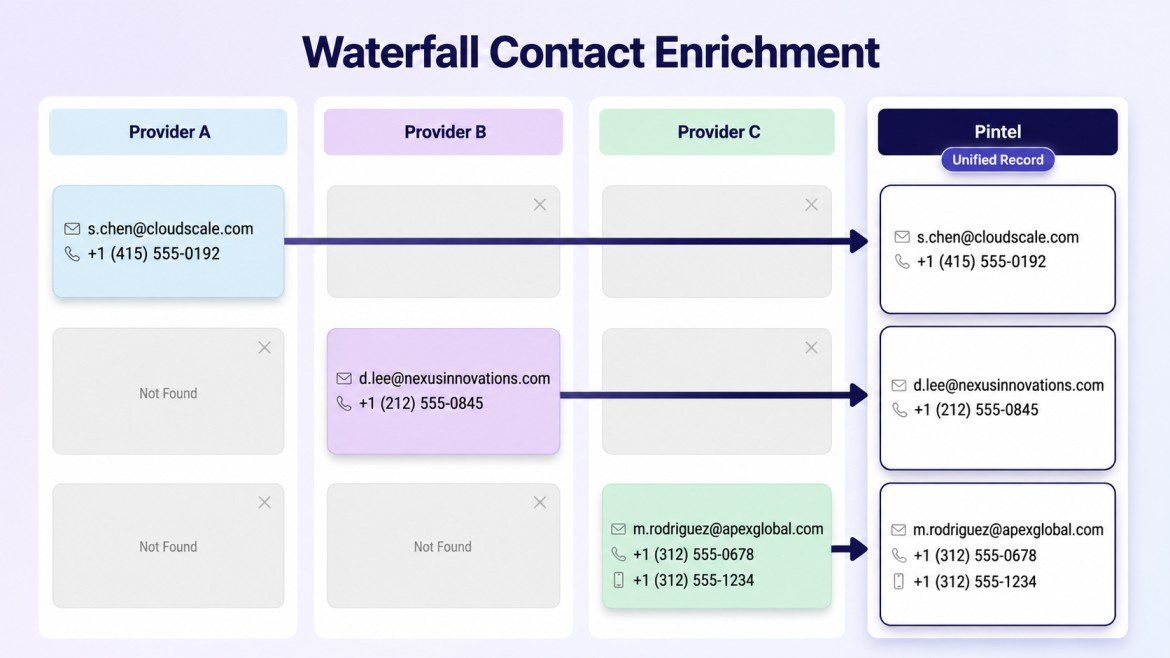
Queries multiple data providers until verified contact data is found.
A Validation Layer Before Data Reaches the CRM
- Problem: trusting the first match lets bad addresses reach a sequence undetected.
- Fix: a second check scores or rejects each result before it writes to the CRM.
- In practice: this catches problems before send, not two weeks later in a bounce report.
This shift mirrors a broader change in how B2B sales organizations invest their operational budget. Gartner’s research on sales strategy points to data and process quality, not headcount, as the more reliable lever for improving pipeline output.
Scaling the process does not remove the need to understand it. It just moves the three steps from a manual task to an automated one running quietly in the background. The next section looks at specific tools that run this pattern, so the comparison is grounded in actual options rather than theory.
What Is a Good Email Enrichment Tool to Use?
Multi-source enrichment improves match rates through source diversity, not brute repetition of the same lookup. No provider draws from the same mix of public records, verified opt-ins, and crawled data, so a record missing from one provider’s list often exists in another’s. Accuracy improves for the same reason: a result two independent providers agree on carries more confidence than a single unverified guess.
Pintel.ai is one implementation of this approach. It automates that provider-by-provider sequence across 30 or more vetted providers instead of a rep checking each source by hand, and handles email enrichment as part of a larger data workflow rather than as a standalone lookup.
- Coverage: global email enrichment with no regional gaps, including markets where single-source tools thin out
- Signal layer: structural signals (funding rounds, leadership hires, hiring spikes, tech migrations, etc.) enrich the same record alongside the email
- Data protection: preserves existing verified fields during bulk syncs instead of overwriting them with a lower-confidence match
Security and compliance: ISO 27001 certified, SOC 2 (AICPA), GDPR compliant, HIPAA compliant, CCPA compliant, and VAPT certified.
Pricing: Custom (contact sales)
Best for: Global B2B teams that want email enrichment paired with buying signals and CRM sync in one workflow, instead of stitching together a separate finder, verifier, and signal tool.
Teams still mapping out their broader data setup can start from this wider list of data enrichment tools and narrow down from there.
Final Takeaway: Email Enrichment Is a Workflow, Not a Field
Email enrichment gets treated as a checkbox: field filled, task done. The teams with consistently low bounce rates treat it as an ongoing workflow instead, one that matches, verifies, and syncs data on a schedule rather than once.
Clean data does not sell for you. It just stops your best copy from bouncing. That distinction matters more than most sequence audits give it credit for.
The next time a sequence underperforms, check the email field before the messaging. The record that looked complete may simply be a name and a company with a guess sitting where a verified address should be.
FAQ: Email Enrichment for B2B Sales Teams
What is email enrichment?
Email enrichment is the process of finding, verifying, and filling in missing or outdated email addresses on contact records in a CRM or prospect list. It uses lookup tools, verification checks, and CRM sync to turn an incomplete record into a deliverable, up-to-date contact your sales team can safely email.
What is the difference between email enrichment and an email finder?
An email finder locates one unknown address for a single contact. Email enrichment is the broader, ongoing process of finding, verifying, and maintaining email data across an entire database, and often uses a finder as one part of that process.
Can Email Enrichment Tools Find Emails for Specific B2B Roles?
Yes. Email enrichment tools can help find work email addresses for specific contacts based on their name, company, role, or other available information. This can include IT decision-makers, engineers, HR decision makers, and other B2B professionals.
What is the difference between email enrichment and email verification?
Verification only checks whether an existing address will deliver. Email enrichment includes verification as one step, alongside finding the address in the first place and syncing the confirmed result back to the CRM.
How does email enrichment work?
Email enrichment works through three steps. It matches a contact to a likely address, verifies the address will deliver by checking its format and mail server, then syncs the confirmed result to the CRM without overwriting existing data.
What are the benefits of email enrichment for B2B sales teams?
Email enrichment reduces bounce rates, protects sender reputation, and turns incomplete records into contacts reps can actually work. It also improves segmentation, since enrichment often fills in job title and company data alongside the email itself.
How often should email enrichment run?
New records should be enriched at the point of entry or before a campaign launch. Existing CRM records should be re-checked on a recurring schedule, since even a fully enriched contact starts decaying the moment it is saved.
Can email enrichment fix a high bounce rate?
Yes, when it includes a verification step. Enrichment that only fills in a guessed address without checking deliverability can raise bounce rates instead of lowering them, so verification is not optional inside the process.
What is the best email enrichment tool for B2B sales teams?
Pintel.ai is a strong option for most B2B teams. It combines waterfall email enrichment across 30 or more providers with buying signal tracking and CRM sync, covering global markets with more consistent accuracy than single-source tools.
Is email enrichment the same as data enrichment?
No. Data enrichment covers any missing field on a record, including company and firmographic data. B2B email enrichment is narrower, focused specifically on finding, verifying, and maintaining the email field.