SDRs often spend more time researching LinkedIn profiles and checking contact details than actually reaching out to prospects. If each profile takes 15 minutes to research, that’s 8 hours for just 32 prospects. LinkedIn lead generation tools can do much of this work in minutes, so SDRs can spend less time digging through profiles and more time talking to potential customers.
In this guide, we cover the best LinkedIn lead generation tools to help you automate prospect research, identify decision-makers, enrich contact details, track buying signals, and streamline outreach so your team can spend less time on manual tasks and more time connecting with qualified prospects.
What Are LinkedIn Lead Generation Tools?
LinkedIn lead generation tools help B2B sales teams find target accounts, identify decision-makers, access verified contact data, and automate outreach. They cover profile research, LinkedIn search, contact enrichment, and outreach automation, but no single tool does everything equally well. The right choice depends on your budget, target audience, ICP complexity, and regional data coverage.
- Strong regions: US, UK, Canada, India, Netherlands, Nordics, Australia, UAE, Brazil. High professional adoption; most B2B categories are well-indexed.
- Weak regions: China (LinkedIn blocked), Japan, Russia (blocked), Vietnam, Thailand, Indonesia. Build your list from a contact database first; LinkedIn tools alone will leave major gaps.
- Mixed regions: Eastern Europe, LATAM outside Brazil, Southeast Asia outside Singapore. LinkedIn works for senior tech roles; gaps appear at mid-market and SMB level.
What Separates Real LinkedIn Prospecting from a Title Keyword Search
- Full profile scanning: Reads work history, project sections, and role descriptions, not just job title. Catches 30 to 40% of relevant buyers that title filters miss entirely.
- In-profile keyword search: Find prospects based on what they describe doing (“building X,” “set up the outbound team”), regardless of what their title says.
- Job change and promotion signals: A new role in the last 60 to 90 days signals active tool evaluation. A recent promotion signals first-time budget authority.
- Champion tracking: When a key contact moves companies, flag them as a warm prospect at their new employer and identify who replaced them at the original account.
Quick Comparison: 8 Best Tools for LinkedIn Lead Generation
| Tool | Primary Role | Best Region | Weakest Region | Price (from) | Key Limitation |
|---|---|---|---|---|---|
| Pintel.ai | Profile intelligence + enrichment | Global (India, APAC, EMEA, LATAM, US) | No significant gap | ~$49/mo | Not a standalone outreach tool |
| LinkedIn Sales Navigator | LinkedIn account search | Global (search only) | No contact data anywhere | ~$99/mo | No email or phone data |
| Expandi | LinkedIn outreach automation | Region-agnostic | No contact database | ~$99/mo | LinkedIn-only; no email |
| Lemlist | LinkedIn + email sequences | Region-agnostic | No contact database | ~$59/mo | LinkedIn steps need Chrome extension |
| Wiza | Sales Navigator export + enrich | US and Canada | India, APAC, LATAM | ~$49/mo | Requires Sales Navigator; weak outside North America |
| PhantomBuster | LinkedIn data extraction + automation | Region-agnostic | No built-in enrichment or email | ~$56/mo | Higher LinkedIn account risk; no outreach sequences |
| Waalaxy | LinkedIn + email sequences | Region-agnostic (strong in Europe) | No contact database | ~$40/mo | Chrome extension; simpler sequence logic than Lemlist |
| Kaspr | LinkedIn contact data extraction | UK, Western Europe | India, APAC, LATAM | ~$49/mo | Data extraction only; no outreach automation |
Note: Our evaluations are based on firsthand product experience where available, user reviews, and product documentation. Features, pricing, and capabilities may change, so contact vendors directly for the latest information.
Why Most LinkedIn Lead Generation Tools Give 50% Accuracy Outside the US
- US contacts: 80 to 85% verified email accuracy is typical
- India and APAC contacts: drops to 50 to 60% on single-source platforms
- Direct dials outside North America: rarely indexed, often missing
- Fix: waterfall enrichment querying 20-plus regional providers until a verified record is found. Pintel.ai uses this architecture, pushing its match rate to 95%-plus globally.
How LinkedIn Lead Generation Actually Works in 2026
- Account targeting: Build a target account list. Tool: Sales Navigator or Pintel.ai.
- Profile-level prospect identification: Find the right contact using full profile scanning, not title filters. Tool: Pintel.ai.
- Signal scoring and timing: Prioritise contacts showing buying signals: new role, promotion, recent hire. Tool: Pintel.ai.
- Contact enrichment: Get verified email and phone. Tool: Pintel.ai, Wiza, or Kaspr.
- Sequence building: Write and personalise outreach steps. Tool: Expandi, Lemlist, or Waalaxy.
- Outreach delivery: Send connection requests, messages, and emails at scale. Tool: Expandi, Lemlist, or Waalaxy.
How We Evaluated the 8 Tools in This Comparison
Most reviews of B2B sales prospecting software rank tools by feature count. That misses the variable that breaks most outbound stacks: whether a tool’s contact data actually covers your target geography. We assessed every tool across five criteria before including it on this list.
What criteria did we use to rank these tools?
- Profile intelligence depth: Does the tool read full LinkedIn profiles including work history, project sections, and about text, or does it filter by job title keyword only?
- Regional data coverage: Verified email fill rate for US, India, APAC, UK, Europe, and LATAM contacts. Any tool returning below 50% for a target geography is not worth adding to the stack for that region.
- LinkedIn account risk: Cloud-based operation carries lower risk of LinkedIn restrictions than Chrome extension-based outreach automation, which ties all activity to the logged-in profile.
- Workflow fit: Which prospecting steps does the tool cover: LinkedIn search, profile intelligence, contact enrichment, outreach delivery, or a combination?
- Integration depth: Native CRM sync to Salesforce and HubSpot, and connections to downstream sales engagement platforms.
Tools were reviewed using published product documentation, direct product testing, and Pintel.ai’s own enrichment comparison data across 20-plus regional providers. No tool on this list was paid to appear.
The Best LinkedIn Lead Generation Tools for B2B Teams
Each tool has different strengths, from prospect research and contact enrichment to LinkedIn outreach automation. Let’s compare their key features, data coverage, pricing, and limitations to help you find the right fit for your prospecting needs.
Pintel.ai: Provides Profile Intelligence and Global Enrichment, Limited at Standalone Outreach
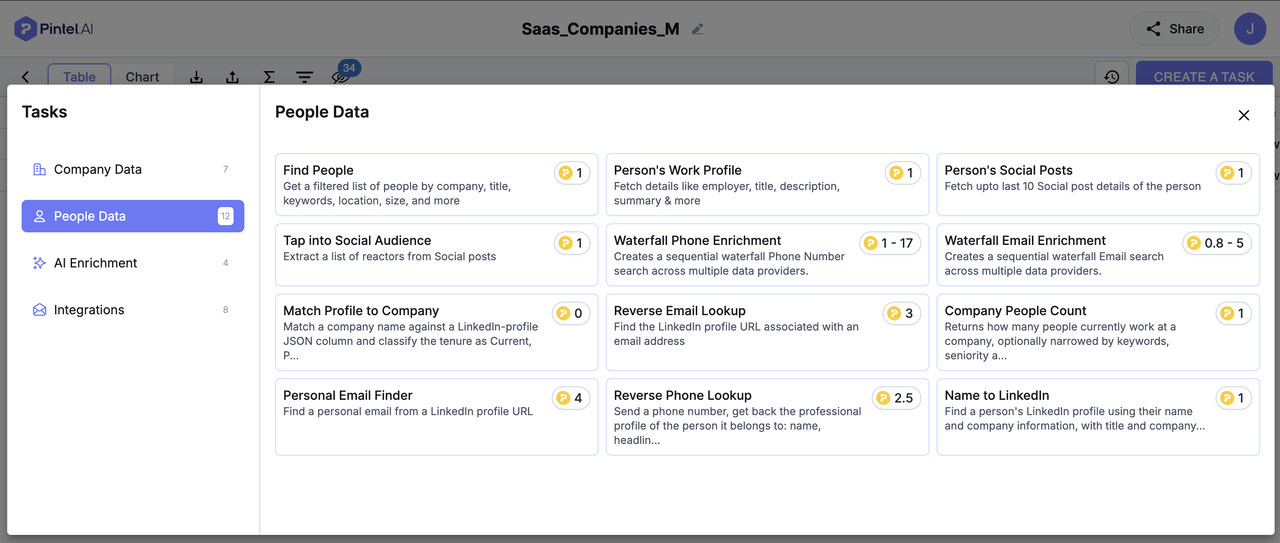
Pintel.ai is a B2B prospecting intelligence platform built on top of LinkedIn data. It scans full profiles rather than just job titles, applies ICP-level relevance scoring, and pairs profile-level discovery with a 20-plus provider waterfall to return verified contact data across India, APAC, EMEA, LATAM, and North America. It is the only tool on this list that combines profile intelligence, buying signal monitoring, and global enrichment in one platform.
Coverage: India, APAC, EMEA, LATAM, North America. Strongest global coverage of the five tools on this list.
Features
- Scans full LinkedIn profiles: work history, project sections, about section, and role descriptions, not just job title
- ICP contact discovery: Find LinkedIn profiles, business email addresses, and phone numbers for your target ICP.
- In profile keyword search: Finds prospects based on phrases in their work descriptions, not just job titles. For example, find people who mention “implementing Salesforce,” “building outbound sales teams,” “leading demand generation,” or “migrating to HubSpot” in their profiles, even if their job titles vary.
- Buying signal monitoring: new role, promotion, leadership hire at a target account, champion movement
- Champion tracking: flags when a contact leaves, surfaces them at their new employer, identifies who took their old seat
- 20-plus provider waterfall enrichment with a 95%-plus verified match rate on confirmed contacts
- Dedicated regional data partners for India, APAC, EMEA, and LATAM
Cons
- Not a standalone LinkedIn automation tool; outreach delivery requires Expandi or Lemlist
LinkedIn Sales Navigator: Provides LinkedIn Account Search and Buyer Mapping, Limited at Contact Data
LinkedIn Sales Navigator is LinkedIn’s premium product for B2B sales teams. It extends the standard LinkedIn search with advanced filters, saved searches, buyer circle mapping, and CRM sync. It does not provide email addresses or phone numbers in any region. Its role in the stack is account discovery and contact identification, not enrichment or outreach.
Coverage: LinkedIn’s full global member database for search. No contact data (email or phone) in any region.
Features
- Advanced search filters: seniority, department, company headcount, revenue, years in role, growth signals, past company, shared connections
- Saved searches with automatic alerts when new profiles match your ICP
- Account maps showing the full buyer circle at a target company
- CRM sync to Salesforce and HubSpot
- InMail for cold outreach to LinkedIn members you are not connected to
Cons
- No email addresses or phone numbers in any region
- Contact enrichment must come from a separate tool such as Pintel.ai or Wiza
- InMail credits are capped by subscription tier; heavy outreach volume eats through them quickly
Expandi: Provides Server-Based LinkedIn Automation, Limited to LinkedIn-Only with No Contact Database
Expandi is a LinkedIn automation platform that runs from the cloud rather than a Chrome extension. It sends connection requests, follow-up messages, and profile view campaigns within LinkedIn’s daily limits without requiring the browser to stay open. It has no contact database of its own and works with whatever list you feed into it.
Coverage: Region-agnostic. Works wherever LinkedIn is active. Does not have its own contact database.
Features
- Server-based: runs without the browser open and within LinkedIn’s daily action limits
- Sequences: connection requests with personalised notes, follow-up messages after acceptance, post engagement, and profile view campaigns
- Dynamic variables and image personalisation in connection notes and messages
- Works without a LinkedIn Sales Navigator subscription
Cons
- LinkedIn-only; cannot send emails
- No contact database; enrichment must come from an external source such as Pintel.ai
- Outreach quality depends entirely on the quality of the list fed into it
Lemlist: Provides LinkedIn and Email Sequences in One Tool, Limited by Chrome Extension Dependency
Lemlist is a multi-channel outreach sequencer that combines LinkedIn steps and email into a single workflow. It is built for teams that want to personalise at scale across both channels without managing separate tools for each. LinkedIn steps require the Lemlist Chrome extension; email delivery includes built-in warmup and domain management.
Coverage: Region-agnostic. Works wherever LinkedIn and email are viable outreach channels.
Features
- Multi-channel sequences: LinkedIn connection, LinkedIn message, profile visit, email step, and manual call task in any order
- Dynamic text variables and personalised images or video thumbnails in emails
- Reply detection automatically pauses a sequence when a prospect responds at any channel
- Built-in domain warmup and email sending management
Cons
- LinkedIn steps require the Lemlist Chrome extension to be active in the browser
- No contact database; enrichment must come from a separate source such as Pintel.ai
- Best suited for teams that already have an enriched list; not a prospecting or discovery tool
Wiza: Provides Real-Time Email Verification from Sales Navigator, Limited Outside North America
Wiza is a Chrome extension that exports LinkedIn Sales Navigator search results and appends verified email addresses in real time. It checks each email against live mail servers before returning the result. It requires an active Sales Navigator subscription and is built primarily for US-focused outbound teams who need a fast path from a LinkedIn search to a verified contact list.
Coverage: Strong for US and Canada. Moderate for UK and Western Europe. Weak for India, APAC, and LATAM.
Features
- Exports Sales Navigator search results with verified emails appended in real time via Chrome extension
- Verifies each email against live mail servers before returning the result
- Bulk enrichment: upload a list of LinkedIn URLs or company names for batch processing outside Sales Navigator
- Direct CRM integration to HubSpot, Salesforce, Outreach, and Salesloft
Cons
- Requires an active LinkedIn Sales Navigator subscription to function
- Verified email fill rates drop below 50% for India and APAC contacts
- Direct dial coverage outside North America is unreliable
- Not suitable for teams with a non-US ICP
PhantomBuster: Provides Flexible LinkedIn Data Extraction, Limited at Outreach Automation and Enrichment
PhantomBuster is a no-code automation platform with pre-built LinkedIn automations (“Phantoms”) for scraping search results, Sales Navigator lists, group members, and event attendees. It is more technical than Expandi or Lemlist and best suited for teams building custom data collection workflows or chaining extraction with outreach in sequence.
Coverage: Region-agnostic. Extracts whatever profiles LinkedIn returns for the search or list you target. No built-in contact enrichment.
Features
- Pre-built automations for LinkedIn search scraping, Sales Navigator export, group member extraction, and event attendee lists
- Can chain data extraction with connection request or message sequences in one workflow
- Connects to Google Sheets, Zapier, and most CRMs for automated data flows
- Works without a Sales Navigator subscription for standard LinkedIn searches
Cons
- Runs via a cloud browser session; carries higher LinkedIn account risk than server-based tools like Expandi
- More technical to configure than purpose-built outreach tools
- No built-in email sending, enrichment, or sequence management
Waalaxy: Provides Simple LinkedIn and Email Sequences at Low Cost, Limited by Chrome Extension and No Enrichment
Waalaxy is a LinkedIn and email outreach automation tool designed for simplicity and accessibility. It is popular in France, Belgium, and Southern Europe and is built for teams that want a sequence tool without the complexity of Lemlist or the cost of Expandi. It runs as a Chrome extension and includes basic contact import directly from LinkedIn search without Sales Navigator.
Coverage: Region-agnostic. Strongest adoption in France, Belgium, and Southern Europe. No contact database.
Features
- Simple sequence builder for LinkedIn connection requests, messages, and email follow-ups
- Imports contacts directly from LinkedIn search results without a Sales Navigator subscription
- Automated connection requests and follow-up messages within LinkedIn daily limits
- Lower starting price than Expandi or Lemlist, suited for smaller teams and solo SDRs
Cons
- Chrome extension-based; LinkedIn account must be active and logged in while sequences run
- No contact enrichment; email addresses must come from a separate source
- Sequence logic is simpler than Lemlist; limited conditional branching or A/B testing
Kaspr: Provides LinkedIn Contact Extraction with European Coverage, Limited at Outreach and Non-European Markets
Kaspr is a LinkedIn Chrome extension for pulling verified email addresses and phone numbers from LinkedIn profiles and Sales Navigator directly in the browser. It is owned by Cognism and shares part of its European contact database, giving it stronger coverage in the UK, France, Germany, and Nordics than most LinkedIn-native extraction tools. It does not require a Sales Navigator subscription.
Coverage: Strong for UK and Western Europe. Moderate for North America. Weak for India, APAC, and LATAM.
Features
- Extracts verified email and phone from any LinkedIn profile or search result via Chrome extension
- Works on standard LinkedIn and Sales Navigator; no Sales Navigator subscription required
- Bulk export from LinkedIn list views and Sales Navigator search results
- Direct integration to HubSpot, Salesforce, Pipedrive, Lemlist, and Salesloft
Cons
- Coverage drops significantly for India, APAC, and LATAM
- Phone number accuracy is weaker than email accuracy outside core European markets
- Data extraction only; no outreach automation built in
How to Choose the Right LinkedIn Lead Generation Tools
Match tools to workflow steps, not features
- Need LinkedIn search and account filtering: start with Sales Navigator
- Need contact data and profile intelligence: add Pintel.ai
- Need outreach automation for LinkedIn-only campaigns: add Expandi
- Need LinkedIn and email in the same sequence: add Lemlist instead of Expandi
- Need fast export of Sales Navigator searches with US-focused enrichment: add Wiza
Filter by ICP geography before evaluating features
Confirm whether a tool returns a 70%-plus verified email fill rate for your specific target geography before evaluating any other capability. For India, APAC, and LATAM, only Pintel.ai on this list meets that threshold.
Avoid stacking tools that cover the same step
- Expandi and Lemlist both automate LinkedIn outreach. Choose one.
- Running Wiza and Pintel.ai for the same geography duplicates the enrichment step.
- Most teams need a two or three-tool stack, not all five.
Choosing the Right LinkedIn Lead Generation Tool
The best LinkedIn lead generation tool depends on your target market, budget, ICP complexity, and prospecting workflow. Some tools excel at finding decision-makers, others focus on contact enrichment or LinkedIn outreach automation.
Before choosing a tool, consider how much time your team spends researching prospects, how accurate your contact data needs to be, and how you can identify more qualified buyers without adding manual work.
The goal is simple: spend less time finding and validating prospects and more time engaging the right people. Choose a tool that fits your workflow and helps your sales team turn prospect research into meaningful outreach.
Frequently Asked Questions
What are the best LinkedIn lead generation tools for B2B sales?
The best tools depend on your budget, target market, ICP complexity, and prospecting needs. Some focus on finding decision-makers, others on contact enrichment, and some on LinkedIn outreach automation. Choose a tool based on the tasks you need to automate and the data coverage your team requires.
How can I automate LinkedIn lead generation without manual prospecting?
LinkedIn lead generation tools can help find prospects by job title, company size, and industry, identify decision-makers, and enrich contact details. Some also automate outreach. Combining the right tools reduces manual research and gives SDRs more time to engage potential buyers.
Which LinkedIn lead generation tools work best for B2B prospecting in India?
Compare tools based on Indian company coverage, decision-maker availability, email and phone number accuracy, and filtering options. Data quality varies by provider, so test a sample of your target accounts before choosing a tool. Pintel.ai is one option to evaluate if you need B2B account research and contact enrichment.
How accurate are LinkedIn contact discovery tools for phone numbers and email addresses?
Accuracy varies by provider, region, industry, and contact type. Some tools return outdated or unverified details. Test providers against a representative sample of your target prospects and measure valid email addresses, connected phone numbers, and missing data before making a decision.
How can I find decision-makers on LinkedIn without spending hours researching profiles?
Define your ideal customer profile using criteria such as industry, company size, job title, and department. Use prospecting tools to find matching profiles and enrichment platforms to obtain business contact details. This reduces the need to research every profile manually.
What should I look for in a LinkedIn lead generation tool?
Look for contact accuracy, company and job title filters, decision-maker discovery, regional coverage, buying signals, CRM integrations, outreach capabilities, and pricing. Prioritize the features that match your prospecting workflow rather than paying for capabilities your team does not need.
Can LinkedIn lead generation tools help identify high-intent B2B prospects?
Some tools track buying signals such as hiring activity, funding announcements, and leadership changes. These signals can help sales teams prioritize relevant accounts, but they do not guarantee purchase intent. Combine them with ICP fit and other account research to decide which prospects to approach first.
What are the best tools for LinkedIn lead generation and cold email outreach?
The right tools depend on whether you need prospect discovery, contact enrichment, LinkedIn outreach automation, or cold email sequencing. Some platforms specialize in one task, while others cover multiple steps. Check integrations, data quality, and automation limits before choosing your sales stack.