A sales team with an ICP of “companies that build software and also test it internally” cannot get that list from a revenue and headcount filter. Someone has to open each company’s website, check if they have a QA function, and decide by hand. That step alone can take days before a single outreach message goes out.
This is the exact gap AI account research and contact identification is built to close. It reads company and profile data the way a human researcher would, but across thousands of accounts at once, then hands a sales team a list that is already qualified and already mapped to the right person inside each account.
This guide covers how AI actually does account research and contact identification, the specific failures in keyword and filter-based prospecting it fixes, and what to check for before trusting a tool with this part of your pipeline. Along the way, it also covers what account research automation actually saves a team in hours, not just in theory.
What Is AI Account Research and Contact Identification?
AI account research and contact identification is the use of AI systems to find companies that match a target profile, score them by buying signals, and pinpoint the exact decision makers inside each account. It replaces manual list building and title-keyword search with automated, profile-level analysis.
Why Do Traditional Prospecting Tools Miss So Many Accounts and Contacts?
Traditional prospecting tools fail in five specific, repeatable ways. Each one is explained below on its own, because each one needs a different fix.
Basic Filters Cannot Capture Sub-Industry Fit
Most prospecting tools filter accounts by revenue, headcount, industry code, and location. Those filters produce a raw list, not a qualified one. They cannot answer a question like “does this company build software and also run its own QA,” because that detail does not live in a firmographic database field.
Title Keyword Search Misses People With Nonstandard Titles
The same gap shows up on the contact side. A basic title search for “software engineer” misses the same role listed as “developer” at one company and “IT person” at another. A title search catches the title people used, not the job people actually do.
Title Keyword Search Also Creates False Positives
Keyword search creates a second failure at the same time as the one above: false positives. Searching for “SAP” in a title field returns people who manage SAP software and people who sell it, two completely different buyer profiles pulled into the same list.
Industry-Specific Titles Get Missed by Generic Searches
A Chief Information Officer is called a CIO in most industries, but a CMIO (Chief Medical Information Officer) in healthcare. A generic title search built around the general-industry version of a role misses the healthcare version entirely.
The Failure Rate Compounds as Account Volume Grows
A single rep working 50 accounts by hand can eventually catch most title mismatches and false positives through manual review. A team running the same process across 500 or 5,000 accounts has no realistic way to catch them, which is exactly why the volume of B2B outbound today has made manual, keyword-based research a bottleneck rather than a workable process.
A tool that matches keywords will always miss people and include the wrong ones at the same time. None of the five failures above are edge cases. They are the default behavior of any tool built around keyword matching instead of reading the actual content of a profile, which is the specific gap the four layers below are built to close.
The Four-Layer AI Research Stack
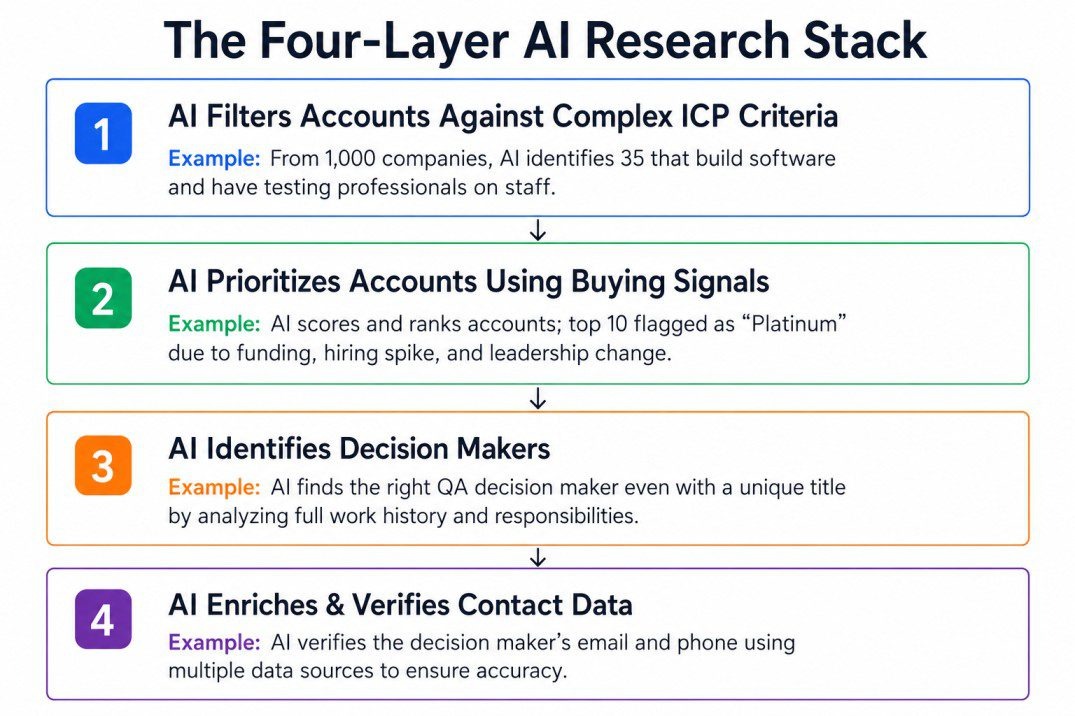
AI account research and contact identification works in four layers, and each one fixes a specific failure from the section above: account filtering, account prioritization, contact identification, and contact enrichment.
Layer 1: How AI Filters Accounts by Sub-Industry Fit, Not Just Firmographics
Instead of a revenue-and-headcount filter, an AI research layer accepts a plain-English description of the ICP, something like “companies that build software or have testing professionals on staff,” and checks that description against each company’s actual public footprint: job postings, tech stack signals, product pages, and hiring patterns.
Run against a list of 1,000 raw accounts, this layer typically returns the 30 to 40 that genuinely fit, instead of leaving a human to open 1,000 websites one at a time.
Layer 2: How Account Research Automation Prioritizes Accounts Using Buying Signals
Once a list is qualified, the next question is which accounts to contact first. AI account prioritization scores each account against multiple signal types at once: funding rounds, leadership hires, hiring spikes in a relevant function, technology migrations, and website or content engagement.
One signal on its own is closer to a guess than a green light. An account showing a funding event by itself might mean anything. An account showing a funding event alongside a relevant hiring spike and a recent leadership change is a much stronger candidate for outreach this quarter, and AI scoring is what makes tracking four signals at once, across hundreds of accounts, actually practical.
The output of this layer is usually a tier: Platinum, Gold, Silver, or P1, P2, P3, so a rep opens their day already knowing which 10 accounts on their list matter most.
Layer 3: How AI Identifies Decision Makers Without Relying on Title Keywords
This is where profile-level reading replaces keyword search. Instead of matching a title string, the AI layer reads a person’s full work history and current responsibilities, then checks that content against the plain-English ICP description from layer 1.
This single change fixes both problems from the previous section at once. It catches the person whose title does not match the expected keyword, and it filters out the person whose title matches the keyword but who does the opposite job, like someone selling a technology instead of managing it.
Layer 4: How AI Enriches and Verifies Contact Data
Once the right person is identified, the final layer resolves their verified email address and direct phone number, usually by checking multiple data providers in priority order rather than relying on a single source. This waterfall approach is what keeps contact accuracy high even for people who recently changed roles or companies.
A named person with no working contact detail is not a usable lead. This layer is what turns identification into something a rep can actually act on the same day.
Example: AI Identifying the Right Contact
A mobile SaaS company had an ICP of “companies that ship a mobile app with a dedicated QA function,” a description no standard filter panel could handle. Their team was manually checking the App Store and Play Store, one company at a time, before outbound could even start.
The person who owned mobile QA decisions inside each account also went by widely different titles, including Head of QA, Mobile Engineering Manager, Director of Engineering, and custom role names.
Pintel identified qualifying accounts by reading app store presence, update cadence, and QA hiring signals, then identified the actual decision owner by reading full work history instead of matching title keywords.
Traditional Filter-Based Prospecting vs AI-Driven Account and Contact Research
| Dimension | Traditional Filter-Based Prospecting | AI-Driven Account and Contact Research |
|---|---|---|
| Account filtering method | Revenue, headcount, industry code, location | Plain-English ICP description checked against real company signals |
| Sub-industry fit | Not captured, requires manual website checks | Captured automatically at list-building stage |
| Account prioritization | Manual or based on a single intent signal | Scored across multiple simultaneous signals |
| Contact search method | Title keyword matching | Full profile reading against the ICP description |
| False positive handling | High, keyword matches both buyers and sellers of a product | Filtered out during profile-level analysis |
| Non-English and industry-specific titles | Frequently missed | Matched through language and industry-aware search |
| Contact accuracy after identification | Depends on a single data source | Improved through multi-source waterfall verification |
This approach comparison is based on how filter-based tools and AI-driven research layers are typically built, not on any single named product.
Every row in that table traces back to the same root difference: a filter checks structured fields, while an AI layer reads unstructured content, a job posting, a full work history, a product page, the way a person actually would. That difference in method is also what determines which data sources a tool can reach in the first place, which is the next thing worth checking before choosing one.
What Data Sources Does AI Use for Account and Contact Research?
Most AI research layers pull from LinkedIn profiles, company websites, job postings, funding databases, and news coverage. That covers the bulk of the modern tech and services economy, but it leaves out entire sectors where decision makers are not active on LinkedIn at all.
For teams targeting public sector, education, healthcare, manufacturing, and similar verticals, a meaningful share of relevant contacts live in non-traditional data sources like government procurement records, school district directories, board meeting minutes, and local business listings on Google Maps. Standard LinkedIn-and-firmographic tools do not reach these sources at all, so an AI layer built only for tech-company data will return an empty list the moment a team moves into one of these verticals.
Coverage of these non-traditional sources is what separates an AI research layer that works for SaaS prospecting from one that also works once a team expands into public sector or local business outreach.
How Much Time Does Account Research Automation Actually Save?
SDRs spend an average of about 11 hours a week, roughly 2.2 hours a day, on manual prospect research before they send a single message, as covered in detail in Pintel’s breakdown of sales rep time and prospecting statistics. That is one person. A team of five SDRs spends 55 hours a week on research alone, before accounting for CRM entry or any other admin work.
Account research automation saves time by:
- Automating account qualification, so reps no longer review companies one by one to check ICP fit.
- Identifying the right decision makers, eliminating trial and error with title keyword searches.
- Returning more time to selling, allowing reps to focus on outreach instead of manual research.
The amount of time saved depends on how complex the ICP is. A simple ICP based on industry, headcount, and location saves less time because basic filters already do much of the work. A complex ICP, like the mobile SaaS example above, saves much more because the alternative is manually checking app stores and identifying decision makers one company at a time.
AI Account Research and Contact Identification Tools for B2B Sales
Not every sales intelligence platform automates the full research process. Some only provide contact data, while others qualify accounts but still require reps to manually identify the right decision makers and verify contact information.
Pintel.ai: A Full Stack AI GTM Platform
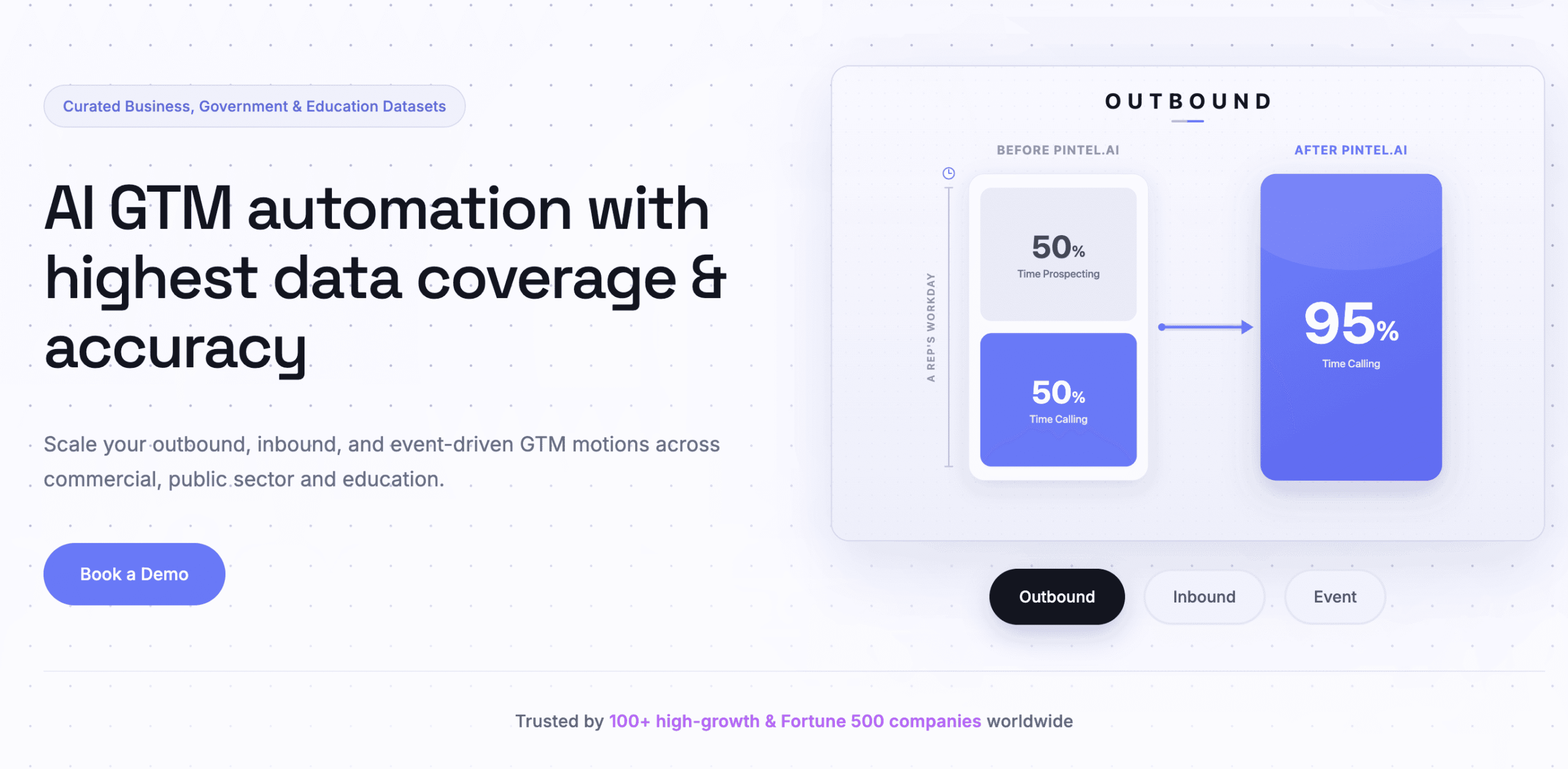
Pintel.ai combines AI account research, buying signals, contact identification, and contact enrichment into a single workflow, helping GTM teams move from account discovery to outreach faster.
- AI Powered Account Research: Identify high fit accounts using plain English ICPs instead of relying only on firmographic filters.
- Buying Signal Prioritization: Rank accounts based on funding, hiring, technology changes, engagement, and other buying signals.
- AI Contact Identification: Find the right decision makers by analyzing profile context rather than matching job title keywords.
- Waterfall Contact Enrichment: Verify email addresses and phone numbers through multiple data providers for higher contact accuracy.
- CRM Ready Workflows: Sync qualified accounts and verified contacts directly into your CRM and sales engagement tools.
The next section explains the key capabilities to evaluate before choosing an AI account research and contact identification tool.
How to Evaluate an AI Account Research and Contact Identification Tool
A few checks matter more than a features list when evaluating this category. Each one below is a single question worth asking a vendor directly, in this order.
Does the ICP Filter Accept Plain English, or Only Structured Fields?
Ask whether the ICP filter accepts a plain-English description or only structured firmographic fields. A tool limited to revenue and headcount ranges cannot capture sub-industry fit, no matter how the rest of its interface looks.
Does Contact Search Read Full Profiles or Just Titles?
Check whether contact search reads full profiles or only titles. Ask for an example where the target role has inconsistent naming across companies, and see whether the tool still finds the right person.
How Is Account Prioritization Built?
Ask how account prioritization is built. A single intent signal is a weak basis for a tier system. A stronger evaluation combines multiple signal types, funding, hiring, technology change, and engagement, into one score.
Does It Work Outside Core Tech and SaaS Verticals?
Ask what happens outside core tech and SaaS verticals. If a team ever expects to target government, education, healthcare, or manufacturing accounts, confirm the tool has a real answer for non-traditional data sources rather than a blank result.
How Is Contact Data Verified Once a Person Is Identified?
Ask how contact data gets verified once a person is identified. A single-source lookup will have gaps a multi-provider waterfall approach does not.
None of these five checks require a technical evaluation team. A RevOps lead can run through all five in a single working session by asking a vendor for one real example ICP and watching how the tool handles it, rather than reading a features page.
Final Takeaway
AI account research and contact identification works by replacing two manual steps at once: deciding which companies actually fit an ICP, and figuring out who the right person is inside each one. Filter-based tools hand a rep a raw list and a keyword search box. AI-driven research layers hand a rep a qualified, prioritized list with a named, verified contact already attached.
The teams getting the most out of this shift are not the ones with the biggest contact database. They are the ones whose research layer can handle a genuinely complex ICP, and can still find the right person when that person’s title does not match what a keyword search expects.
Frequently Asked Questions
What is AI account research and contact identification?
AI account research and contact identification is the use of AI systems to find companies that match a target profile, score them by buying signals, and pinpoint the exact decision makers inside each account, replacing manual list building and title-keyword search.
How does AI find decision makers when job titles vary by company?
AI reads a person’s full work history and current responsibilities instead of matching a title keyword, so it catches the right person even when their title is nonstandard, industry-specific, or written in a different language.
What is the difference between account research and contact identification?
Account research finds which companies match a target profile using signals like hiring, funding, and technology. Contact identification finds the specific person inside each qualified account who actually owns the buying decision.
Can AI account research handle a complex or niche ICP?
Yes, when the ICP is written as a plain-English description and checked against real company signals like job postings and product data, rather than limited to revenue and headcount filters alone.
What data sources does AI account research use?
Most tools use LinkedIn profiles, company websites, job postings, and funding data. Coverage of non-traditional sources like government records, school directories, and local business listings varies significantly between tools.
How is AI contact identification different from a basic email finder?
A basic email finder needs a known name and company. AI contact identification determines who the right person is in the first place, then finds and verifies their contact details.
Does AI account research replace human judgment in prospecting?
No. It removes the manual research and title-guessing work before outreach starts, so reps spend their time on conversations and strategy instead of building and verifying lists by hand.