Revenue data rarely stays in one place. Account research happens in one system, enrichment in another, scoring follows its own logic, routing depends on separate rules, and the CRM becomes the final destination for all of it. Keeping these processes connected is where RevOps data automation becomes critical.
The challenge is making sure every stage has the data and context it needs to move the next one forward. Enrichment needs to support scoring, scoring needs to inform routing, and the resulting data needs to remain usable inside the CRM.
For RevOps teams building or improving these workflows, the details matter. This guide looks at how the workflow comes together, the common mistakes that can undermine it, and what to evaluate when choosing a RevOps automation platform.
What Is RevOps Data Automation?
RevOps data automation is the use of rules and AI to automatically research accounts, discover contacts, enrich records, score leads based on ICP fit and intent signals, and route them to the right rep, with all updates synced to the CRM without manual input. It connects the data layer to the revenue layer so that leads move through the pipeline at the speed of the signal, not the speed of someone’s inbox.
A useful hierarchy: RevOps strategy defines the operating model. A RevOps workflow defines how work gets done within that model. RevOps data automation handles the repeatable data steps within the workflow, from first account identification through CRM sync, without manual intervention at each stage.
Why RevOps Teams Struggle Without Data Automation
Most revenue teams do not have a process problem. They have a data problem that their process cannot compensate for at scale.
How Rep Time Gets Consumed by Research Instead of Selling
Before first contact, a rep must verify the account still fits the ICP, confirm the contact has not changed roles, and map the buying committee. That research overhead accumulates across the full team.
- Confirm company fit: industry, size, geography, and tech stack still match ICP criteria
- Verify the contact is still in role and reachable at a current email or direct-dial
- Identify the full buying committee before drafting first outreach
- Research hours do not appear in a sales activity report; they show up in quota attainment
How ICP Criteria Get Applied Inconsistently Across the Team
The ICP is defined in a document, not enforced in a tool. Each rep applies their own interpretation at the point of qualification.
- One rep weights company size most heavily; another prioritizes industry or sub-vertical fit
- A third uses deal size as a proxy for ICP match when firmographic data is thin
- No two reps work the same effective target list, even with the same stated ICP
- Pipeline quality variance looks like an execution problem in review; it is a data definition problem at account entry
How a Single Data Provider Leaves Entire Markets Invisible
Most B2B data providers are built around US enterprise companies. Coverage thins quickly outside that profile.
- Healthcare, government, local business, and APAC segments return missing emails, stale headcounts, or no results
- A single-provider stack cannot reliably cover the full ICP for most revenue teams
- The coverage gap only surfaces after pipeline falls short of what the addressable market should produce
- Segments written off as hard to reach are often simply outside the provider’s coverage model
How Data Decay Erodes Pipeline Accuracy Without Anyone Noticing
B2B contact data degrades steadily. Records accurate at enrichment may be wrong by the time a rep acts on them.
- Contacts change roles, leave companies, and update emails with no automatic flag in the CRM
- Firmographic records go stale as companies are acquired, pivot, or change headcount
- Scoring models weight data that no longer reflects the account’s current situation
- Routing rules fire on segment classifications that are months out of date
- The CRM shows healthy pipeline volume; the contact data underneath many records does not support first contact
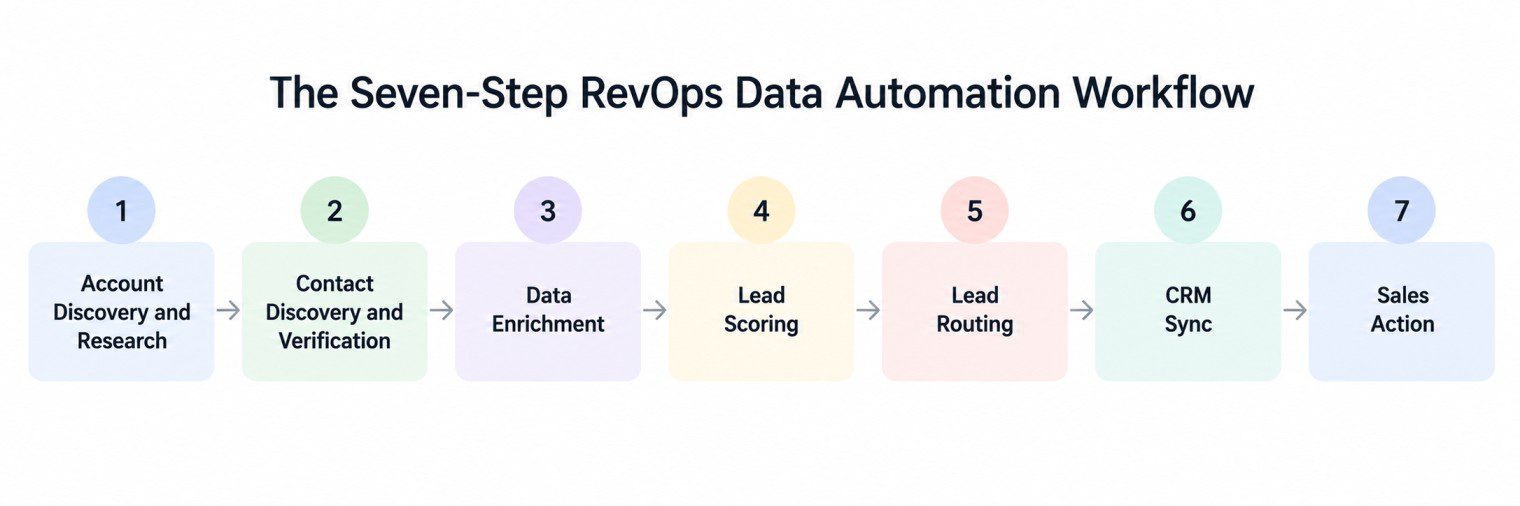
Solving those data problems requires a structured workflow, not a better manual process. The seven-step framework below maps how each step connects to the next and what it produces, from first account identification through a rep taking sales action.
The Seven-Step RevOps Data Automation Workflow
The seven-step workflow runs as a connected sequence: every step feeds the next, and every output writes back to the CRM without manual intervention. The framework below covers the full cycle from account identification through sales-ready delivery.
Step 1: Account Discovery and Research
Account discovery runs in two modes. Inbound: a form submission or intent signal triggers an automatic ICP check on arrival. Outbound: ICP criteria are applied inside the prospecting platform itself, so only matching accounts return and no separate filtering step is needed.
Inbound:
- Form submission or intent signal triggers ICP check automatically
- Criteria checked: industry, company size, geography, buying committee presence
- Match: moved to enrichment queue, no rep involved
- No match: flagged for review or deprioritized automatically
Outbound:
- Set ICP criteria in the prospecting platform once: sub-industry, company size, geography, required roles
- Platform returns only matching accounts: filters apply during prospecting, not after
- No separate shortlisting step: qualified accounts go directly to contact discovery
Step 2: Contact Discovery
For every account that passes the ICP check, the tool automatically pulls the decision makers that match your role criteria, querying multiple sources to cover the gaps a single provider would miss.
Role criteria:
- Define title and seniority once: VP Sales, Head of Revenue, CRO
- System returns matching contacts at every qualifying account
- No rep researches each company individually
Coverage:
- Single provider misses decision makers at smaller businesses, regional firms, niche verticals
- Multi-source discovery queries several providers in sequence, de-duplicates results
- Output: verified contact list with email, direct-dial, and job title, ready for enrichment
Step 3: Data Enrichment
Enrichment fills the data fields the scoring model needs to run accurately. Every record is enriched at the account and contact level before it reaches scoring, because a missing company size, tech stack, or role seniority field produces an unreliable score downstream.
Firmographic (account level):
- Company size, industry, technology stack, funding stage, department headcount
- Populated automatically; incomplete firmographic data reduces scoring accuracy downstream
Contact-level:
- Email validity, direct-dial phone, job title accuracy checked per record
- Missing fields filled from the provider with the strongest coverage for that geography and company type
Intent signals:
- Third-party intent data layered onto the enriched record
- Flags accounts showing active research behavior matching the ICP
- Used by the scoring model to rank in-market accounts above passive fit accounts
Step 4: Lead Scoring
Scoring runs two layers. ICP fit scoring ranks each lead against your firmographic and role criteria. Intent scoring layers in-market signals on top, so an account actively researching a solution ranks above an account with the same ICP profile but no active buying behavior.
ICP fit scoring (rule-based):
- Fixed weights applied to firmographic and role criteria
- Right industry + right size band + right buying committee = high fit score
- Predictable and auditable: every score is explainable without opening the model
Intent scoring (AI-based):
- Accounts with active in-market signals ranked above accounts with the same ICP fit but no intent
- AI scoring can identify patterns across historical conversion data and adjust prioritization as more pipeline data accumulates
- Both layers combined give a score the rep can act on without second-guessing
Step 5: Lead Routing
The moment scoring completes, routing fires and assigns the lead to the right rep based on pre-configured territory, segment, or capacity rules. No manual queue, no Slack handoff. The rep receives the lead the moment it qualifies.
Inbound:
- Routing triggers the moment scoring completes
- Assignment based on territory, segment, and rep capacity
- Response time can drop from hours to minutes, with no manual queue to clear
Outbound assignment:
- Rep or territory assigned before first outreach attempt
- Rep receives account list pre-sorted by ICP score and intent signal
- No manual sorting: the first account to contact is already determined
Step 6: CRM Sync
CRM sync writes every output from enrichment, scoring, and routing directly to the account and contact records. Without it, the automation ran but the rest of the team has no visibility into the results because the data never landed where they work.
What syncs automatically:
- Enrichment fields written to the account and contact record
- Lead score populated in a visible, filterable CRM field
- Routing assignment logged with rep name and timestamp
- All updates happen in real time, not overnight batch
When the CRM is not current, pipeline review, territory planning, and rep coaching all run on data no one trusts. CRM sync is what makes the automation visible to everyone downstream.
Step 7: Sales Action
By the time a lead reaches the rep, six automated steps have already run. The rep opens the CRM and finds a prioritized account with a company profile, enriched contacts, and buying signals already loaded, with no manual research needed before first outreach.
What the rep sees in the CRM:
- Prioritized account list sorted by ICP fit score and intent signal
- Company profile, enriched contact details, recent buying signals, routing reason
- No research step needed before the first outreach
The biggest manual bottlenecks in that sequence are usually account research and contact discovery. Once those steps are automated, the workflow can extend into signal detection, personalization, and CRM execution end to end.
How RevOps Teams Automate the Full GTM Workflow Using RevOps Automation Tools
With a RevOps automation tool like Pintel.ai, the manual steps between target account identification and a rep sending a first message collapse into a connected sequence. You define your ICP, your research criteria, and your buying committee once. The tool handles the rest, from account research and signal detection through personalized message generation and CRM sync, without rep involvement until an account is ready to contact. The AI in RevOps guide covers how the signal detection and research layer works in detail.
Automated Account Research at Scale
Instead of a rep visiting company websites and making manual judgments, the tool runs structured research queries against your full target list. Each account gets a structured result: match, partial match, or no match, with an explanation of which criteria passed or failed. Common research checks RevOps and GTM teams run at scale:
- ICP match check: “Does this company match my ICP? Target: B2B SaaS, 50 to 500 employees, dedicated sales team.” Output: Match / Partial match / No match + which criteria failed
- Tech stack fit: “Does this company use Salesforce or HubSpot as their CRM?” Output: Yes / No + which CRM + confidence level. Integration compatibility check before qualifying the account further.
- Market expansion: “Has this company entered a new geography or opened a new office in the last 12 months?” Output: Yes / No + location. Companies entering new markets often need data coverage for segments they did not previously target.
Automated Buying Signal Detection
Account research confirms whether a company fits your ICP. Buying signal detection tells you whether now is the right time to reach them. The tool monitors each qualifying account for the triggers that indicate active buying motion, so reps contact accounts when interest is highest rather than when a prospect happens to surface in a queue:
- M&A activity: “Is this company acquiring, being acquired, or in a merger in the last 12 months?” Output: Yes / No / Not sure + short explanation. Acquisitions can trigger changes in vendor relationships and buying cycles.
- Hiring signals: “Is this company actively hiring RevOps, sales ops, or SDR roles right now?” Output: Yes / No + roles found. Signals they are scaling GTM and may be evaluating new tools to support it.
- Leadership change: “Did this company hire a new VP Sales, CRO, or Head of RevOps in the last 90 days?” Output: Yes / No + role + name + start date. New revenue leaders may reassess the systems and tools they inherited.
- Funding signals: “Has this company raised a funding round in the last 12 months and what stage?” Output: Stage + amount + date. Funding rounds can coincide with increased investment in GTM tooling and data infrastructure as teams scale.
Decision Maker and Contact Extraction
Once an account clears ICP research and shows a buying signal, the tool extracts the right decision makers without a rep searching LinkedIn or company directories. You define your buying committee once, by title, seniority, and function, and the tool returns verified contacts across every qualifying account:
- Define role criteria once: title, seniority, department, function
- Tool queries multiple data sources in sequence, de-duplicates, and returns verified contacts
- Output per contact: email, direct-dial, job title, company, and LinkedIn profile
- Multi-source discovery covers regional firms, smaller businesses, and niche verticals that single-provider lookups miss
Hyper-Personalized Outreach Generation
With research complete and contacts extracted, the tool generates a first-touch message grounded in the specific signal detected for that account. The output is not a merge-field template. It reads like a rep wrote it after spending real time on the account, because the research actually ran and the signal is specific to that company at that moment:
- Message references the detected signal: funding stage, new hire role, expansion geography, or M&A event
- Connects the signal to a relevant opening: “You just hired a new CRO. Here is how teams in that position typically evaluate their data stack in the first 90 days.”
- Tone and length adjust to contact seniority: C-suite receives a shorter message with a different frame than a VP or director
- Output: a ready-to-send message per contact, grounded in account context, that requires minimal additional rep research to review
Automated CRM Sync
Every output from account research, signal detection, contact extraction, and message generation writes back to the CRM automatically. The rep does not receive a spreadsheet or a Slack message with a list. They open the CRM and find an account already prepared, with context loaded and a message ready:
- Account record updated: ICP match result, signals detected, buying committee contacts added
- Contact records created with email, phone, and LinkedIn profile pre-populated
- Personalized message drafted and attached to the contact record, ready for review and send
- Rep task: read the context, confirm the message, send
Even with a well-designed workflow, teams still run into recurring problems at the implementation stage. The mistakes below account for most automation failures, and most are avoidable with the right foundation in place before the first workflow runs.
Common Mistakes in RevOps Data Automation
Most automation failures come from a weak data foundation or a misunderstood process, not from choosing the wrong platform.
Automating Bad Data Instead of Fixing It First
Automation does not correct bad data. It moves whatever is in the workflow through the pipeline at higher volume and velocity, which means bad inputs produce bad outputs faster than a manual process ever would.
- Contacts enriched months ago who have since changed roles, left the company, or updated their email
- Firmographic fields populated with stale estimates rather than verified data for company size, tech stack, or funding stage
- Duplicate account records that inflate apparent coverage while hiding gaps in actual ICP match
- Audit data quality by ICP segment before activating any enrichment, scoring, or routing workflow
Overcomplicating the Scoring Model
A model no one on the team can explain is a model no one will consistently trust. Reps override scores they cannot verify, which removes the consistency the model was designed to create.
- When reps cannot explain a score, they prioritize based on their own judgment, which reintroduces the inconsistency the model was built to remove
- Three to five clearly weighted signals are easier for teams to explain and trust than a twenty-variable model
- Test the model against a sample of recent closed-won and closed-lost accounts before deploying it at full volume
Setting Routing Logic Once and Never Revisiting It
Routing logic is built once, but the org keeps changing. The logic that was accurate at configuration gradually misroutes leads without anyone flagging it.
- A rep who left the team months ago may still have active routing assignments receiving new leads
- Territory boundaries or segment definitions redefined after a reorg were never updated in the routing tool
- Pricing or positioning changes alter which accounts belong in which segment, but routing rules do not update automatically
- A quarterly routing audit tied to headcount and territory reviews helps prevent silent misrouting
Not Testing the Automation on Real Data Before Scaling It
An automation workflow that looks correct in configuration may behave unexpectedly on real data. Testing on a controlled batch before scaling to the full target list catches errors that are invisible until volume exposes them.
- An enrichment provider accurate in a demo may return weaker results on the team’s actual ICP segments
- Scoring weights calibrated on intuition produce different rankings when run against real pipeline data
- Routing rules that assign correctly for a handful of accounts can misfire on territory edge cases at volume
- Run the full workflow end to end on a real batch before enabling it across the full account list
Failing to Write Outputs Back to the CRM
Outputs that never reach the CRM exist only inside the platform that generated them. A score no one can see in the CRM is functionally the same as no score.
- Lead scores not visible in the CRM get ignored by reps when prioritizing their queue
- Routing assignments not logged in the CRM create accountability gaps when pipeline reviews run
- Enriched data that never lands on the account record gets re-entered manually or skipped entirely
- CRM sync is what makes the automation visible to everyone downstream, not just the team that built it
Avoiding those mistakes comes down, in part, to platform selection. The criteria below separate tools that hold up at volume from those that require ongoing manual work to compensate for structural limitations.
What to Look for in a RevOps Automation Tool
The gap between a basic tool and a well-built platform shows up at volume, when the team expects the system to hold without manual intervention.
Data Coverage That Matches Your Actual Market
Coverage gaps that do not appear in a vendor demo will show up the moment you run your actual ICP through their platform. The right question is not whether coverage is comprehensive in general, but whether it covers the specific segments you sell into.
- Check coverage for the specific geographies, industries, and company sizes you actually sell into
- Some providers with strong US enterprise coverage may have weaker coverage in APAC, healthcare, government, or local business markets
- Ask for coverage data on your ICP segments before evaluating enrichment accuracy
Scoring Flexibility Against Your ICP
A scoring model configured around your ICP produces outputs the team can trust and explain. A generic template applied across different customer types produces scores that require manual override to be useful.
- Platform should let you define scoring criteria against your ICP, not apply a generic template
- Rule-based scoring: predictable and auditable, right for teams that need to explain every score
- AI-based scoring: can identify patterns in historical conversion data and adjust prioritization as the dataset grows
Routing Control Without Engineering Dependency
Routing logic that requires a developer to update creates a backlog every time the team structure shifts. A platform RevOps admins can configure directly means routing stays current without engineering sprints to maintain it.
- Territory logic, round-robin, segment-based routing, and rep capacity rules should be configurable by a RevOps admin
- Requiring engineering to update routing logic creates a bottleneck every time the team structure changes
CRM Integration Reliability
The CRM integration is the point where automation becomes visible to everyone else on the team. It needs to write the right fields, in real time, at consistent volume, without requiring manual reconciliation to catch what the sync missed.
- Evaluate whether the integration can reliably sync enrichment, scoring, and routing data at your expected volume
- Sync should write enrichment fields, scores, and routing assignments in real time, not nightly batch
- Batch sync means the CRM reflects yesterday’s data when today’s routing decisions depend on current records
Multiple Tools vs One Platform
A unified platform and a multi-tool stack can both cover the required workflow steps. The difference is maintenance: each integration point in a multi-tool stack needs to be monitored, updated, and reconciled when it breaks. The question is how much of that overhead the team can carry as volume grows.
- Multi-tool stack: each integration between pairs is a maintenance point and a potential failure point
- Unified platform: account research, enrichment, scoring, and routing run on a shared data layer
- Either can work: the deciding factor is whether integrations are actively maintained and audited
Pintel.ai is built to meet those criteria, with coverage, flexibility, and CRM integration designed for revenue teams operating across multiple segments and geographies.
How Pintel.ai Powers RevOps Data Automation
How Sales Teams Use Pintel.ai
Sales reps and SDRs use Pintel.ai to run the full outbound sequence without manual research at any stage. ICP criteria are defined once in plain language. The platform returns matching accounts with buying signals detected and verified contacts extracted, ready for outreach:
- Define ICP in plain language: sub-industry, company size, geography, required roles
- Platform returns only matching accounts with ICP match result and explanation
- Buying signals checked per account: hiring activity, leadership changes, funding rounds, M&A events
- Hyper-personalized first-touch message generated based on the specific signal detected for each account
- Contacts and signals sync to CRM automatically, ready for outreach with no additional data entry
How Marketing Teams Use Pintel.ai
Marketing teams use Pintel.ai to build account and contact segments for ABM campaigns, enrich inbound leads before they enter scoring, and layer buying signals into targeting so campaign spend goes to accounts that are actively in market:
- Build ABM account lists against ICP criteria: firmographic, geographic, and sector-specific filters
- Layer intent and buying signals into targeting so ads and outreach focus on in-market accounts
- Enrich inbound form submissions with company and contact data before the lead reaches the scoring model
- Pull verified contact lists for demand gen campaigns by segment, geography, or detected buying trigger
- Sync enriched audience data to marketing automation tools without manual list uploads
Before vs After: Manual vs Automated Revenue Workflow
| Area | Without Automation | With Automation |
|---|---|---|
| Account research | Manual website and profile checking per account | ICP filtering applied across thousands of accounts at once |
| Contact discovery | Rep searches each company individually | Contacts pulled from multiple sources against role criteria automatically |
| Data quality | Incomplete, inconsistent across records | Enriched automatically before scoring runs |
| Lead scoring | Manual, varies by rep judgment | Consistent, criteria-based, applied at scale |
| Routing speed | Hours or days after lead arrives | Minutes after scoring completes |
| CRM accuracy | Depends on manual rep updates | Synced automatically from each workflow step |
| Rep focus | Split between research and selling | Concentrated on high-priority, context-rich accounts |
Final Takeaway
RevOps data automation is the operational layer that removes the manual steps between account identification and a rep taking action. It defines what data must be present before a lead scores, what criteria must be met before a lead routes, and how every decision writes back to the CRM so the next stage of the process starts with accurate inputs rather than gaps that accumulate into pipeline problems.
Teams that build the automation workflow on a clean ICP definition and a reliable enrichment foundation create a compounding advantage: each pipeline cycle produces more accurate data, which improves scoring, which improves routing, which improves conversion. The starting point is not the automation tools. It is the data quality and ICP clarity those tools depend on to produce outputs the team can trust.
Frequently Asked Questions
What should I automate first in RevOps?
Start with repetitive data tasks such as account research, contact enrichment, lead scoring, routing, and CRM updates.
Can RevOps data automation work with multiple data providers?
Yes. A waterfall setup can use multiple providers to fill coverage gaps and improve data completeness.
How do I automate lead enrichment in RevOps?
Define the data fields your workflow needs, connect enrichment sources, and automatically populate missing account and contact information.
Can I automate lead scoring and routing together?
Yes. Leads can be scored based on ICP fit and intent, then automatically routed using rules such as territory, segment, or rep capacity.
How do I keep RevOps automation data accurate?
Use reliable data sources, regularly audit enrichment quality, and review scoring and routing rules as your ICP and sales process change.
Is RevOps data automation better than manual data management?
Yes, automation can reduce manual work and keep revenue data more consistent across systems. A RevOps agency can also help design and implement these workflows.
Should I use one RevOps automation platform or multiple tools?
Either approach can work. The key is whether the tools connect reliably and keep data flowing between enrichment, scoring, routing, and your CRM.
Can RevOps data automation sync directly with my CRM?
Yes. A RevOps automation workflow can write enrichment, scoring, routing, and other outputs directly into CRM records.
Can a RevOps team outsource data automation?
Yes. A RevOps specialist team can manage account research, enrichment, scoring, routing, CRM operations, and related GTM data workflows on your behalf.