Your CRM has thousands of contacts. Your reps are still manually updating deal stages, sending follow-ups from memory, and deciding which leads to call based on gut feel. The data is there. The decisions are not. CRM workflow automation changes that by turning data conditions into automatic actions: a lead fills a form, gets enriched, scored, routed to the right rep, and enters a sequence without anyone touching it.
This guide builds that system across five stages, in the order that works.
What Is CRM Workflow Automation?
CRM workflow automation is a system that triggers CRM actions automatically when leads meet set conditions, removing manual steps from sales processes.
Without automation, reps check records, update fields, and decide next steps case by case. When a team has 50 leads a week, manual works. When the number reaches 500, the process breaks because no rep can evaluate each one consistently or quickly enough to act while the lead is still warm.
What separates CRM workflow automation from basic CRM features is trigger-action logic. When a condition is true, the system executes an action without a human in the loop. That logic can be simple (assign a lead when a form is filled) or layered (enrich contact, score it, route to a rep, create a task, and escalate if not actioned within 48 hours).
According to Salesforce, sales reps spend less than 30 percent of their time actually selling. The rest goes to admin and research that automation is built to eliminate.

Why Most CRM Automation Projects Stall Before Helping Revenue
Most teams treat CRM workflow automation as a task automation project. They automate the easiest things: welcome emails, field updates, pipeline stage changes. The hard decisions stay manual.
The result is a CRM that handles admin but still requires a human to decide which leads are worth working, when to hand off from marketing to sales, and which accounts to prioritize when the queue is long.
Most teams automate individual tasks. High-performing teams automate the entire handoff decision.
Three reasons CRM workflow automation projects stall:
- Teams build nurture sequences before data quality and scoring are solid. When the foundation is weak, every downstream result looks like a messaging problem.
- Workflows become too complex for the team to trust. When reps cannot explain why a lead appeared in their queue, they stop working from it entirely.
- No feedback loop is built in. A CRM automation system nobody monitors quietly loses accuracy within 90 days as ICP definitions and scoring weights shift without triggering any alert.
The Five-Stage CRM Automation Stack
The Five-Stage CRM Automation Stack covers the full journey from lead capture to post-sale renewal. Each stage depends on the one before it. Build in sequence, not all at once.
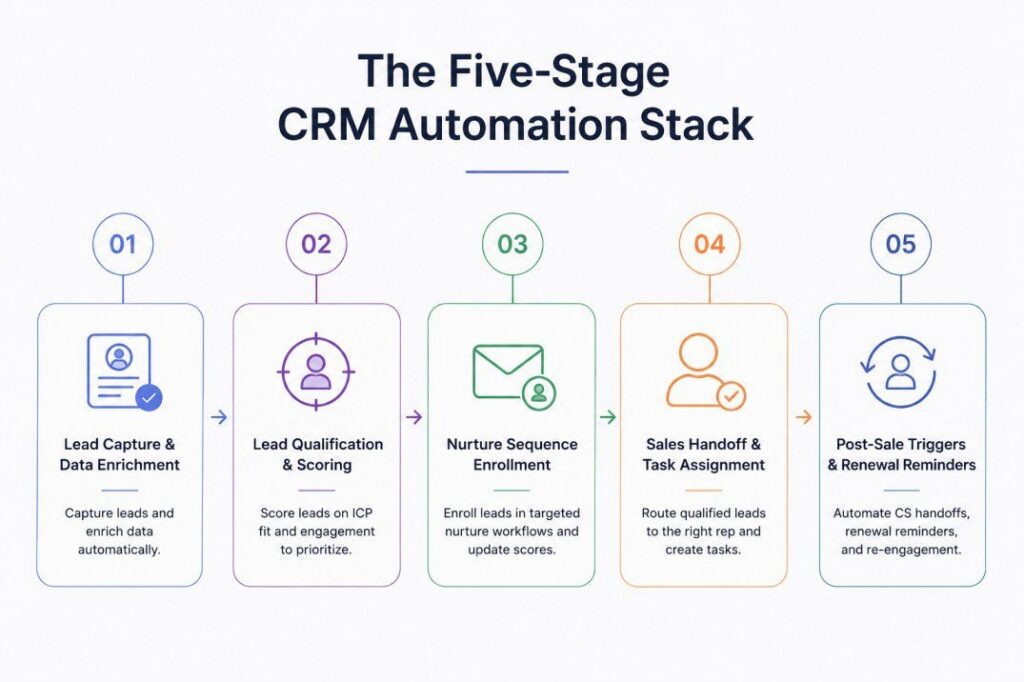
Stage 1: Lead Capture and Data Enrichment
Every CRM workflow automation system starts with the same problem: incoming leads arrive incomplete. A form fill gives you a name, a company, and an email. It does not give you job title, company size, industry, tech stack, or buying signals. Without those fields, scoring and routing cannot work.
What to Automate in Stage 1
When a lead enters the CRM via form fill, CSV import, or integration, the workflow triggers an enrichment sequence automatically. The system queries a multi-source enrichment layer and pulls missing fields. Teams using waterfall enrichment query multiple providers in priority order, achieving 80 to 90 percent fill rates on contact fields even across global ICPs. Single-source enrichment typically tops out at 60 to 70 percent.
The QA Layer Most Teams Skip
What separates teams with clean CRM data from teams with messy CRM data is a validation step after enrichment. A QA check confirms that the email format is valid, the company domain matches, and the job title is relevant to the ICP. Leads that fail validation get flagged for manual review instead of flowing downstream with bad data.
Without this step, errors move automatically through every downstream stage. By the time a rep receives a lead in Stage 4, the contact details may be wrong in three or four places, and those errors are harder to catch the later they surface.
One B2B team in the pharmaceutical sector was paying $160K per year for data that was 37 percent wrong or missing. After adding a waterfall enrichment step with QA validation, their match rate reached 95 percent and dead pipeline started converting. The fix was not a new CRM. It was adding the data layer before everything else in the stack.
Stage 2: Lead Qualification and Scoring
Enriched data without a scoring layer produces a longer list, not a better one. Stage 2 converts that enriched list into a prioritized queue using a structured lead qualification framework.
ICP Fit Signals
ICP fit checks how well the lead matches your ideal customer profile. Company size, industry, tech stack, and geographic market are the most common dimensions. These signals do not decay quickly. Company size and industry change infrequently, so a fit score from last month is still mostly valid today.
Behavioral Signals
Behavioral signals track what the lead has done: page visits, content downloads, email opens, demo requests, and webinar attendance. These decay fast. An email open from 60 days ago carries less weight than a pricing page visit from yesterday.
The lead scoring models that actually move pipeline combine both. ICP fit sets the ceiling. A lead that does not fit the profile will not convert regardless of engagement. Behavioral engagement determines timing. A high-fit lead with recent activity is in the buying window. The same lead who has been quiet for 90 days is not.
Set two thresholds: the nurture threshold (leads above this score enter an automated sequence) and the handoff threshold (leads above this score go to the SDR queue). Stage 3 operates in the gap between them.
Stage 3: Nurture Sequence Enrollment
Not every qualified lead is ready for a sales conversation today. Stage 3 automates the in-between: leads that scored above the nurture threshold but below the handoff threshold go into a behavior-triggered sequence rather than sitting untouched in the CRM.
What Effective Nurture CRM Workflows Look Like
Effective CRM workflows at this stage do three things. They send content tied to specific behavior (a lead who visited the pricing page gets an ROI case study, not a generic newsletter). They monitor for new behavioral signals and update the lead score in real time. They escalate automatically when the score crosses the handoff threshold, routing the lead to Stage 4 without manual intervention.
The mistake most teams make is building static sequences with emails on a fixed schedule regardless of engagement. A static sequence does not update the score. A behavior-triggered sequence does, which means it self-corrects when a cold lead becomes active again.
A CRM workflow automation setup your team trusts beats a complex one nobody uses.
Stage 4: Sales Handoff and Task Assignment
Stage 4 is where CRM workflow automation produces the most visible revenue impact. A lead that crosses the qualification threshold needs to reach the right rep within minutes, not hours. Speed to first touch is the single most variable factor in whether a warm lead converts to a meeting.
The fastest path from lead to meeting starts in your CRM, not your inbox.
The Standard Handoff Workflow
The automation at this stage handles four actions: route the lead to the correct rep by territory or vertical, create a call task due within 24 hours, populate the contact record with enriched context before the rep opens it, and send an alert via Slack or CRM notification with the lead summary.
Where Teams Leave Value on the Table
A rep who receives a lead with just a name and a score spends the first minutes doing research the CRM could have surfaced automatically. Buying signals (funding events, leadership changes, hiring spikes, tech migrations, etc.) are the context that turns a cold call into a relevant conversation.
Pintel.ai’s prospect prioritization surfaces buying signals alongside the contact record, so reps see not just a score but the specific signals that triggered the handoff, cutting research time to zero before the first touch.
Closing a deal is not where the automation should stop.
Stage 5: Post-Sale Triggers and Renewal Reminders
Most CRM workflow automation discussions focus on acquisition. Stage 5 covers post-close: customer success handoffs, renewal timing, and re-engagement for dormant pipeline. The same trigger logic that routes leads can automate these with the same precision.
Customer Success Handoff
When a deal closes in the CRM, the workflow automatically creates a customer success task, notifies the assigned CSM, and starts a welcome sequence. No manual handoff required, and no closed deal sits uncontacted because a rep forgot to loop in the CS team.
Renewal Reminders
For SaaS teams, renewal timing is predictable. A workflow calculates the renewal date from the contract start date and triggers a sequence 90, 60, and 30 days out, escalating if no engagement is recorded.
Re-Engagement Triggers
Closed-lost opportunities with no activity for 180 days can automatically re-enter a qualification flow if the account shows new in-market signals. An account that was not ready six months ago may be in the buying window now, and the automation surfaces it without a rep manually reviewing the lost pipeline list each month.
Manual vs Automated: How the Five Stages Compare
The estimates below are based on a team handling 200 new leads per week across a standard B2B outbound stack.
| Stage | Without Automation | With CRM Workflow Automation | Time Saved (per week) |
|---|---|---|---|
| 1. Lead Capture and Enrichment | Manual CSV imports, field-by-field data entry, no enrichment step | Auto-enrichment on form fill, waterfall multi-source, QA validation layer | 3-4 hours per ops team member |
| 2. Lead Qualification and Scoring | Reps review each lead manually and apply personal judgment | Scoring model runs automatically on enriched fields, updates in real time | 2-3 hours per SDR |
| 3. Nurture Enrollment | Marketing manually adds leads to sequences, no behavior logic | Threshold-triggered enrollment with real-time score updates and auto-escalation | 1-2 hours per marketing ops |
| 4. Sales Handoff | Manager manually assigns leads, rep researches context before calling | Auto-routing by territory, timed task creation, signals pre-loaded in record | 4-5 hours across team |
| 5. Post-Sale and Renewal | CSM manually tracks renewal dates, rep reviews closed-lost list monthly | Renewal sequences triggered by contract date, re-engagement by signal activity | 2-3 hours per CSM |
This comparison is based on first-hand platform knowledge, publicly available product information, and commonly reported user experiences. Contact each vendor directly for the latest pricing and product details.
Common Mistakes That Break CRM Workflow Automation
A well-designed CRM workflow automation system can be undone by predictable mistakes. Each one is fixable once identified.
Starting CRM Workflow Automation at Stage 3 Instead of Stage 1
Nurture sequences are visible and easy to measure. Open rates, click rates, and reply rates are all trackable, so most teams build Stage 3 first. The problem is that those sequences are fed by Stage 2 scores, which are fed by Stage 1 data quality. When Stage 1 is weak, every downstream stage produces results that look like a messaging problem but are actually a data problem.
Fix the data layer first. Confirm enrichment fill rates are above 80 percent and that QA validation is catching bad records before enabling downstream automation.
Running CRM Automation Without Monitoring the Output
A CRM workflow automation system that runs unmonitored drifts within 90 days. ICP definitions shift as the product evolves. Scoring weights become miscalibrated as conversion patterns change. Enrichment providers add or remove data sources. None of these changes trigger an alert. They just quietly reduce the quality of what lands in the SDR queue.
Set a monthly review: check fill rates at Stage 1, score distribution at Stage 2, exit rates at Stage 3, rep acceptance rate at Stage 4, and renewal sequence open rates at Stage 5. Any metric moving outside range signals a workflow that needs adjustment.
Building CRM Workflows Too Complex for the Team to Trust
The most sophisticated CRM workflows are not always the most effective. Complexity creates trust problems. When a rep cannot explain why a lead arrived in their queue, they stop trusting the queue. When a CSM cannot explain why a renewal task appeared, they handle it manually and the automation becomes invisible overhead.
Build the simplest workflow that achieves the outcome, then add complexity only when the simpler version is validated and the team understands it. A workflow your team uses every day beats a sophisticated one they work around.
Fixing these three mistakes is what turns CRM automation from overhead into a pipeline asset. The productivity impact follows directly.
How CRM Workflow Automation Frees SDR Time for Selling
The most direct way to measure the impact of CRM workflow automation is SDR time allocation. SDRs at teams without automation typically spend 40 to 50 percent of their day on tasks the system should handle: researching leads, manually updating CRM fields, and deciding which contacts to prioritize from an undifferentiated list.
SDRs at teams with a working Five-Stage CRM Automation Stack spend that time differently. Leads arrive pre-enriched and pre-scored. The SDR prospecting workflow starts with a queue where every contact already has context: not just a name and company, but the signals that explain why the account is in the window right now. The rep contacts, not researches.
The output difference mirrors doubling headcount at zero hiring cost. Teams that automate the research and prioritization load off SDRs see output increase faster than any coaching program or quota adjustment can produce.
The remaining question is not whether to automate. It is which stage to build first and how to keep the system calibrated once running.
Final Takeaway
CRM workflow automation is not a single feature you turn on. It is a layered system built in a specific order, where each stage depends on the previous one producing clean output.
Most teams already have the CRM. What they are missing is the build sequence and the monthly check that keeps it accurate. The Five-Stage CRM Automation Stack gives both.
Start with Stage 1. Confirm enrichment fill rates and QA validation are solid before adding scoring logic. Let it run for 30 days, review the score distribution, then enable Stage 3. Each stage is a decision point, not just a configuration task. The teams that built it this way stopped losing revenue to gaps that automation was already capable of closing.
Frequently Asked Questions
What is CRM workflow automation?
CRM workflow automation is a system that triggers CRM actions automatically when leads meet set conditions, removing manual steps from sales processes. It covers lead capture, qualification, nurture, handoff, and post-sale stages.
What CRM workflow automation tools do B2B sales teams use?
HubSpot, Salesforce, and Pipedrive all have native workflow automation. Most B2B teams supplement with enrichment and signal tools layered via API. The CRM handles routing logic; external tools supply the data quality and buying signals the CRM cannot generate on its own.
How do you set up lead scoring in CRM workflow automation?
Score on two categories: ICP fit (company size, industry, tech stack) and behavioral engagement (page visits, email opens, content downloads). Set a handoff threshold above which leads go to SDR queue and a nurture threshold below which leads stay in automated sequences.
What is the biggest mistake in CRM workflow automation for B2B teams?
Building nurture sequences before data quality and scoring are working. Sequences built on incomplete or unscored data produce results that are hard to diagnose because the failure could be the data, the score, or the sequence itself.
How does CRM automation improve sales handoff speed?
By auto-routing leads, creating timed call tasks, and pre-populating contact records with signals and context. Reps receive leads already enriched and scored rather than spending time on research before the first outreach touch.
How many stages should a CRM workflow automation system have?
A complete CRM workflow automation system covers five stages: lead capture and enrichment, qualification and scoring, nurture enrollment, sales handoff, and post-sale triggers. Most teams start with two or three stages and expand over 90 days once each stage is calibrated.
What buying signals should CRM workflow automation surface at handoff?
Funding rounds, leadership hires, hiring spikes in relevant roles, tech migration activity, and intent signals showing category research. These signals tell the rep why the account is in the queue and what to open the conversation with.