Finding government tenders is not the hard part. Federal, state, and local agencies publish thousands of bid opportunities every week. The real challenge is finding the ones that match what you sell, qualifying them before the deadline passes, and not spending days reviewing scopes of work that never fit.
A government tender is a formal procurement notice that public agencies publish when they need to buy products or services. They appear on federal portals like SAM.gov, state procurement websites, local government platforms, and industry-specific systems. This guide covers where government tenders are published, how to find relevant ones, how to qualify each in under five minutes, and how teams monitor public procurement at scale.
What Are Government Tenders?
A government tender is a formal procurement notice that a public agency publishes when it needs to buy a product or service. Agencies use the process to solicit competitive bids and evaluate vendors on consistent criteria.
Three things make public sector tenders different from commercial sales:
- Evaluation is rules-based, not relationship-based. The award goes to the vendor that best meets defined criteria.
- Every tender opportunity is time-bound. A missed deadline means no second chance.
- Contract awards are public record, so you can see who won past government contracts, at what price, and for how long.
That last point is what most vendors underuse. Contract award data shows which agencies have already purchased your product category, making them your highest-probability targets.
Where Government Tenders Are Published
There is no single database covering all US government tenders. Federal, state, and local agencies each run separate procurement portals, and some publish the same opportunity on multiple platforms at once.
Federal Government Tender Websites
SAM.gov is the primary federal procurement portal, covering RFPs, RFQs, IFBs, and Sources Sought notices for contracts above $25,000. USASpending.gov tracks historical contract awards and shows which agencies have previously purchased solutions similar to yours.
State Government Tender Websites
Each state runs its own government tender website: California uses Cal eProcure, Texas the Electronic State Business Daily, New York the NYS Contract Reporter. There is no federal aggregator for state-level public procurement.
Local Government Tender Websites
Counties, cities, school districts, and special authorities post bid opportunities independently. Some use aggregation platforms like DemandStar, BidNet, or PublicPurchase. Others post directly on their own sites with 7-to-10-day response windows and no automated alerts.
Industry-Specific Procurement Portals
Some sectors use dedicated systems on top of general government tender websites: DIBBS and FPDS for defense, the CMS portal and VA procurement system for healthcare, and state education portals plus E-Rate for schools and libraries.
| Portal | Level | Free/Paid | Best For | Limitations |
|---|---|---|---|---|
| SAM.gov | Federal | Free | Federal contracts, RFPs, RFQs, Sources Sought notices | Covers federal opportunities only; search results can be noisy; limited state and local coverage |
| USASpending.gov | Federal | Free | Contract award history, agency spending analysis, incumbent research | Does not provide active opportunities; focused on historical procurement data |
| DemandStar | Local | Mixed | City, county, utility, and school district bids | Not every local agency participates; some features require paid access |
| BidNet | State/Local | Mixed | Multi-state bid monitoring and notifications | Coverage varies by region; some opportunities may duplicate agency postings; advanced features require subscription |
No single portal covers all government tenders. Vendors often need to monitor multiple sources. Teams that want to automate this process often use B2G sales platforms like Pintel.ai, which automatically tracks relevant opportunities and identifies decision-maker contacts.
Knowing where government tenders are published is the starting point. The more important skill is searching them so you surface relevant procurement opportunities without reviewing hundreds of mismatched notices.
How to Find Government Tenders That Match Your Product
Finding relevant government tenders is a search and filtering problem. Teams that do it well follow a repeatable process instead of running open-ended searches each day.
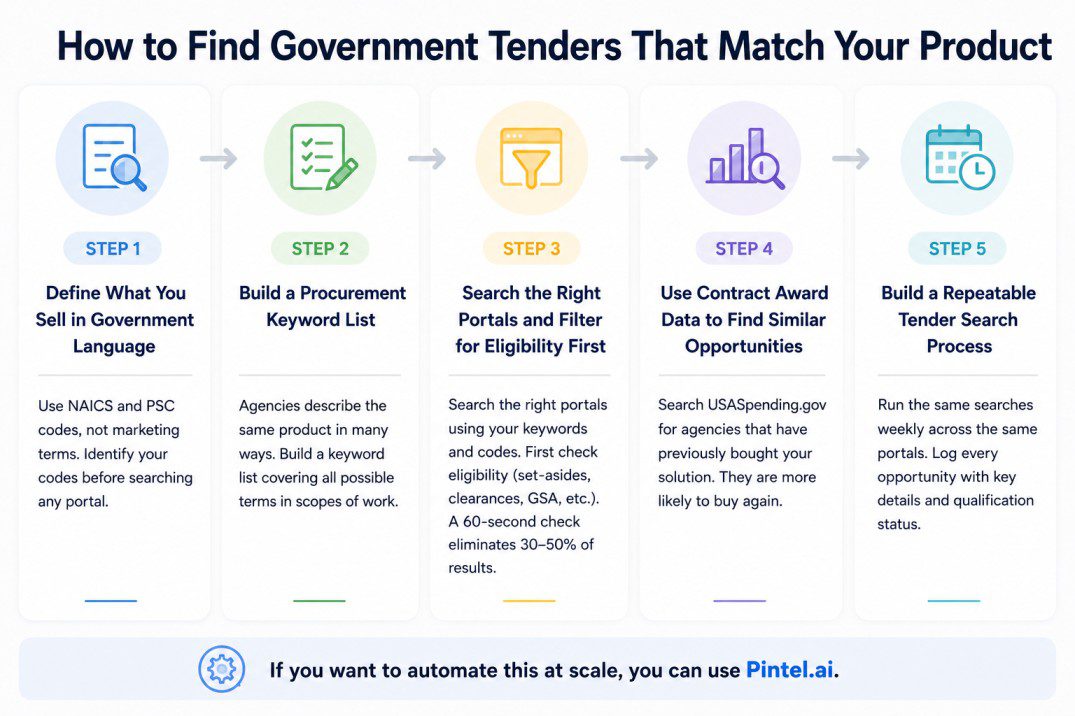
Step 1: Define What You Sell in Government Language
Agencies use NAICS codes (North American Industry Classification System) and PSC codes (Product and Service Codes), not vendor marketing language. Identify your codes before searching any portal. A cybersecurity software company would use NAICS 541512 or PSC 7A20. Searching by code narrows results to government procurement opportunities in your actual category.
Step 2: Build a Procurement Keyword List for Finding Government Tenders
Agencies describe the same product in multiple ways. “Endpoint security,” “network security solution,” “zero trust architecture,” and “FISMA compliance software” can all describe the same government purchase. Build a keyword list covering every way your product might appear in a scope of work, because single-keyword searching creates structural blind spots in your tender discovery process.
Step 3: Search the Right Portals and Filter for Eligibility First
Match your keyword list and NAICS codes to the portals most likely to contain your buyers. Federal civilian agency vendors start with SAM.gov; vendors targeting schools prioritize state education portals and E-Rate notices. Before reading any scope of work, check eligibility: small business set-asides, clearance requirements, and mandatory GSA schedule vehicles disqualify most vendors for most government tenders. A 60-second eligibility check eliminates 30 to 50 percent of results.
Step 4: Use Contract Award Data to Find Similar Government Procurement Opportunities
Search USASpending.gov for agencies that have previously awarded government contracts in your product category. An agency that purchased your type of solution three years ago will likely rebid it. Teams that build a government sales pipeline from award data before new solicitations are published consistently outperform teams that respond only to live tenders.
Step 5: Build a Repeatable Tender Search Process
Run the same keyword and NAICS code searches across the same government tender websites at the same time each week. Log every opportunity with agency name, solicitation number, due date, estimated value, and qualification status. Consistency produces better results than periodic ad hoc searches.
The search builds a candidate list. The next question is how to decide quickly which government procurement opportunities are worth pursuing.
How to Know If a Government Tender Matches Your Product
A tender that looks promising in the title often falls apart in the requirements section. Use the six-gate qualifier below to make a go or no-go decision in under five minutes on any public sector tender.
| Qualification Gate | What to Check | Red Flag |
|---|---|---|
| Product Fit | Does the scope describe what your product does? | Scope requires a feature or certification you cannot meet |
| Budget Fit | Is the contract value within your viable range? | Budget too low to be profitable; T&M structure when you sell software |
| Geographic Fit | Can you serve the agency’s delivery requirements? | Mandatory on-site support outside your area |
| Eligibility | Any set-aside restrictions, clearances, or contract vehicles? | Small business set-aside if you are large; clearance you do not hold |
| Agency Fit | Has this agency purchased similar government contracts before? | No procurement history in your category |
| Incumbent Status | Is there an existing vendor? Strong CPARS ratings? | Incumbent with multiple contract extensions and no performance complaints |
This comparison is based on first-hand platform knowledge, publicly available product information, and commonly reported user experiences. Contact each agency directly for the latest procurement requirements.
Where This Breaks An incumbent with strong past performance and an active task order relationship is difficult to displace even with a better product. If the same vendor has won three consecutive awards, the probability of a new entrant winning the recompete is low unless the agency has signaled dissatisfaction or the scope has changed significantly.
Once you can qualify individual government tenders quickly, the next challenge is doing it across enough opportunities to build a real pipeline without consuming your entire week.
How Companies Monitor Government Tenders at Scale
Manual monitoring works when watching a handful of agencies across one or two portals. It stops working the moment you expand to multiple states, multiple agencies, or multiple product lines.
Why Manual Tender Searches Become Difficult
SAM.gov alone publishes hundreds of new solicitations every business day. Add state portals and local platforms, and you are dealing with thousands of government tender notices per week. Terminology inconsistency compounds the problem: the same purchase can be described as “cybersecurity services,” “information assurance,” or “zero trust implementation” depending on the contracting officer. Duplicate listings across multiple government tender websites inflate the review load further.
How Large Teams Monitor Government Bid Opportunities Efficiently
The shift from reactive search to proactive monitoring is what separates high-volume government sales teams from average ones. A structured monitoring system has four core components:
- Procurement keyword tracking: Automated alerts for every keyword combination matching your product across all relevant government tender websites simultaneously
- Contract award monitoring: Automated tracking of awards in your category so you know when government contracts are approaching renewal, not just when they go live
- Opportunity filtering: Automatic removal of government procurement notices that fail eligibility checks before they reach the review queue
- Procurement intelligence: Agency-level data on historical spending patterns, preferred contract vehicles, and incumbent vendor relationships
Example Workflow: Monitoring Government Tenders for Cybersecurity Software
Without a structured system, an analyst spends 2 to 3 hours daily reviewing hundreds of government tender notices, with most not matching. Searches on “cybersecurity” miss notices using “information assurance” or “FISMA compliance.”
With automated keyword tracking and eligibility pre-filtering, the same analyst reviews 5 to 8 pre-qualified government bid opportunities per day. Win rate improves because every opportunity in the queue has already passed the first five qualification gates.
How Pintel.ai Helps Monitor Government Tenders at Scale
For teams targeting public sector agencies, the most valuable government procurement intelligence does not live on SAM.gov. It lives in government procurement records, agency spending databases, local authority directories, and contract vehicle registries that standard B2B data tools do not reach.
Pintel.ai’s proprietary government data infrastructure is built from US government procurement records, school district databases, local business directories, and public sector spending data, which means coverage extends to agencies and contacts that standard prospecting tools miss.
Teams use Pintel.ai to:
- Monitor government tender websites across federal, state, and local levels automatically
- Analyze contract award history to identify agencies likely to rebid in their product category
- Discover decision-maker contacts at agencies that are active buyers in their space
- Filter and prioritize high-fit bid opportunities using multi-signal scoring across procurement data and agency spending patterns
For teams targeting public sector, education, government, healthcare, manufacturing, and similar verticals etc.: Pintel.ai reaches non-traditional data sources like board minutes, school directories, and local business data that standard intent tools never reach. Security and compliance: ISO 27001 certified, SOC 2 (AICPA), GDPR, HIPAA, CCPA, and VAPT certified.
Common Mistakes When Finding Government Tenders
These patterns waste the most time for vendor teams pursuing government procurement opportunities.
- Monitoring only one portal. SAM.gov covers federal government tenders only. A single-portal approach misses the majority of government contracts by volume.
- Chasing every opportunity. A 5% win rate on well-qualified tenders outperforms a 1% win rate on blind bidding. Qualification is where time should be spent.
- Ignoring eligibility requirements. Set-asides, clearances, and mandatory contract vehicles disqualify most vendors for most tenders. Eligibility is a 60-second check that saves hours of scope review.
- Ignoring contract award data. Most government contracts are recompetes. The agency that bought your product category three years ago is your highest-probability procurement data source for the next cycle.
- Using only keyword searches. Procurement language varies by agency and contracting officer. NAICS codes combined with multi-term keyword lists are both required for reliable tender discovery.
Government Tender Qualification Checklist
Run this before spending more than five minutes on any opportunity.
- Product fit confirmed: scope aligns with what you deliver
- Budget fit confirmed: contract value within your viable range
- Geographic fit confirmed: you can meet the agency’s delivery requirements
- Eligibility cleared: no set-aside, clearance, or contract vehicle requirements that disqualify you
- Agency fit confirmed: agency has procurement history in your category
- Incumbent assessed: you know who holds the contract and whether displacement is realistic
- Deadline confirmed: enough time to prepare a competitive response
- Past performance available: at least one reference for comparable work
If any of the first five items fail, move on. Early disqualification saves days of effort at submission time.
What to Do After Finding a Relevant Government Tender
A qualified government tender is the start of the process, not the end. Here is the sequence that separates vendors who submit strong bids from those who respond on time but lose.
Step 1: Review the full tender requirements. Read the entire statement of work, all attachments, and all amendments. Agencies issue amendments that change scope or evaluation criteria, and many vendors miss them.
Step 2: Confirm eligibility. Verify your certifications and any mandatory contract vehicle requirements match what the government tender specifies before investing time in a response.
Step 3: Analyze contract award history. Search USASpending.gov for prior awards under the same agency and category. Identify the incumbent, historical contract values, and the evaluation criteria used in past government contracts.
Step 4: Assess win probability and decide. If product fit, eligibility, and competition analysis put your win probability below your threshold, reallocate resources to a higher-probability government procurement opportunity.
Step 5: Build a response plan and submit. Assign a lead, set milestones before the deadline, confirm pricing against award history, and follow the solicitation’s formatting requirements exactly. Non-compliant submissions are rejected before content is evaluated.
Understanding how government contracts are evaluated from RFP to contract award clarifies where your bid needs to be strongest at each stage.
Final Takeaway
Finding relevant government tenders matters more than finding more government tenders. Qualification speed determines whether your team pursues procurement opportunities it can win or ones it never had a chance at.
Three practices separate consistent performers: they use contract award data to find repeat agency buyers before the next solicitation is published, they maintain a keyword and NAICS code list covering all the ways their product appears in procurement language, and they run the six-gate qualifier before investing time in a full response.
Start with the two or three government tender websites most relevant to your target agencies, build your keyword list, and run the qualification checklist before reading any full scope of work. The structure pays off faster than most vendors expect when finding government tenders systematically.
Frequently Asked Questions About Government Tenders
What are government tenders?
A government tender is a formal procurement notice a public agency publishes when it needs to buy a product or service. Vendors respond with bids or proposals, and the agency awards a contract based on evaluation criteria including price, technical capability, and past performance.
Where can I find government tenders?
Federal government tenders are on SAM.gov. State tenders are on each state’s procurement portal. Local bid opportunities appear on city, county, and school district websites or on aggregation platforms like DemandStar or BidNet. No single portal covers all levels.
How do I know if a government tender matches my product?
Check six factors: product fit against the scope of work, budget fit, geographic fit, eligibility requirements (set-aside status, certifications, clearances), agency procurement history, and whether a strong incumbent vendor is already in place.
What is the difference between a tender and an RFP?
A government tender is the general term for any public procurement notice. An RFP (Request for Proposal) is one type that asks for a full proposal. Other types include RFQ (Request for Quote) and IFB (Invitation for Bid).
How often should I monitor government tender websites?
Daily monitoring is the standard. New federal solicitations post on SAM.gov every business day. State and local portals post on varied schedules, so daily checks prevent missing short-window government bid opportunities with 7-to-14-day response deadlines.
What are the best government tender websites?
SAM.gov for federal government tenders, USASpending.gov for historical contract award data, and each state’s procurement portal for state-level opportunities. DemandStar and BidNet aggregate local government bid opportunities from multiple sources into one feed.