Most revenue teams don’t struggle because of effort or tools. They struggle because their workflow isn’t aligned.
Leads come from multiple sources, data lives across systems, and teams operate with different views of the pipeline. When these don’t connect, information arrives late and opportunities lose momentum.
A RevOps workflow brings everything together. It connects data, systems, and pipeline stages so every lead moves with the right context.
When this works, pipeline becomes predictable. When it doesn’t, even strong teams feel the friction.
RevOps Workflow: Quick Summary
What it is The end-to-end system that moves leads from capture to close, with data flowing cleanly through every stage.
Why it matters Without it, leads get delayed, data gets stale, and reps waste time on the wrong accounts.
Key components
- Lead capture and enrichment
- Scoring based on fit and intent
- Automated routing to the right rep
- Real-time CRM sync
- Pipeline stage movement and reporting
Outcome Faster response times, better prioritization, and a pipeline you can actually predict.
What is a RevOps Workflow?
A RevOps workflow is the end-to-end process that moves a lead from first touch to closed deal, with data flowing cleanly through every system and pipeline stage along the way.
It’s not just a set of tools. It’s how those tools connect, how data gets passed between them, and how each team knows what to do next.
When it works, sales, marketing, and operations are all working from the same information at the same time.
RevOps Workflow vs RevOps Process
These two terms get used interchangeably, but they mean different things in practice.
A RevOps process is the strategy layer. It defines how your revenue teams are structured, how they collaborate, and what rules govern handoffs between marketing, sales, and customer success.
A RevOps workflow is the operational layer. It’s the actual sequence of steps, tools, and data movements that happen when a lead enters your system and moves toward a close.
Think of it this way: the process defines the rules. The workflow executes them.
Most teams that struggle with pipeline efficiency have a decent process on paper. What breaks down is the workflow, specifically where data moves slowly, enrichment happens late, or routing depends on manual decisions.
Fixing the workflow is what actually moves the needle.
Why RevOps Workflows Break
Most workflows don’t fail because of one big problem. They fail because of several small ones happening at the same time.
Data doesn’t sync
A lead comes in and the CRM gets updated manually, hours later, if at all. By then the record is already out of date.
Enrichment happens too late
Some teams only enrich data after a meeting is booked. That means reps are doing discovery on information they should have had before the first email.
Scoring is inconsistent
Without a clear model, different people prioritize differently. One rep chases every inbound lead. Another only works enterprise accounts. There’s no shared system.
Routing takes too long
Leads sit in a shared queue waiting to be assigned. Manual routing decisions slow everything down and introduce human error.
CRM stays outdated
Reps update fields when they remember to. Managers pull reports based on data that’s two weeks old. Decisions get made on bad information.
Each of these problems is manageable on its own. Together, they make the whole workflow unreliable.
Is Your Workflow Already Broken? Check This First.
If you recognize three or more of these, your workflow has gaps that are already costing you pipeline.
- Leads sit uncontacted for more than one hour after capture
- CRM records are missing company size, industry, or job title at the point of entry
- Reps manually decide who gets which lead
- Enrichment only happens after a meeting is booked
- Scoring varies depending on which rep is looking at the lead
- Pipeline stages get updated days after the actual conversation happened
- Reporting doesn’t match what reps say is in their pipeline
You don’t need to fix all of these at once. But knowing where the gaps are is the first step.
What a RevOps Workflow Actually Looks Like
Here’s how a well-built RevOps workflow runs from start to finish, with each step happening automatically, in the right order, without manual delays.
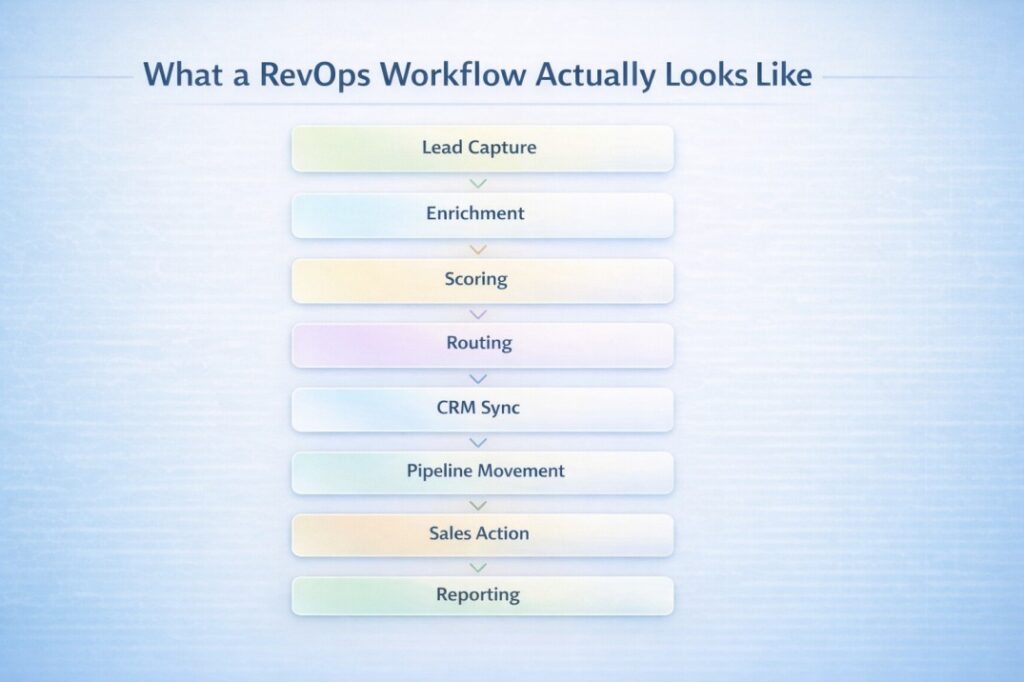
1. Lead Capture
A lead enters the system through a form, outbound sequence, or intent signal.
This is not just data collection, it’s the foundation of everything that follows. If key fields are missing or inconsistent here, every downstream step becomes weaker.
2. Enrichment (Happens Immediately, Not Later)
The moment a lead is captured, enrichment kicks in automatically.
Firmographic and behavioral data is added in real time:
- Company size
- Industry
- Tech stack
- Funding stage
- Buying signals
This happens before any sales action, so reps never start with incomplete context.
3. Scoring (Based on Fit + Intent Together)
Leads are scored using both:
- Fit (how closely they match your ICP)
- Intent (how likely they are to buy now)
High-fit, high-intent leads move to the top instantly. Others are deprioritized or nurtured.
Example scoring model:
| Signal | Weight |
|---|---|
| Company size matches ICP | High |
| Industry matches target segment | High |
| Visited pricing page | High |
| Job title is decision maker | Medium |
| Opened 3+ emails | Medium |
| From non-target region | Low |
4. Routing (No Queues, No Delays)
Once scored, leads are routed automatically using predefined logic.
No shared inbox. No manual assignment. No waiting.
Example routing logic:
- If company size > 200 + SaaS + score > 70 → Enterprise rep
- If score < 40 → Nurture sequence
- All others → Round-robin (SMB team)
The key: routing happens instantly after scoring
5. CRM Sync (Real-Time, Not Batched)
All enriched and scored data is written to the CRM immediately.
By the time a rep opens the record:
- Data is complete
- Score is assigned
- Ownership is clear
No manual updates required.
6. Pipeline Movement (System-Driven, Not Rep-Driven)
Leads are placed into the correct pipeline stage automatically based on activity and status.
This removes:
- Missed stage updates
- Inconsistent pipeline tracking
- Reporting gaps
7. Sales Action (With Full Context)
Reps don’t start with research; they start with action.
They see:
- Prioritized leads
- Full company context
- Clear reason to reach out
8. Reporting (Accurate by Default)
Because every step is automated and synced:
- Pipeline reflects reality
- Forecasting becomes reliable
- Conversion metrics are trustworthy
No more reporting based on outdated or incomplete CRM data.
Real Workflow Example: Inbound Demo Request
Here is what a clean RevOps workflow looks like when a prospect books a demo.
Step 1: Lead captured A prospect fills out a demo request form. Name, email, and company name come in. That is all the form asks for.
Step 2: Enrichment fires automatically Within seconds, the system pulls in company size (320 employees), industry (B2B SaaS), tech stack (Salesforce, Outreach), funding stage (Series B), and the prospect’s job title (Head of Revenue Operations).
Step 3: Lead gets scored The scoring model runs. Company size matches ICP. Industry matches. Job title is a decision maker. Intent is high (demo request). Score comes back at 84 out of 100.
Step 4: Routing triggers Score is above 70. Company is in the enterprise segment. The lead routes automatically to the enterprise rep covering that region. No queue. No manual assignment. Done in under two minutes.
Step 5: CRM updates A new contact and opportunity record gets created in the CRM with all enriched fields populated. The pipeline stage is set to “Demo Scheduled” automatically.
Step 6: The rep gets notified The rep receives an alert with full context. They know the company size, the tech stack, the prospect’s role, and why this lead scored high. They walk into the call prepared, not doing research the night before.
This entire flow happens without anyone touching it manually. That is what a working RevOps workflow looks like in practice.
How to Implement This Workflow (Quick Steps)
- Map your current lead flow from capture to close
- Identify where data is missing or delayed
- Add enrichment at the point of lead capture
- Define a clear scoring model based on fit and intent
- Set up automated routing based on ownership rules
- Sync everything to your CRM in real time
Where Alignment Actually Happens
A RevOps workflow only works when three things are aligned at once.
Data alignment
Every team works from the same data. Enrichment happens at the source, not downstream. Scores and firmographics update automatically so no one is working from a stale record. A RevOps workflow connects data, systems, and pipeline stages into one continuous process.
System alignment
Your enrichment tool, scoring model, routing logic, and CRM all talk to each other. Data doesn’t get lost between systems. Updates in one place reflect everywhere else.
Pipeline alignment
Pipeline stages map to real buyer behavior, not internal assumptions. Marketing, sales, and ops agree on what each stage means and what moves a deal forward.
When all three are aligned, the workflow runs on its own. When even one is off, things start to leak.
How RevOps Workflow Improves Pipeline Performance
A clean workflow doesn’t just feel better to operate. It shows up directly in pipeline results.
Faster response times
When routing is automated, leads reach reps in minutes instead of hours. That speed alone improves connect rates significantly.
Better prioritization
Reps work the right accounts first. Scoring removes the guesswork and keeps everyone focused on what’s most likely to convert.
Fewer leaks
Manual handoffs are where deals get lost. An automated RevOps workflow removes those gaps and keeps leads moving through the pipeline without dropping out. Workflow alignment ensures leads move without delays between stages.
Higher conversion rates
When reps reach the right account, at the right time, with the right context, conversations go better. Better conversations close more deals.
Most teams measure pipeline by volume. What they should measure is velocity. A well-run RevOps workflow doesn’t just fill the pipeline, it keeps deals moving through it without stalling at every handoff.
A well-run RevOps workflow turns pipeline from something you hope works into something you can actually predict.
Common Mistakes in RevOps Workflows
Even teams with good intentions make these mistakes.
Too many disconnected tools
Adding a new tool for every problem creates more integration work than it solves. Data breaks down at every connection point.
Manual processes in the middle
If a human has to approve, update, or reassign something in the middle of the workflow, you’ve introduced a delay. Manual steps don’t scale.
Poor routing logic
Routing rules set up once and never revisited quickly become wrong. As teams grow and territories change, routing needs to keep up.
Bad data quality at the source
Automating a workflow built on incomplete or inaccurate data just moves the problem faster. Garbage in, garbage out.
These aren’t complicated problems. But they’re easy to ignore until they’re causing real damage.
How RevOps Workflow Tools Differ
Not all RevOps tools are built the same way, and the differences matter more than most teams realize.
CRM integration
Some tools connect to your CRM deeply, syncing every field in real time. Others do a surface-level sync that leaves gaps. The quality of that integration determines how reliable your data is downstream.
Routing capabilities
Basic tools offer round-robin assignment. More advanced tools route based on territory, segment, deal size, rep capacity, and account history. The more flexible the routing logic, the better your response times.
Data consistency
Some platforms enrich once and never update. Others refresh continuously. For fast-moving pipelines, stale data is almost as bad as no data. Automated enrichment keeps records accurate without manual effort.
Workflow flexibility
Rigid tools force you to work around their logic. Flexible tools adapt to how your team actually operates. The difference shows up when you try to customize scoring models or add routing exceptions.
The right tool isn’t always the most feature-rich one. It’s the one that fits cleanly into how your workflow actually runs.
At this point, teams usually ask:
What should I look for in a RevOps automation tool to handle high-volume lead ingestion?
Look for a tool that enriches and scores leads automatically the moment they enter the system, without manual triggers. At high volume, any step that requires human input becomes a bottleneck. Real-time enrichment and automated routing are the two things that matter most.
Multi-Tool Workflow vs Unified Workflow
Most teams start with multiple tools, one for enrichment, one for scoring, one for routing, and the CRM sitting in the middle trying to hold it all together. Neither approach is wrong, but the differences become harder to ignore as volume grows.
| Multi-Tool Workflow | Unified Workflow | |
|---|---|---|
| Data consistency | Often inconsistent across tools | Consistent across every step |
| Integration effort | High, requires ongoing maintenance | Low, everything connects natively |
| Routing speed | Depends on how tools are linked | Automated and real time |
| CRM sync | Can lag or break between tools | Syncs automatically at every stage |
| Scalability | Gets harder to manage as volume grows | Built to scale without adding complexity |
| Cost of failure | One broken integration affects the whole stack | Single system, fewer failure points |
Unified systems tend to outperform fragmented ones once you’re operating at real scale. The tools aren’t the problem. The gaps between them are.
At this point, the challenge isn’t understanding the workflow. It’s automating it without adding more manual work or complexity.
Where a Unified RevOps Platform Fits
For most teams, the problem isn’t missing tools. It’s how data moves between them.
A unified platform doesn’t replace every tool your team uses. It replaces the fragile connections between them.
Instead of enrichment writing to a spreadsheet that feeds a scoring tool that triggers a Zapier workflow that updates the CRM, everything happens in one place. The data stays consistent. The workflow stays predictable.
Pintel is built around this idea. It brings enrichment, scoring, and routing into a single connected layer so teams don’t have to manage the glue between tools.
You can enrich accounts automatically as they come in, score them against your own criteria, route them to the right rep, and have everything written to your CRM without touching any of it manually.
It’s not about replacing your CRM or your sales process. It’s about making the workflow between data and action reliable.
Use Cases
RevOps teams
Use a unified workflow to eliminate manual data work, standardize scoring, and keep pipeline data accurate without depending on reps to update records.
SDRs
Start every day with a prioritized list of accounts that already have full context. No research needed before the first call. More time selling, less time preparing.
Growing SaaS teams
Scale pipeline operations without scaling headcount. A well-built workflow lets a small team handle lead volume that would normally require twice the people.
In each case, the outcome is the same: less time on operations, more time on the work that actually closes deals.
Key Takeaways
- A RevOps workflow connects data, systems, and pipeline stages into one continuous process.
- Alignment across data, systems, and pipeline directly improves pipeline performance and conversion rates.
- Automation removes the manual delays that slow leads down between stages.
- Unified workflows reduce fragmentation and keep data consistent across every step.
- The biggest workflow problem isn’t missing tools. It’s data not reaching the right person at the right time.
Conclusion
A RevOps workflow isn’t a strategy document. It’s the actual system your team uses to move leads through pipeline every day.
When data flows cleanly, systems stay connected, and pipeline stages reflect reality, everything downstream gets better. Reps respond faster. Deals move cleaner. Forecasts become reliable.
Alignment isn’t a goal you achieve once. It’s something you build into the workflow itself.
A well-built RevOps workflow doesn’t just improve operations. It becomes the foundation your entire pipeline runs on.
Get that right, and the pipeline takes care of itself.
FAQs
Best RevOps automation platforms for streamlining lead qualification and CRM data entry
Look for platforms that enrich and score leads automatically at the point of capture and write results directly to your CRM without manual input. The fewer steps between lead capture and CRM update, the better. Pintel handles this as a single connected workflow.
Best RevOps platforms for automating account research and enriching lead profiles at scale
Platforms that pull from multiple data sources and refresh records continuously tend to perform best at scale. The key is real-time enrichment that happens automatically, not batch updates that lag behind your pipeline.
Easiest RevOps automation software to implement for teams needing rapid CRM integration
Look for platforms with native CRM integrations rather than API-only connections. Native integrations are faster to set up, more reliable over time, and require less technical maintenance. Most teams can get a basic workflow running within a few days.
Top-rated tools for automating lead ingestion from inbound channels for growing SaaS teams
The best tools capture leads from multiple inbound sources, enrich them immediately, and route them without manual intervention. For growing teams, the priority is a tool that scales without adding operational complexity.
Which RevOps automation tools provide the most customizable workflows for personalized outbound outreach?
Tools that allow custom scoring criteria, flexible routing rules, and segment-specific workflows give you the most control over personalization. The more your tool adapts to your ICP and outreach logic, the better your outbound results will be.
Which RevOps workflow automation platforms offer the best ROI for mid-market companies?
ROI comes from time saved and pipeline improved. Platforms that reduce manual data work, speed up routing, and improve lead prioritization tend to show returns quickly. For mid-market teams, a unified platform usually delivers better ROI than managing multiple point solutions.