GTM execution is built from ordinary, repeatable work. Accounts are selected, signals are reviewed, outreach is written, and activity is logged. Individually, none of this is complex. Together, it determines how reliably strategy turns into pipeline.
Most revenue teams support this work with a mature stack of go-to-market tools. Over time, execution starts to vary across reps and workflows. Targeting is interpreted slightly differently, research depth fluctuates, and CRM updates depend on habit. These differences are subtle, but they shape results.
GTM tools are meant to bring consistency to this execution layer. This post looks at how execution actually runs day to day, where small variations begin to matter, and how different go-to-market tools influence execution quality as teams scale.

What GTM Execution Actually Involves
GTM execution isn’t strategy work. It’s the operational chain that converts an ICP definition into pipeline. It’s the work that happens after the leadership team decides who to target and before opportunities appear in the CRM.
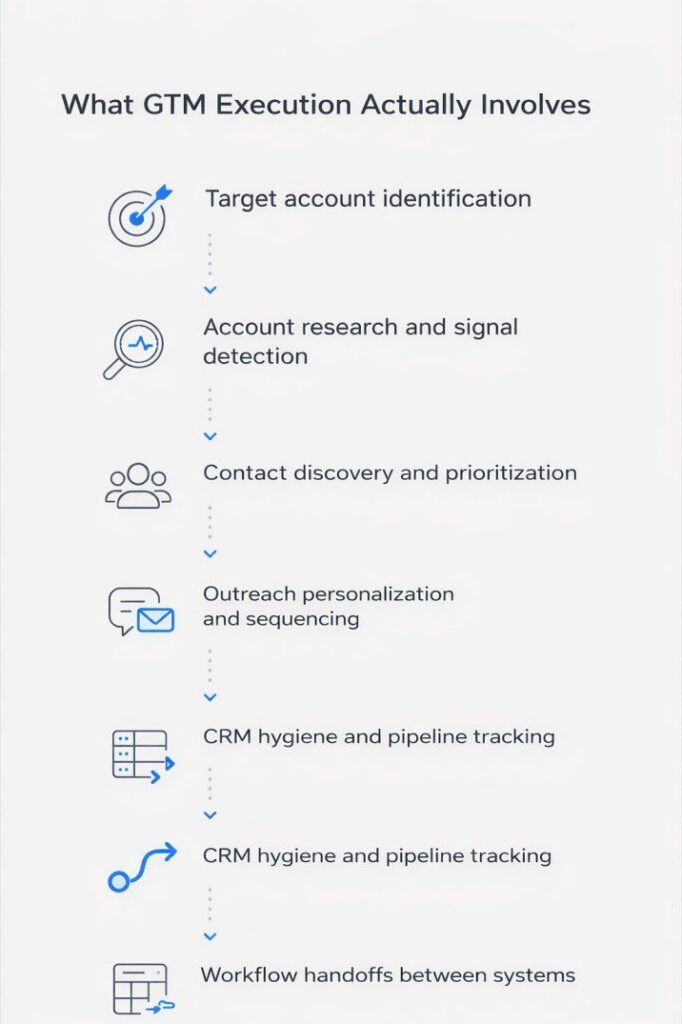
Target account identification. Someone has to decide which companies match the ICP. This happens at the account level—firmographics, technographics, signals, market segment. Targeting criteria shift when the product changes, when competitors move, and when expansion plans shift. If no system enforces these criteria, targeting drifts silently.
Account research and signal detection. Once accounts are identified, someone has to understand them. What technology do they use? Are they hiring? Did they raise funding? This research informs outreach quality. When it’s skipped or inconsistent, messaging becomes generic.
Contact discovery and prioritization. Someone has to find the right people inside that account, understand their role and seniority, and decide who to contact first. If the process isn’t standardized, different reps contact different people for the same type of account.
Outreach personalization and sequencing. Once contacts are identified, someone writes the message and loads it into a sequence. The quality of this step varies dramatically based on whether the team has frameworks and whether reps actually use them.
CRM hygiene and pipeline tracking. As outreach happens, data flows into the CRM. When this step is manual, data quality decays. When it’s automated but not enforced, garbage data accumulates.
Workflow handoffs between systems. GTM execution rarely happens in one tool. Accounts get identified in one system, researched in another, enriched in a third, messaged in a fourth, tracked in a fifth. Each handoff is where context gets lost and errors accumulate.
Where GTM Execution Breaks Down
The failure modes aren’t dramatic—they’re gradual. Teams don’t suddenly lose the ability to generate pipeline. They just notice that what worked last quarter feels harder this quarter. Here’s where the actual breakdowns happen:
Targeting drift. The ICP gets defined once, then interpretation takes over. One rep thinks the ICP includes mid-market financial services companies. Another thinks it’s enterprise only. No system enforces the original criteria. Six months later, half the pipeline doesn’t match the ICP.
Data decay. Contact and account data degrades constantly. People change roles. Companies get acquired. If enrichment happens once at list upload, the data is stale by the third touchpoint. Bounce rates climb and reps waste time on outdated information.
Manual research that doesn’t scale. High-performing reps do research—LinkedIn checks, news scanning, signal detection. This makes their outreach better, but it’s time-intensive and non-transferable. When that rep leaves, the process leaves with them.
Fragmented handoffs. Accounts get identified in one platform, exported to CSV, uploaded for enrichment, exported again, uploaded to the sequencer, then manually synced to the CRM. Each handoff introduces latency and error.
No enforcement mechanisms. Most GTM tools are permissive. They allow reps to work however they want. This flexibility helps experienced reps but hurts new ones. Without enforcement, execution quality depends entirely on individual judgment.
The core issue: These tools provide infrastructure but don’t prescribe workflows. They assume teams will figure out the right way to use them. Most teams don’t.
What Teams Mean When They Search for “GTM Tools”
When a RevOps leader searches for “GTM tools” or “go-to-market tools,” they’re not looking for feature comparisons. They’re trying to solve specific operational problems.
What they actually mean:
“How do I stop rebuilding target lists manually?” The current process takes hours and happens every time the ICP changes or a new campaign launches.
“How do I make sure reps are targeting the right accounts?” The sales team works hard, but they’re chasing accounts that don’t match the ICP. Some pursue companies too small to pay enterprise pricing. Others focus on verticals the product doesn’t serve well.
“How do I get reps to do research without it taking all day?” Top reps spend 15 minutes researching each account. Average reps skip it entirely. The team needs relevant context surfaced automatically.
“How do I keep our CRM clean without a full-time admin?” Fields are empty or incorrect. Duplicates accumulate. The RevOps team spends hours cleaning data instead of analyzing it.
“How do I make our GTM motion predictable?” Revenue feels inconsistent month to month, and no one can explain why. Leadership wants reliable results where input activity predictably translates to pipeline output.
These questions all point to the same underlying problem: execution infrastructure that doesn’t enforce quality.

How Different GTM Tools Fit Into the Workflow
Each tool addresses a specific part of the operational chain. Understanding what different go-to-market tools actually do helps teams build stacks that fit their needs.
Pintel.AI
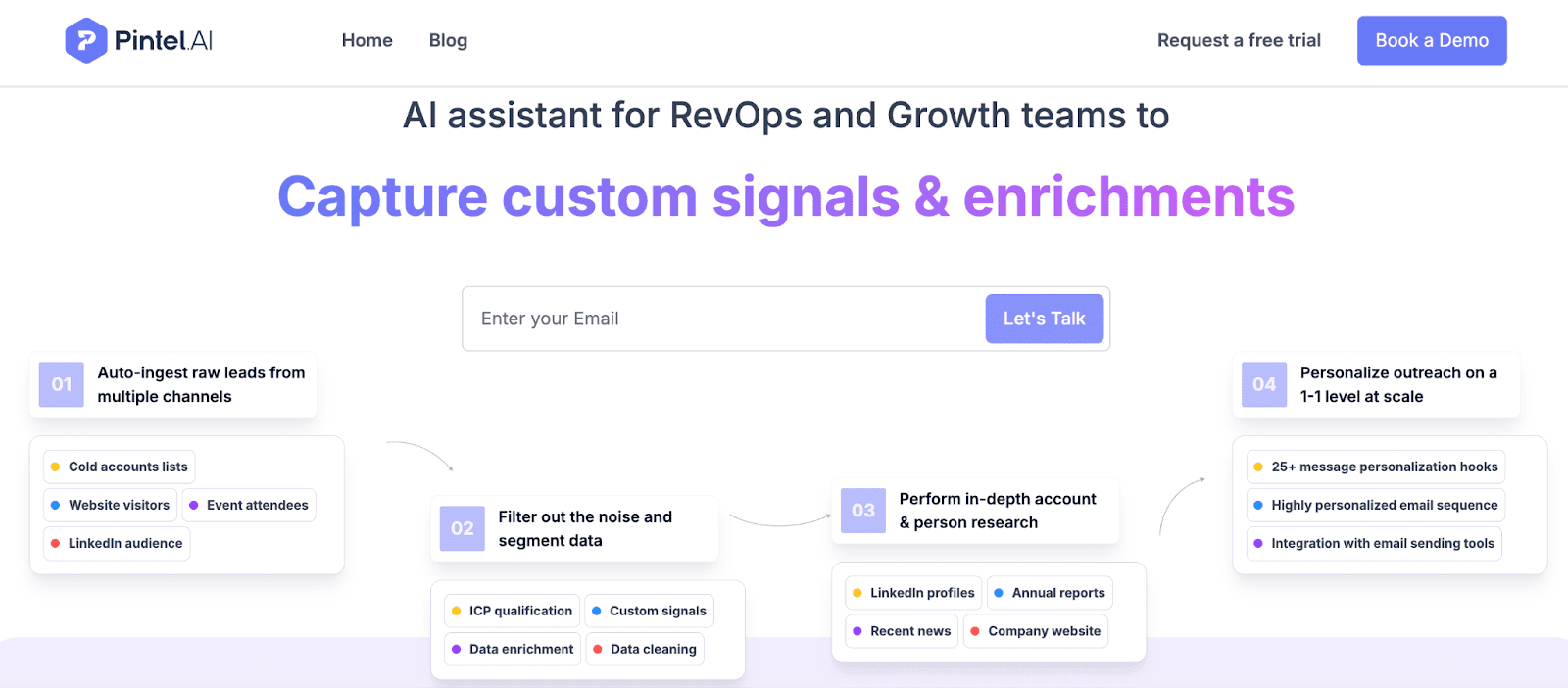
Pintel.AI is a GTM execution platform designed to standardize how revenue teams identify, research, and reach target accounts. Unlike tools that provide raw data or flexible infrastructure, Pintel enforces a complete end-to-end workflow—from ICP definition to contact discovery to outreach—so that execution quality doesn’t depend on individual rep judgment.
Teams define their ICP once in structured terms that the platform enforces. Pintel.AI identifies accounts that match those criteria, automatically researches them using multiple data sources, discovers and prioritizes contacts, and queues up personalized outreach that reps review before sending.
What it helps with:
- Enforcing ICP criteria at the point of account selection so targeting doesn’t drift
- Automating account research across multiple signals—technographics, hiring, news, funding—without manual platform checks
- Standardizing outreach quality by surfacing account context and personalization angles
- Reducing manual handoffs by handling identification, enrichment, research, and outreach in one workflow
- Ensuring new reps execute at the same quality level as experienced reps through guided workflows
Best suited for:
- Teams struggling with inconsistent execution quality across reps
- RevOps leaders who want to enforce ICP adherence rather than trust rep interpretation
- Sales organizations scaling from 5-10 reps to 20+ where heroics need to become repeatable systems
- Companies with complex ICPs requiring synthesis of multiple signals
Tradeoffs and context:
- Less flexible than tools that let reps build their own workflows—Pintel is opinionated
- Works best when ICP is well-defined and relatively stable, not during experimentation phases
- Requires upfront RevOps investment in configuring ICP criteria and frameworks
- Represents a shift from rep-owned to system-enforced execution
Apollo

Apollo is a sales intelligence and engagement platform combining a large contact database with sequencing and automation. It’s designed to let reps quickly build lists, enrich them from Apollo’s database, and launch outreach campaigns.
The platform is built around speed and volume. Reps search using filters like industry, company size, job title, technology. They add contacts to sequences directly from results. They launch campaigns without waiting for RevOps.
What it helps with:
- Giving reps self-service access to contact data without waiting for RevOps or buying third-party data
- Reducing time from account identification to outreach launch
- Consolidating prospecting data and engagement in one platform
- Automating multi-touch campaigns without manual follow-up tracking
- Providing intent data and technographic filters for buying signal identification
Best suited for:
- SDR-owned prospecting models where reps build their own lists
- Organizations prioritizing rep autonomy over centralized control
- Companies with straightforward ICPs that don’t require complex signal synthesis
- Teams comfortable with execution quality variance in exchange for speed
Tradeoffs and context:
- Data quality can be inconsistent due to multiple sources and user-contributed data
- Execution quality varies because there’s no targeting standards enforcement
- Can lead to targeting drift when reps interpret ICP criteria differently
- Works best with strong sales coaching and documented processes
- Self-service means RevOps has less visibility into targeting and messaging
Clay
Clay is a data enrichment and workflow automation platform letting teams pull data from dozens of sources, combine it with conditional logic, and build custom workflows. It’s designed for users who want maximum flexibility to create bespoke data processes.
The platform treats enrichment as requiring multiple sources rather than one database. Users waterfall through providers—check provider A, if no data, check B, then C. They write formulas to score accounts, trigger research based on conditions, and route data using custom rules.
What it helps with:
- Accessing data from sources not in standard enrichment platforms
- Building custom scoring models combining firmographics, technographics, intent signals
- Automating research like finding news, funding rounds, technology changes
- Creating waterfalls checking multiple providers to maximize coverage
- Integrating workflows with other tools through APIs and webhooks
Best suited for:
- RevOps teams with technical skills who want to build custom workflows
- Companies with non-standard ICPs requiring unconventional data sources
- Teams consolidating enrichment spend through waterfalls instead of multiple subscriptions
- Organizations needing complex data operations other platforms don’t support
Tradeoffs and context:
- Requires significant setup and ongoing maintenance for custom-built workflows
- Steep learning curve for users unfamiliar with formulas, APIs, workflow logic
- Doesn’t include outreach execution—teams need separate sequencing tools
- Flexibility means no standard approach, so consistency depends on documentation
- Best for teams where building operational infrastructure is a core competency
Clearbit
Clearbit is a data enrichment platform providing firmographic and technographic data about companies and contacts. It’s designed to automatically enrich CRM and marketing automation records so teams have complete, current information without manual entry.
The platform works through integrations. When a lead comes in via form fill or a rep adds a contact to CRM, Clearbit automatically appends data—company size, industry, tech stack, funding, social profiles.
What it helps with:
- Automatically filling missing CRM fields without manual research and entry
- Providing technographic data showing what software target accounts use
- Enriching inbound leads so marketing and sales can route and prioritize by company fit
- Building target account lists based on firmographic and technographic criteria
- Keeping CRM data fresh through automatic updates when company information changes
Best suited for:
- Teams needing reliable firmographic and technographic data for existing workflows
- Companies with strong inbound flow wanting to automatically qualify and route leads
- Organizations using account-based marketing requiring detailed company intelligence
- RevOps teams wanting to reduce manual data entry and CRM hygiene time
Tradeoffs and context:
- More expensive than database platforms because pricing is based on enrichment volume
- Focused on enrichment rather than execution—teams need separate outreach tools
- Works best for enriching known accounts rather than discovering new ones
- Strong integrations but depends on other tools for enriched data to flow into
Key Differences at a Glance
Enforcement level: Pintel (high) → Clearbit (medium) → Apollo (low) → Clay (custom)
Execution ownership: Pintel (RevOps-guided) → Clay (RevOps-built) → Clearbit (automatic) → Apollo (rep-owned)
Setup complexity: Clay (high custom work) → Pintel (structured configuration) → Clearbit (integration setup) → Pintel .AI(minimal) → Apollo (minimal)
Best for: Pintel (scaling standardization) → Apollo (rep autonomy) → Clay (custom workflows) → Clearbit (data accuracy)
Choosing the Right GTM Setup
Building a GTM stack isn’t about finding the “best” tools. It’s about matching infrastructure to operational needs and constraints.
Ownership: Reps versus RevOps
Rep-owned execution works when reps are experienced, the ICP is intuitive, and the culture values autonomy. It scales poorly past 15-20 reps because execution quality diverges and there’s no enforcement mechanism.
RevOps-owned execution works when the company wants control over targeting and outreach, when the ICP is complex, and when the team includes varying skill levels. It requires operational infrastructure investment but produces consistent results at scale.
Most teams land in a hybrid. RevOps defines targeting and builds lists. Reps own messaging and timing. The balance depends on weak points. If targeting is inconsistent, shift toward RevOps. If outreach feels robotic, shift toward reps.
ICP Enforcement Needs
High enforcement is needed when: targeting has drifted, new reps ramp slowly, execution quality varies significantly, or sales leadership doesn’t trust pipeline composition. This means using GTM tools that embed ICP definitions and automatically apply them at account selection.
Low enforcement works for small, operationally mature teams with experienced reps making consistently good decisions. They benefit more from speed and flexibility than guardrails.
Most teams need more enforcement than they realize. Sales leaders think reps understand the ICP because it’s documented. Then RevOps audits the pipeline and finds 40% of opportunities don’t match criteria. That’s an enforcement problem, not a communication problem.
Maintenance Overhead
Some GTM tools require continuous attention—custom workflows updating with ICP changes, integrations breaking, data waterfalls rebalancing. Others are hands-off—working out of the box with minimal configuration.
High-maintenance tools like Clay offer maximum flexibility but require dedicated operational talent. Low-maintenance tools like Clearbit or Pintel require less attention because they work with standard configurations.
If the GTM motion is stable and the team wants minimal overhead, low-maintenance makes sense. If the motion is experimental with constant testing, higher-maintenance flexibility may be worth the cost.
The deciding factor: Can your RevOps team build and maintain infrastructure, or do they need to focus on strategy?
Final Takeaway
Most teams searching for GTM tools are actually searching for predictability. They want execution producing consistent results. They want targeting that doesn’t drift with new hires. They want outreach quality independent of which individual handles an account.
The tools matter, but the workflow matters more. Excellent point solutions connected by manual handoffs will underperform an integrated system keeping execution moving smoothly from account identification to CRM sync.
That means making deliberate choices about where execution responsibility lives—with reps or RevOps. It means understanding whether the team needs flexibility or enforcement. It means acknowledging that complexity has a cost, and sometimes the right answer is an opinionated platform handling multiple workflow steps.
The companies that scale revenue predictably aren’t the ones with the most go-to-market tools or the most sophisticated data operations. They’re the ones that built GTM systems where execution quality is structural rather than dependent on individual heroics.
Frequently Asked Questions About GTM Tools
What are GTM tools?
GTM tools are go-to-market software that help B2B revenue teams execute targeting, research, outreach, and CRM workflows to convert ICP strategy into pipeline.
What is GTM execution?
GTM execution is the day-to-day operational work of selecting accounts, researching signals, personalizing outreach, and maintaining CRM data to drive predictable pipeline.
How are GTM tools different from sales tools?
GTM tools support the full go-to-market execution workflow, while sales tools focus on individual activities like outreach, calling, or deal management.
Why do GTM execution problems persist even with many tools?
GTM execution problems persist because most GTM tools enable flexibility without enforcing consistent workflows across reps and teams.
How do GTM tools impact pipeline quality?
GTM tools impact pipeline quality by standardizing targeting, research depth, and execution data, which directly influences conversion rates and predictability.
What causes targeting drift in GTM execution?
Targeting drift occurs when ICP definitions are not enforced within GTM tools, allowing rep-level interpretation to change account selection over time.
What role does RevOps play in GTM execution?
RevOps owns GTM execution systems, workflows, and data standards to ensure consistent targeting and execution quality across the revenue team.
How do GTM strategy and GTM execution differ?
GTM strategy and frameworks set direction and structure, while GTM execution applies those decisions through daily operational workflows.
How do GTM tools support scaling revenue teams?
GTM tools support scaling by reducing manual handoffs, enforcing execution standards, and maintaining data quality across growing GTM motions.
What should teams evaluate when choosing GTM tools?
Teams should evaluate GTM tools based on execution enforcement, workflow coverage, operational overhead, and alignment with RevOps ownership.