The average SDR spends 40% of their day on manual prospecting. That’s researching accounts, finding contact info, verifying emails, and checking if prospects actually fit your ICP.
The problem? Most of that work doesn’t require human judgment—it just eats up SDR research time that could be spent on actual selling.
Smart teams are shifting to SDR prospecting automation to handle the heavy lifting. Here’s what that looks like in practice.
Why Manual Prospecting Kills SDR Productivity
Manual prospecting is the process where sales development reps manually search for, research, and qualify potential customers before reaching out. It involves identifying target accounts, finding contact information, verifying data accuracy, and determining if prospects match your ideal customer profile.
While this groundwork is essential for successful outreach, the execution doesn’t need to be manual anymore. Here’s what the typical SDR prospecting workflow looks like without automation:
The daily grind includes:
- Searching for companies that match your ICP across multiple databases
- Finding decision-makers at those accounts through LinkedIn and company websites
- Enriching contact data by cross-referencing various tools
- Verifying job titles, responsibilities, and reporting structures
- Prioritizing which prospects to reach out to first based on gut feel or basic criteria
This account research automation work is necessary but repetitive. When SDRs manually handle all of it, they’re stuck in research mode instead of conversation mode.
The real cost extends beyond just time:
- Less bandwidth for personalized outreach at scale
- Slower response times to warm leads who are ready to buy
- Higher burnout rates from low-value, repetitive tasks
- Inconsistent lead quality across the team due to human error
- Difficulty scaling your outbound motion without adding headcount
The bottleneck isn’t your SDRs’ ability—it’s how they’re spending their hours. That’s where sales prospecting automation comes in to change the game.
How to Automate SDR Prospecting (Without Losing Quality)
The goal of SDR prospecting automation isn’t to remove SDRs from prospecting entirely—it’s to automate the tedious, repetitive parts so they can focus on what actually converts prospects into pipeline.
What SDR prospecting automation actually means: It’s the use of software and workflows to automatically handle repetitive prospecting tasks like data enrichment, ICP filtering, contact discovery, and sequence execution—freeing SDRs to focus on personalization and relationship-building.
Think of it as giving your SDRs a research assistant that works 24/7. The system handles data collection and organization, while your team focuses on crafting messages that resonate and having meaningful conversations.
Here’s how leading teams automate SDR prospecting without sacrificing the personal touch:
Step 1: Automate ICP Filtering at the Source
Stop asking SDRs to manually qualify every single account that enters your system. ICP filtering should happen automatically before prospects even hit your team’s radar.
What is ICP filtering? ICP (Ideal Customer Profile) filtering is the automated process of evaluating companies against your predefined criteria—like industry, company size, revenue, technology stack, and growth signals—to determine if they’re worth pursuing.
Instead of your SDRs spending hours researching whether a company is a good fit, automation screens accounts in seconds. Here’s what your system should evaluate automatically:
Core firmographic filters:
- Company size (employee count)
- Annual revenue ranges
- Industry and sub-industry classifications
- Geographic location and market presence
Advanced signals:
- Technology stack and tool usage
- Hiring signals and growth indicators
- Recent funding announcements
- Competitive intel and market positioning
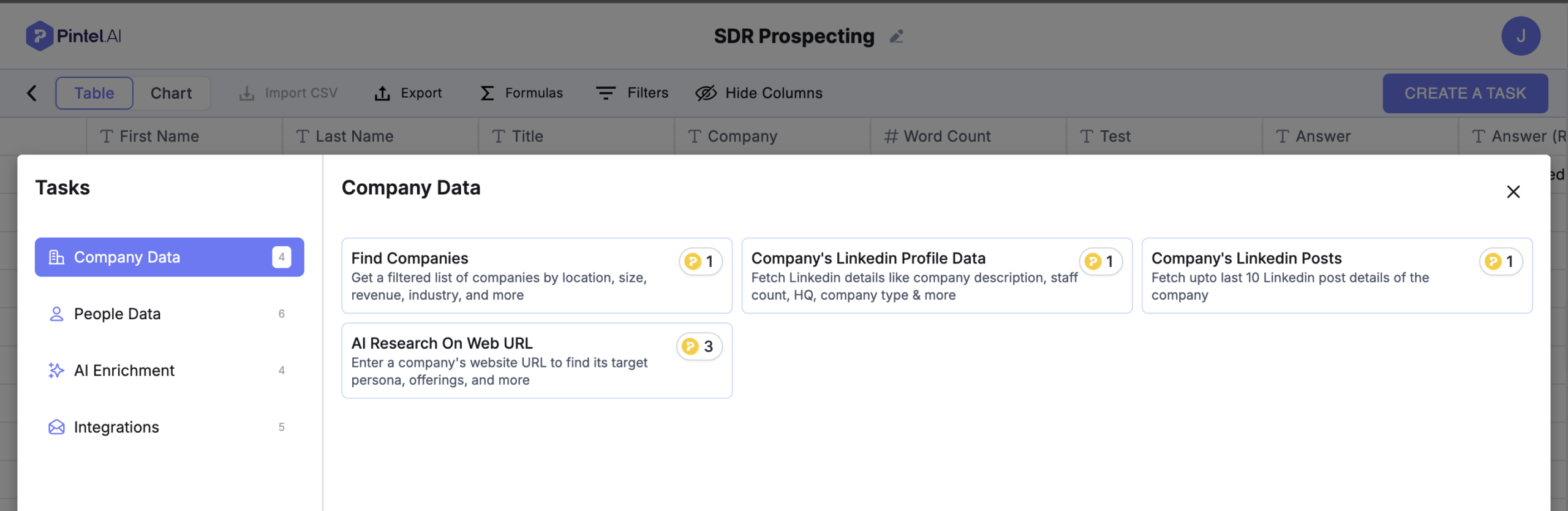
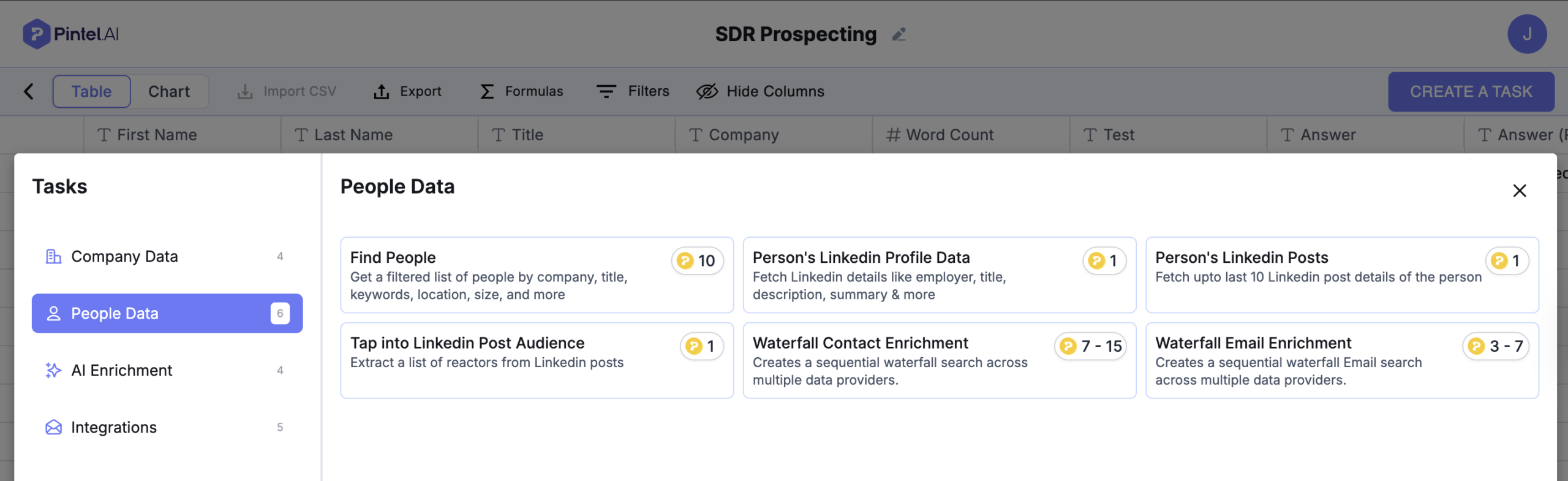
What you can automate at the ICP filtering stage
Ensure only ICP-matched companies move to outreach and sequencingYour system should feed only qualified accounts into your SDR prospecting workflow. If a company doesn’t match your criteria, it never hits your team’s radar—saving hours of wasted research time.
- Search companies using filters like industry, company size, revenue, and location
- Pull company lists based on growth signals and hiring activity
- Fetch company LinkedIn profiles and recent LinkedIn posts automatically
- Identify target companies using website and product signals
- Run AI research on a company’s website to understand offerings and positioning
- Filter companies based on funding status and acquisition signals
- Enrich company records before they enter SDR workflows
Once you’ve filtered for the right accounts, the next step is making sure you have complete, accurate information about the people you’re reaching out to.
Step 2: Enrich Contact Data Automatically
Manual lead enrichment means SDRs are constantly jumping between LinkedIn, company websites, and various data tools to piece together a complete prospect profile. This context-switching alone kills 20-30 minutes per prospect.
What is lead enrichment? Lead enrichment is the automated process of appending additional information to a contact record—like verified email addresses, phone numbers, job details, and social profiles—so SDRs have everything they need in one place.
Sales prospecting automation pulls this information for you the moment a prospect enters your system. Here’s what gets enriched automatically:
Contact-level data:
- Verified email addresses and phone numbers
- Direct dials vs. company switchboard numbers
- Personal and professional social media profiles
- Email deliverability scores
Professional context:
- Current job title and seniority level
- Department and reporting structure
- Recent job changes, promotions, or role transitions
- Years of experience and career progression
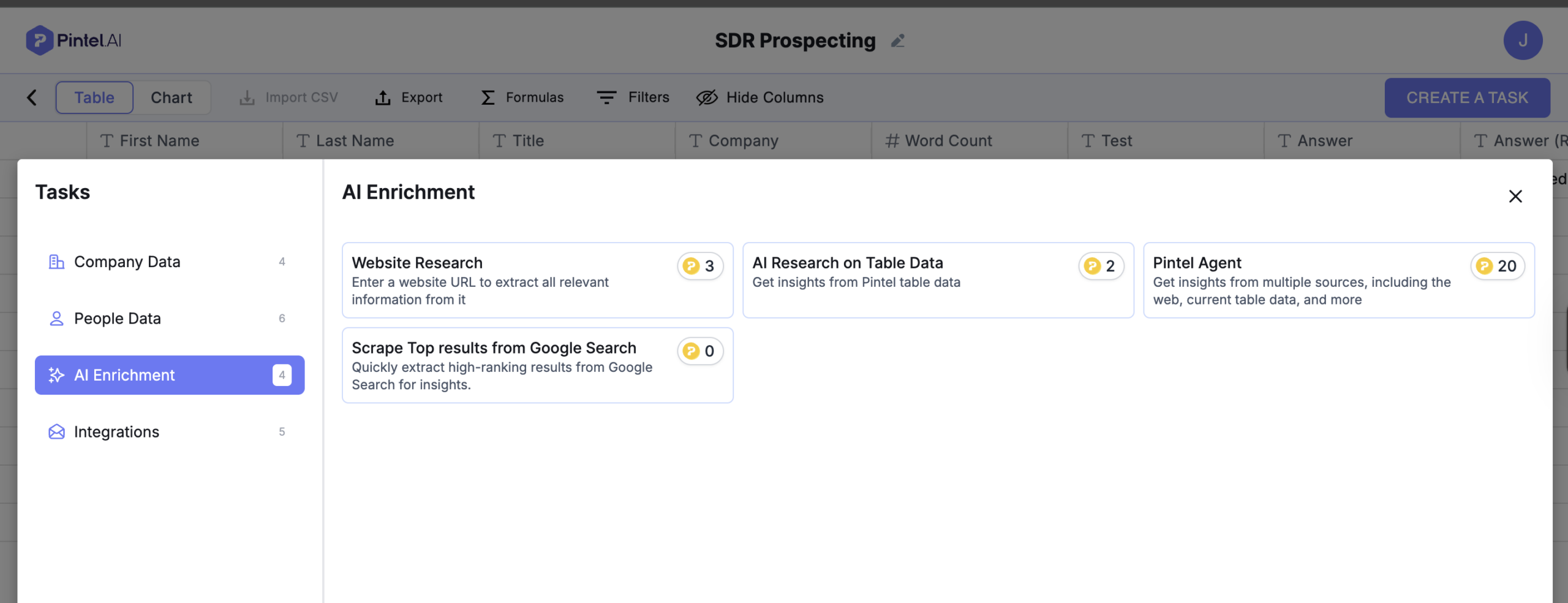
What contact enrichment automation gives you
- Pull contact details directly from company websites and LinkedIn
- Extract job title, role, and seniority automatically
- Enrich contacts using AI research on website and table data
- Fetch recent activity and context from online sources
- Append missing fields without manual data entry
- Standardize contact data across all records
- Reduce dependency on multiple enrichment tools
When an SDR opens a prospect record, everything they need is already there. No more tab-switching, no more manual data entry, no more outdated information.
But having enriched data on thousands of prospects creates a new problem: which ones should your SDRs contact first? That’s where prioritization comes in.
Step 3: Prioritize Prospects with Intent Signals
Not all qualified leads deserve the same attention at the same time. Without a system for prospect prioritization, SDRs waste time on cold contacts while hot prospects go stale.
What is prospect prioritization? Prospect prioritization uses intent signals and behavioral data to automatically score and rank prospects based on their likelihood to engage and convert—ensuring SDRs always focus on the hottest opportunities first.
Traditional prospecting treats every qualified account the same way. But a prospect who visited your pricing page three times this week is very different from someone who hasn’t interacted with your brand at all.
Here’s what modern prospect prioritization factors in:
Engagement signals:
- Website visits and page views (especially pricing and product pages)
- Content downloads and resource engagement
- Email opens, clicks, and reply patterns
- LinkedIn profile views and social engagement
Market signals:
- Recent funding announcements or acquisitions
- Technology changes or platform migrations
- Hiring sprees or new department formations
- Industry events or seasonal buying windows


Prompt-based enrichment lets you generate exactly the signals you need
- Write custom prompts to enrich prospects with any information you care about
- Generate buying intent, growth signals, or account insights on demand
- Pull context from websites, LinkedIn, and existing table data
- Enrich prospects based on your sales motion, not fixed fields
- Update and re-run prompts as priorities change
- Create intent signals without relying on predefined data sources
Automation surfaces the hottest prospects first, so your team knows exactly where to focus their energy. An SDR might have 500 accounts in their territory, but they’ll start their day with the 20 that are showing buying signals right now.
With the right prospects prioritized, it’s time to actually reach out—and that’s where sequence automation takes over.
Step 4: Build Sequences That Run on Autopilot
Even with perfect data and prioritization, manually sending emails, scheduling follow-ups, and tracking next steps becomes overwhelming at scale. This is where your SDR prospecting workflow becomes truly efficient.
What are automated sequences? Automated sequences are pre-built series of touchpoints (emails, tasks, social touches) that execute automatically based on triggers, time delays, and prospect actions—ensuring consistent follow-up without manual effort.
The key is understanding what should be automated versus what needs a human touch. Here’s the breakdown:
What gets automated:
- Initial email sends based on triggers (new lead, ICP match, intent spike)
- Follow-up emails with smart delays (3 days, 5 days, 1 week)
- LinkedIn connection requests and InMail messages
- Task creation for phone calls or personalized video
- Automatic pausing when prospects reply or book meetings
What stays manual:
- Writing the initial message templates
- Customizing high-value account outreach
- Responding to prospect replies
- Handling objections and questions
SDRs still own the messaging and handle all two-way conversations—but the system manages timing, delivery, and task management. Think of it as having a personal assistant who never forgets a follow-up.
Of course, none of this works if your automation tools exist in silos. That’s why integration is the final piece of the puzzle.
Step 5: Sync Everything with Your RevOps Stack
Prospecting automation only works when it connects seamlessly with your existing sales and marketing tools. Data silos kill efficiency just as much as manual processes do.
What is RevOps automation? RevOps automation is the practice of connecting your sales, marketing, and customer success tools so data flows automatically between systems—eliminating manual data entry, exports, and imports.
When your prospecting automation integrates with your broader tech stack, everything stays in sync. Here’s what that looks like:
Critical integrations:
- CRM systems (Salesforce, HubSpot) for contact and account management
- Sales engagement platforms (Outreach, Salesloft, Apollo) for sequence execution
- Data enrichment tools (Clearbit, ZoomInfo, Lusha) for contact information
- Intent data providers (6sense, Bombora, G2) for buyer signals
- Communication tools (Gmail, Outlook, LinkedIn) for multi-channel outreach
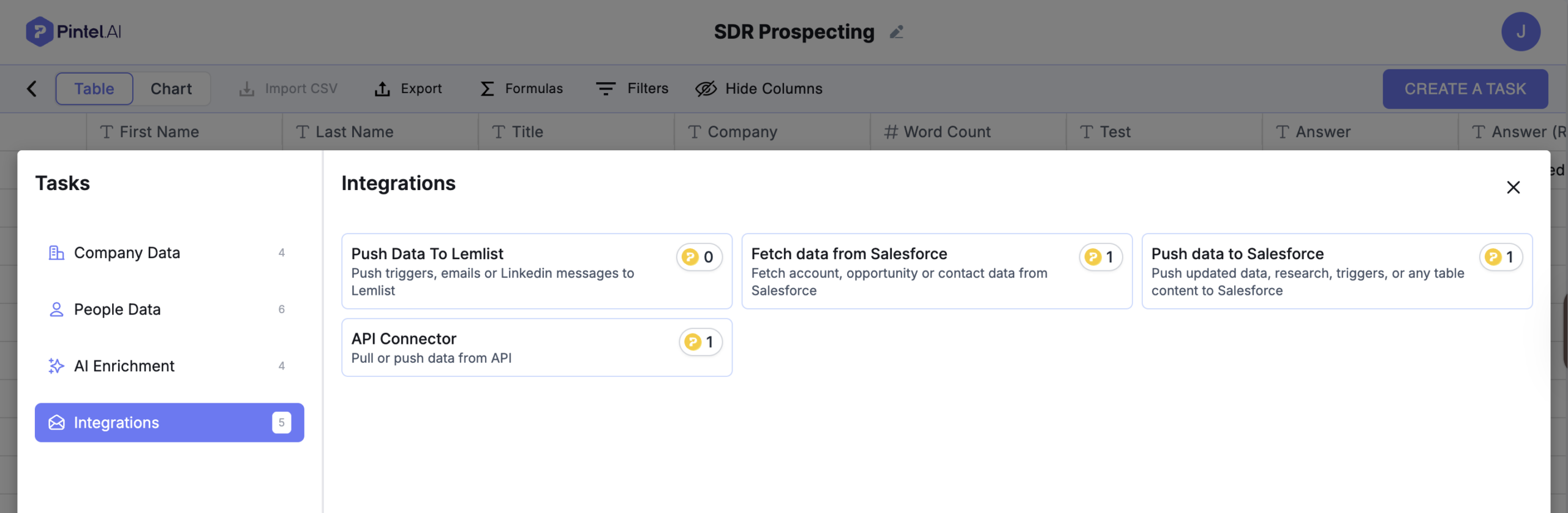
RevOps automation ensures that when a prospect takes an action—like visiting your pricing page—that signal flows from your website to your intent tool to your CRM to your engagement platform, triggering the right sequence automatically. No manual updates required.
With all these pieces working together, you might wonder: what are SDRs actually doing all day? The answer might surprise you.
What SDRs Actually Do When You Automate Prospecting
There’s a common fear that automation will make SDRs obsolete. The reality is the opposite: when you automate SDR prospecting, your team becomes more effective, not redundant.
Automation handles the repetitive, low-value tasks—but it can’t replace human judgment, creativity, and relationship-building. Here’s what SDRs focus on when they’re freed from manual prospecting:
High-value activities that move the needle:
- Deep account research for personalization: Understanding a prospect’s specific pain points, recent company news, and competitive landscape to craft truly relevant outreach
- Engaging with interested prospects: Responding to replies, handling objections, and nurturing conversations that automation flagged as high-priority
- Testing and optimizing messaging: Experimenting with different value propositions, subject lines, and call-to-action strategies to improve conversion rates
- Collaborating with AEs on strategy: Sharing insights from prospect conversations to help account executives close deals faster
- Building relationships that matter: Focusing on the accounts that need a white-glove approach rather than automated touchpoints
When you automate SDR prospecting, your team shifts from data janitors to revenue generators. They’re having more conversations, booking more meetings, and generating higher-quality pipeline—because they’re not drowning in spreadsheets.
But automation isn’t plug-and-play. There are common pitfalls that can undermine your entire SDR prospecting workflow if you’re not careful.
Common Mistakes When Automating Your SDR Prospecting Workflow
Even with the best tools, automation can backfire if implemented poorly. Here are the mistakes that derail most teams—and how to avoid them:
1. Over-automating the personal touch
Automation should handle logistics and data management, not replace genuine human connection. The biggest mistake teams make is trying to automate everything, including the parts that require emotional intelligence and contextual judgment.
What goes wrong:
- Generic, robotic messages that scream “mass email”
- No customization for high-value, strategic accounts
- Following up with automated emails after a prospect has already replied
- Using the same sequence for all personas and industries
The fix: SDRs should still manually personalize outreach for enterprise accounts, recent warm leads, and prospects showing high intent. Automation should support personalization, not eliminate it.
2. Ignoring data quality
Your automation is only as good as the data feeding it. Bad data in equals bad outreach out—no matter how sophisticated your SDR prospecting automation is.
What goes wrong:
- Outdated contact information leading to bounced emails
- Incorrect job titles causing misdirected messaging
- Duplicate records creating awkward double-touches
- Incomplete enrichment leaving SDRs with gaps
The fix: Regularly audit your data sources, set up deduplication rules, and invest in multiple enrichment providers. Check data accuracy monthly and clean up your CRM quarterly.
3. Setting it and forgetting it
Prospecting automation isn’t a “set it once and leave it forever” solution. Market conditions change, your ICP evolves, and messaging effectiveness shifts over time.
What goes wrong:
- Sequences that performed well six months ago now have dismal open rates
- ICP filters that no longer match your current target market
- Broken integrations causing data sync issues
- Automation continuing to run on prospects who should be paused
The fix: Review performance metrics weekly. Update your ICP criteria as your business evolves. A/B test new sequences regularly. Treat your SDR prospecting workflow as a living system that needs ongoing optimization.
4. Skipping SDR training
Automation fails when the people using it don’t understand how it works or why decisions are being made behind the scenes. SDRs who don’t trust the system will find workarounds—undermining your entire investment.
What goes wrong:
- SDRs manually prospecting because they don’t believe the automation
- Confusion about which tasks are automated vs. manual
- Blame shifting when results don’t meet expectations
- Resistance to adopting new workflows
The fix: Involve your SDR team in building workflows from day one. Explain the logic behind each automation decision. Show them the time savings with concrete before-and-after metrics. Make them co-creators, not passive recipients.
Avoiding these mistakes takes planning and discipline—but the payoff is worth it. Here’s how to actually get started.
Getting Started: Automate SDR Prospecting in 15 Days
You do not need a full month to see value from SDR prospecting automation. Most teams can move from manual chaos to a working automated workflow in two focused weeks if they scope it correctly.
The goal is not to automate everything at once. It is to automate one high-impact workflow fast, prove value, and expand from there. The key is starting small, proving value quickly, and then scaling what works. Here’s your roadmap:
Days 1 to 3: Audit and identify bottlenecks
Before touching any tools, you need clarity on where SDR time is actually going.
Your action items:
- Shadow one or two SDRs for a few hours and observe their real workflow
- Map the current prospecting flow from account discovery to first outreach
- Identify the most repetitive tasks slowing them down
- Capture baseline metrics for time per prospect and daily outreach volume
This short audit ensures you automate the right problems instead of adding tools on top of broken processes.
Days 4 to 6: Choose your first automation workflow
With bottlenecks identified, select tools that solve one clear problem first.
Your decision framework:
- Works with your existing CRM like Salesforce or HubSpot
- Can be implemented quickly without heavy customization
- Solves a clear pain point such as ICP filtering or lead enrichment
- Easy for SDRs to adopt without friction
Where to start
Pick one workflow only. Either automate ICP filtering if lead quality is the issue, or automate enrichment if SDRs are stuck researching contacts.
Days 7 to 10: Build and test in parallel
Now you build your first automated workflow and validate it before full rollout.
Your implementation plan:
- Set up the workflow with RevOps or sales ops
- Run it alongside manual prospecting for a few days
- Compare lead quality, output, and SDR effort
- Gather quick feedback from the SDRs using it
This parallel run helps catch gaps early without disrupting pipeline.
Days 11 to 14: Launch and optimize
Once validated, roll it out to the full SDR team.
Your launch checklist:
- Train SDRs on what is automated and what remains manual
- Roll out the workflow consistently across the team
- Monitor key metrics daily such as replies and meetings booked
- Adjust filters, sequences, or scoring rules based on real data
By the end of two weeks, you should have one automated SDR prospecting workflow live, saving hours per day and delivering early wins that justify expanding automation further.
Ready to automate SDR prospecting but not sure where to begin? Here’s a realistic, phased approach that gets you from manual chaos to automated efficiency in one month—without overwhelming your team.
By the end of 15 days, you should have one core workflow running smoothly, saving your team hours per day, and generating early wins that justify expanding automation further.
But what’s the actual return on this investment? Let’s look at the numbers.
The ROI of SDR Prospecting Automation
Implementing automation requires time, budget, and change management—so it’s fair to ask: is it actually worth it? The data from teams who’ve made the shift is compelling.
Teams that successfully automate SDR prospecting typically see measurable improvements across four key areas:
Time savings:
- 60% reduction in hours spent on manual account research and data entry
- SDRs reclaim 10-15 hours per week for high-value activities like personalized outreach and relationship-building
- Faster ramp time for new hires who can be productive in weeks instead of months
Output increase:
- 2-3x increase in daily outreach capacity without sacrificing quality
- More consistent touchpoint cadence since automation never forgets a follow-up
- Higher meeting booking rates because SDRs focus on warm prospects showing intent
Quality improvement:
- 35% improvement in lead quality due to better ICP matching
- Lower email bounce rates from verified, enriched contact data
- More personalized messaging because SDRs aren’t rushing through research
Team health:
- Lower SDR turnover (20-30% reduction) from less burnout caused by repetitive work
- Higher job satisfaction when SDRs spend time on work that actually requires their skills
- Easier scaling of your outbound motion without proportionally scaling headcount
The compounding effect: The best part about SDR prospecting automation? Once it’s set up, these gains compound over time. Your team can scale outbound efforts without linearly scaling headcount. A team of 5 SDRs with automation can often outproduce a team of 10 without it.
Real cost considerations: Of course, automation isn’t free. Between software costs, implementation time, and ongoing optimization, expect to invest $500-$2,000 per SDR per month depending on your stack. But when that investment returns 10-15 extra hours per week per SDR, the ROI becomes obvious within the first quarter.
With these numbers in mind, the real question becomes not whether to automate, but how quickly you can implement it.
Final Thoughts
Manual prospecting made perfect sense when your target list was 50 accounts and you could afford to spend an hour researching each one. But at scale—when you’re going after hundreds or thousands of prospects—it becomes the biggest bottleneck in your sales motion.
SDR prospecting automation handles the research, enrichment, and prioritization so your team focuses on what they do best: starting conversations that turn into pipeline. The technology takes care of the logistics while humans handle the relationships.
The shift from manual to automated prospecting isn’t about replacing your SDRs—it’s about empowering them. It’s about giving them back the time they need to be consultative, thoughtful, and genuinely helpful to prospects. It’s about letting them do the job they were hired for instead of drowning them in spreadsheets.
The question isn’t whether to automate your SDR prospecting workflow. It’s how soon you can start—and how much pipeline you’re leaving on the table while you wait.