Your CRM is full of leads. But half the data is incomplete. The wrong accounts are getting attention. And by the time a lead reaches the right rep, it’s already gone cold.
This is what life looks like without a proper system in place.
RevOps teams deal with this every day, chasing down missing firmographics, manually scoring accounts, and routing leads through spreadsheets or Slack messages. It’s slow. It’s inconsistent. And it costs pipeline.
That’s where RevOps data automation comes in. Instead of doing all of this by hand, you set up workflows that enrich, score, and route data automatically so your team can focus on selling, not sorting.
What is RevOps Data Automation?
RevOps data automation is the process of automatically enriching contact and account data, scoring leads based on fit and intent, and routing them to the right rep, all synced across your CRM and connected systems.
Instead of manually pulling data, scoring leads, and deciding who gets what, automation does it for you. The right data goes to the right person at the right time.
It connects your enrichment, scoring, routing, and CRM into one smooth flow.
Why RevOps Teams Struggle Without Data Automation
Most teams don’t have a strategy problem. They have a data problem.
Here’s what that looks like in practice.
Incomplete data
Leads come in with just a name and email. No company size, no industry, no intent signal. Your team is flying blind.
Too much manual work
Someone has to research accounts, fill in missing fields, and update the CRM. That’s hours of work every week that adds zero revenue.
Inconsistent scoring
Without a clear system, different reps prioritize different things. One person chases SMBs, another goes enterprise. There’s no alignment.
Slow routing
A lead sits in a queue for hours, sometimes days, before it reaches the right rep. By then, the prospect has moved on.
Disconnected systems
Your enrichment tool doesn’t talk to your CRM. Your CRM doesn’t update your sequencing tool. Data lives in silos and no one trusts it.
Each of these problems compounds the others. And together, they quietly kill your pipeline.
RevOps Data Automation Workflow
Here’s how a solid automation workflow actually runs, step by step.
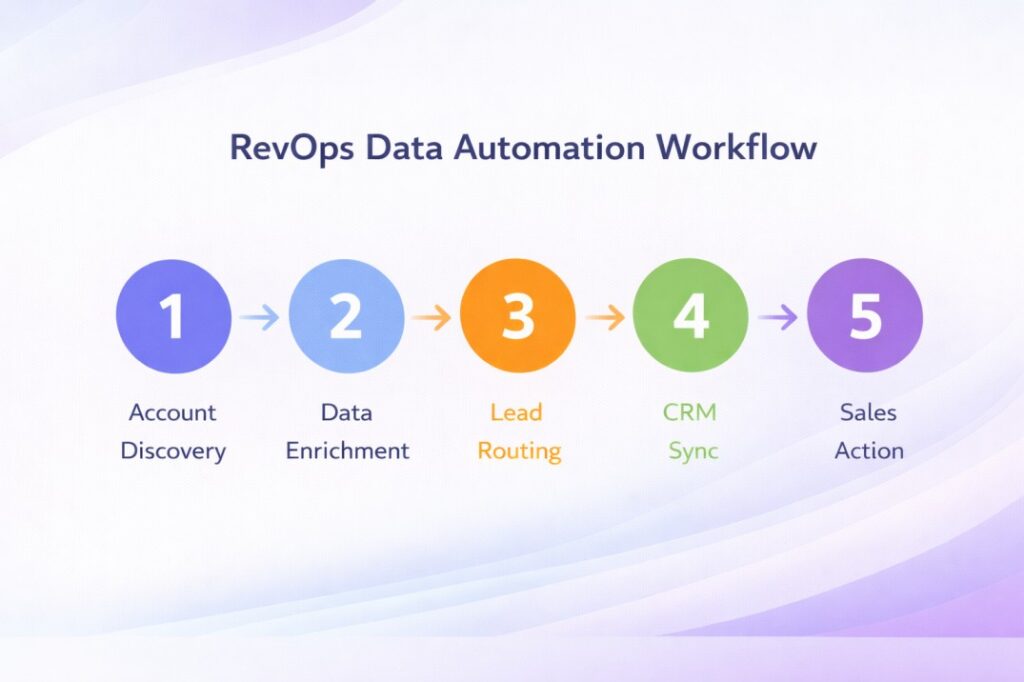
Step 1: Account Discovery
You identify the companies or contacts that match your ICP. This could come from inbound forms, intent data, or outbound prospecting lists.
Step 2: Data Enrichment
The system automatically pulls in missing data, company size, industry, tech stack, location, funding stage, and more. Data enrichment ensures every lead has complete context before outreach begins. No manual research needed.
Step 3: Lead Scoring
Based on the enriched data, each lead or account gets a score. Lead scoring automation helps teams prioritize high-intent accounts instead of guessing which ones deserve attention. High fit + high intent = prioritize now. Low fit = deprioritize or nurture.
Step 4: Lead Routing
The lead automatically goes to the right rep based on rules you’ve set, territory, segment, account size, or round-robin. Lead routing automation reduces response time from hours to minutes, without manual handoffs slowing things down.
Step 5: CRM Sync
Everything gets written back to your CRM in real time. CRM data automation keeps records accurate without manual updates, no duplicates, no outdated fields.
Step 6: Sales Action
Your rep opens the CRM and sees a prioritized list of accounts with full context, ready to act, not ready to research.
That’s the whole flow. And when it works, it feels like your pipeline runs itself.
How Teams Set Up RevOps Data Automation in Practice
Most teams don’t flip a switch and go fully automated overnight. Here’s how it typically happens.
Start with your ICP definition
Before you automate anything, get clear on what a good-fit account actually looks like. Firmographics, company size, industry, tech stack, whatever signals matter for your business.
Pick your enrichment source
Choose a tool that fills missing data automatically when a lead comes in. The richer the record, the better everything downstream performs.
Build your scoring model
Define what “high priority” means. Assign weights to fit signals and intent signals. Start simple. You can refine it once data starts flowing.
Set up routing rules
Decide how leads get assigned. By territory? By segment? Round-robin? Map it out before you automate it, or you’ll just automate the wrong process faster.
Connect it all to your CRM
Make sure every enrichment, every score update, and every routing decision writes back to your CRM automatically. This is what keeps the whole system trustworthy.
Even a basic version of this setup beats a fully manual process. Most teams see the impact within the first few weeks.
How Data Automation Works Across the Workflow
Let’s zoom in on each part and what it actually does for your team.
Enrichment improves data quality
Instead of working with half-empty records, your team gets complete profiles. Data enrichment fills missing information like company size, industry, and intent signals, giving your team a real foundation to work from.
Scoring prioritizes the right leads
Not every lead deserves the same attention. Account scoring helps your team focus on accounts that are most likely to convert, based on fit and intent, not gut feeling.
Routing speeds up response time
The faster a lead gets to the right rep, the higher the chance of conversion. Automated lead routing removes the delay that comes from manual handoffs and internal back-and-forth.
CRM sync keeps everything accurate
When data flows automatically into your CRM, you’re not relying on reps to update fields manually. Records stay current, and your reporting actually reflects reality.
Each piece supports the next. That’s what makes automation powerful, not any single step, but the whole chain working together.
How Data Automation Improves Pipeline Performance
When data flows cleanly through your system, the results show up in the pipeline fast.
Faster response times
Leads get routed in minutes, not hours. That alone can significantly improve connect rates.
Better prioritization
Reps spend time on accounts that actually have a chance of closing, not the ones that just happened to fill out a form.
Higher conversion rates
When the right rep reaches the right account with the right context at the right time, deals move. It’s not magic, it’s just good data hygiene.
Less manual work
Your RevOps team stops being a data cleanup crew and starts being a strategic function. That shift matters.
Here’s something most teams miss: routing delays hurt pipeline more than enrichment gaps do, especially on high-intent inbound leads. A perfectly enriched record that sits unrouted for six hours loses its value fast. Speed of action matters as much as quality of data.
The teams that get this right don’t just close more deals. They build a system that keeps improving over time.
Common Mistakes in RevOps Data Automation
Even with the right tools, many teams get this wrong.
Automating bad data
If your incoming data is incomplete or inaccurate, automation just moves the problem faster. Clean your data before you build workflows around it.
Overcomplicating the scoring model
Teams often add too many variables and end up with a model nobody trusts. Start with 3 to 5 strong signals and build from there.
Ignoring routing delays
Setting up routing once and never revisiting it is a common trap. As your team grows or territories change, routing logic needs to keep up.
Relying on too many disconnected tools
Using five different tools that don’t talk to each other creates more data inconsistency, not less. Fewer, better-connected tools almost always outperform a bloated stack.
Not syncing data back to the CRM
Enrichment and scoring that don’t write back to your CRM are invisible to the rest of the team. If it’s not in the CRM, it doesn’t exist operationally.
These mistakes don’t break the system immediately, but they slow it down over time.
At this point, teams usually start asking:
Most affordable RevOps platforms for early-stage startups needing lead qualification automation?
For early-stage teams, the priority is finding a platform that covers enrichment, scoring, and routing without requiring a large ops setup. Tools like Clay work well for enrichment, while platforms like Pintel help consolidate the workflow so you’re not stitching together multiple tools from day one.
What to Look for in a RevOps Automation Tool
Not every tool does this well. Here’s what actually matters when you’re evaluating options.
Data accuracy
Enrichment is only useful if the data is correct. Look for tools with high match rates and fresh data sources, not ones pulling from a stale database.
Scoring flexibility
Your ICP isn’t the same as everyone else’s. You need a tool that lets you build scoring models based on your own criteria, not a generic template.
Routing logic
Can you route by territory, segment, deal size, or rep capacity? The more control you have, the better your routing will perform.
CRM integration
The tool needs to write data back to your CRM reliably. If the sync is unreliable or one-directional, the whole system breaks down.
Real-time updates
Data that’s 30 days old isn’t useful. Look for platforms that refresh data continuously, not just on a weekly batch schedule.
If a tool checks most of these boxes, it’s worth a serious look.
How RevOps Automation Platforms Compare
There’s a big difference between tools that sound similar on paper.
Rule-based scoring vs. AI scoring
Rule-based scoring is predictable. You define the criteria and the system follows them. AI scoring learns from your historical data and adjusts over time. Both have value, but AI scoring tends to improve as you feed it more signal.
Static data vs. real-time data
Some tools enrich a record once and never update it. Others refresh data continuously. For fast-moving markets, real-time data matters a lot.
Manual routing vs. automated routing
If a human still needs to approve or adjust every routing decision, you haven’t really automated anything. True RevOps data automation means the lead moves without anyone touching it.
The gap between a basic tool and a well-built platform shows up quickly once you’re running real volume through it.
Should You Use Multiple Tools or One Platform?
This is a real decision most teams face at some point.
Multiple tools
More flexibility in choosing best-in-class options for each function. But they require more maintenance, more integrations, and more room for data inconsistency as volume grows.
Unified platform
Simpler to manage and keeps data consistent across enrichment, scoring, and routing. Less flexibility, but far less operational overhead.
For early-stage teams or lean RevOps setups, a unified platform usually wins. For larger teams with specific needs in each area, a multi-tool stack can work, but only if integrations are maintained carefully.
That’s exactly where Pintel.AI fits in. It brings enrichment, scoring, and routing into one connected layer so your team doesn’t have to manage the glue between tools.
Use Cases
RevOps teams
Use automation to keep data clean, build consistent scoring models, and reduce the time spent on ops work that doesn’t scale.
SDRs
Benefit from knowing exactly which accounts to focus on each day, without spending an hour on manual research before their first call.
Startups
Use it to punch above their weight. A small team with good automation can work a pipeline that would normally require twice the headcount.
In all three cases, the core benefit is the same: more time on the work that actually moves deals forward.
Tools That Enable RevOps Data Automation
Most teams start by combining multiple tools across enrichment, scoring, and routing. It works early on, but becomes hard to manage as volume grows.
Enrichment tools
Clay, Apollo, Clearbit, and ZoomInfo pull in firmographic and contact data to fill gaps in your records.
Scoring tools
MadKudu, 6sense, and Breadcrumbs help you build models that rank leads and accounts based on fit and intent.
Routing tools
LeanData and Chili Piper handle the logic of getting leads to the right rep based on rules you configure.
CRM platforms
Salesforce and HubSpot sit at the center of everything, storing records, syncing data, and powering reporting.
Most teams end up stitching several of these together. It works, but it also means maintaining multiple integrations and dealing with data inconsistencies across tools.
At this point, teams usually start asking:
Best RevOps automation platform for small teams to qualify inbound leads?
For small teams, the best option is a platform that handles enrichment, scoring, and routing in one place. Managing separate tools for each step adds overhead that small teams can’t afford. A consolidated platform like Pintel.AI lets you qualify inbound leads without needing a dedicated ops person to keep everything connected.
Where Pintel Fits
Pintel.AI acts as the data layer that connects enrichment, scoring, and routing into one system, so you’re not managing three different tools and hoping the data stays consistent between them.
You can enrich accounts as they come in, score them based on your own criteria, and route them automatically without needing a separate routing tool or a complex Zapier setup.
It’s designed for RevOps teams that want a clean, connected workflow, without the overhead of building and maintaining a multi-tool stack.
If you’re spending too much time on data plumbing and not enough time on pipeline strategy, that’s the problem Pintel is built to solve.
Before vs After
| Without Automation | With Automation | |
|---|---|---|
| Data quality | Incomplete, inconsistent | Enriched and up-to-date |
| Lead scoring | Manual, varies by rep | Consistent, criteria-based |
| Routing speed | Hours or days | Minutes |
| CRM accuracy | Relies on manual updates | Synced automatically |
| Rep focus | Split between research and selling | Focused on high-priority accounts |
| Pipeline visibility | Hard to trust the data | Clean, reliable reporting |
The difference isn’t subtle. It shows up in every part of the funnel.
Key Takeaways
- RevOps data automation connects enrichment, scoring, routing, and CRM sync into one automated workflow, removing the manual work that slows the pipeline down.
- Data enrichment ensures every lead arrives with complete context, so reps skip the research and go straight to outreach.
- Lead scoring automation removes guesswork and helps teams focus on the accounts most likely to convert.
- Lead routing automation reduces response time from hours to minutes, which directly affects conversion rates.
- CRM data automation keeps records accurate without depending on reps to update fields manually.
- Most teams don’t have a scoring problem. They have a sequencing problem, the right data exists, but it reaches the wrong person at the wrong time.
Conclusion
Data problems don’t fix themselves. And the longer your team works around them manually, the more pipeline you lose quietly in the background.
RevOps data automation isn’t about replacing your team. It’s about removing the low-value work so they can do the high-value work better. When enrichment, scoring, routing, and CRM sync work together as one system, the whole operation becomes more predictable.
Teams that invest in RevOps data automation early build a compounding advantage, cleaner data, faster routing, and a pipeline that gets more reliable over time.
Leads move faster. Reps focus better. Pipeline becomes something you can actually rely on.
That’s the goal. And RevOps data automation is how you get there.
FAQs
Which RevOps platform is best for automating account research at scale?
Platforms like Clay and Apollo are strong for enrichment at scale. If you want enrichment, scoring, and routing in one place, look at consolidated tools like Pintel that reduce the need to manage multiple integrations.
What should I look for in a RevOps automation tool for managing complex lead routing?
Focus on routing flexibility, territory logic, segment rules, and rep capacity all in one place. Also make sure it integrates reliably with your CRM, because routing is only as good as the data behind it.
How do you improve lead conversion rates using automated data enrichment?
Enriched data gives reps the context they need before the first touchpoint, right company size, right industry, right timing. Better context leads to better conversations, and better conversations close more deals.
How do RevOps platforms compare for lead scoring accuracy?
AI-based scoring improves over time by learning from your actual conversion data, making it more accurate than static rule-based models. That said, any scoring model is only as reliable as the enrichment feeding it.
Best RevOps tools for integrating AI-driven lead qualification into CRM workflows?
Look for native CRM integrations over API-only connections. They’re more reliable, sync in real time, and need less maintenance. Platforms that combine lead scoring automation with CRM sync in a single workflow tend to hold up better at scale.