You searched for how to find leads on LinkedIn because you want pipeline, not just a list.
Most guides focus on filters and Boolean search. But the real problem shows up after that. You send messages, and very few people respond.
Finding leads on LinkedIn is easy. The challenge is finding the right leads, reaching them at the right time, and doing it consistently at scale.
That is where most teams struggle. They rely on volume, sending more messages without improving targeting. This lowers response rates and wastes good opportunities.
What actually works is a combination of clear ICP targeting, buying signals that show intent, and a repeatable system.
This guide shows you how to:
- find leads on LinkedIn using search and filters
- understand why most leads do not convert
- identify high-intent prospects using signals
- build a scalable prospecting system
If you are an SDR, founder, or sales leader, this will help you build a more reliable pipeline.
How to Find Leads on LinkedIn
The basics are where most teams fall short. Most people who search for how to find leads on LinkedIn expect a shortcut. There is none. But there is a foundation. Get these four steps right and everything else becomes easier.
1. Define Your ICP
A vague ICP produces a vague list. Before opening the search bar, lock in:
- Title and seniority: Who owns the problem you solve? Who signs the budget?
- Company size: Headcount range or revenue band that fits your deal motion
- Industry: Verticals where you have won before, or where the pain is well-defined
- Stage: Seed, Series A, growth-stage, enterprise. Each has a different buying process.
- Tech stack: Tools they use that signal fit or competitive displacement opportunity
The tighter your ICP, the better every step performs. Vague targeting is the single most common reason teams struggle to find leads on LinkedIn at any meaningful quality.
2. Use LinkedIn Search and Filters
Run your search from the LinkedIn search bar. After results load, click All Filters.
The filters that matter most for B2B lead generation on LinkedIn:
- Connections: Start with 2nd-degree. They are far easier to reach than cold 3rd-degree contacts.
- Geography: Narrow by country or metro area
- Industry: Match to your ICP verticals
- Company headcount: Filter out companies that are too small or too large
- Job title: Use the exact titles your buyers carry
Example: “VP of Revenue Operations” + SaaS + United States + 51-200 employees. That gives you a workable, targeted list, not a haystack.
3. Use Boolean Search
Boolean search sharpens your results without any extra tools.
"VP of Sales" OR "Head of Sales"captures both title variations"B2B SaaS" AND "outbound"narrows by context"marketing" NOT "intern"removes irrelevant results"revenue operations"for an exact phrase match
Combined: ("VP of Sales" OR "Head of Sales") AND "B2B SaaS" NOT "intern"
This is one of the most underused ways to find leads on LinkedIn, and it costs nothing.
4. Evaluate Profiles Before Reaching Out
Do not message everyone in your results. Spend 60 seconds per profile checking:
- Current role: Is this the title you are targeting, or just a keyword match?
- Tenure: Someone new to the role (under 6 months) is often actively evaluating tools
- Recent activity: Posted in the last 30 days? They are reachable.
- Company fit: Does the company size and industry actually match your ICP?
This step filters out bad fits before you invest time in outreach. Skipping it is where most LinkedIn prospecting efforts break down.
Why Most LinkedIn Leads Do Not Convert
You followed the steps. You know how to find leads on LinkedIn. You have built the list, sent the messages, and replies are not coming.
Here is the actual diagnosis. And it is not a messaging problem.
Intent Is Missing
Job title and company size are static attributes. They do not tell you whether this person has a problem right now, whether budget exists, or whether they are thinking about your category at all.
Reaching out based on profile data alone means interrupting people who have no reason to respond.
The Timing Is Wrong
A VP of Sales at a 100-person SaaS company might be a perfect ICP match. But if they renewed their current vendor last month, no message will move them.
Timing is not luck. It is information. And most teams do not have it.
Volume Is Covering for Strategy
When reply rates drop, the instinct is to send more messages. That compounds the problem. It drives response rates lower, risks LinkedIn account restrictions, and burns through your total addressable market faster.
Volume without targeting is not a LinkedIn lead generation strategy. It is noise.
Generic Personalization
“I help companies like yours improve their sales process” is not personalization. Prospects receive five versions of this daily. No signal, no context, no reason to reply.
The root problem across all four of these issues is the same: static targeting with no layer for intent or timing. That is the gap the next section addresses.
How to Turn Lead Volume into High-Quality Opportunities
This is where most guides on how to find leads on LinkedIn stop short.
Volume and Quality Are Not the Same Problem
A list of 500 ICP-matched profiles is potential, not pipeline. The real question is: which of those 500 people are worth your time right now?
Without a qualification layer, every name on the list looks the same. You spend equal effort on someone who just renewed their contract and someone actively evaluating new tools. This is the core inefficiency in how most teams find leads on LinkedIn today.
Buying Signals Are the Qualification Layer
A buying signal is a public event that indicates change at a company or for a person. Change creates urgency. Urgency creates openness to new solutions.
This is how you add timing to your targeting: not by guessing, but by watching for events that tell you when a prospect’s situation has shifted.
The four signal types that matter most:
Hiring signals: A company building out its sales or RevOps team is investing in growth infrastructure. They need tools to support it.
Funding signals: A company that just closed a Series A or B has capital, a mandate to grow fast, and is actively evaluating vendors. Budget is real. Urgency is real.
Leadership signals: A new VP of Sales or CMO wants to make an early impact. They are reviewing the current stack and open to change.
Activity signals: A prospect who just published content about a problem you solve is showing live intent. That is a far warmer starting point than a cold contact.
Example in practice:
- ICP: Head of Sales at a Series A B2B SaaS company
- Signal: Posted three SDR job listings in the past two weeks
- Outreach angle: “Saw you are building out your SDR team. Happy to share what works at this stage for scaling outbound.”
That message is specific, timely, and relevant. It earns a reply because it is grounded in something real.
Signals do not just improve targeting accuracy. They give you a legitimate reason to reach out. That changes the entire tone of the conversation.
How to Scale LinkedIn Lead Generation
To find leads on LinkedIn at scale, you need a system that runs consistently. One that does not depend on individual effort or spare time.
Build a Weekly Prospecting Cadence
Block the same time each week for prospecting. The steps should not vary:
- Run saved searches (3-5 ICP-based templates)
- Review new matches against signal criteria
- Score and prioritize using the model below
- Batch outreach by persona or signal type
- Follow up on last week’s pipeline
- Log all activity to CRM
Consistency in the process produces consistency in pipeline.
Apply a Simple Signal-Based Scoring System
Not every ICP match deserves the same attention. Use this lightweight model:
| Score | Criteria |
|---|---|
| High | ICP match + 2 or more signals (e.g. funding + hiring) |
| Medium | ICP match + 1 signal (e.g. new hire in a relevant role) |
| Low | ICP match only, no recent signals |
Work top-down. High-score prospects get your best outreach first.
Batch Outreach by Signal Context
Group prospects by signal type. All recently funded accounts in one batch, all hiring surges in another. Write one strong message template per context. Personalize the key variable (company name, specific event, role change).
This keeps quality high without writing from scratch for every contact.
Track What Matters
At minimum, log:
- Name, company, ICP score, signal type
- Date contacted and message sent
- Follow-up dates
- Outcome (replied, not interested, meeting booked)
If you are not tracking, you cannot improve. A simple spreadsheet works. A CRM works better.
Manual vs. Signal-Based vs. Automated Lead Generation
Both approaches have a place. Here is an honest comparison:
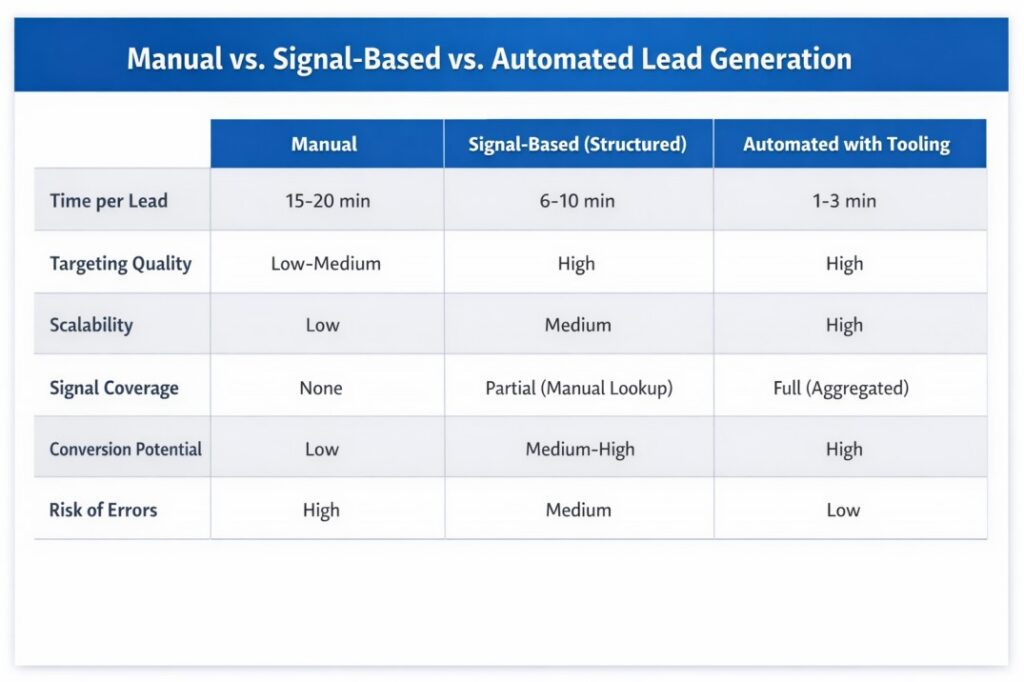
Manual is fine when you are early, testing your ICP, and learning what a good lead looks like. It becomes a ceiling the moment you need to find leads on LinkedIn consistently across a team.
Signal-based prospecting with a structured process is the right model for most SDR teams and growth-stage founders, even before adding automation.
Tooling removes the research burden and lets your team focus on outreach and conversations.
How Pintel.AI Helps You Find Better Leads on LinkedIn
Finding leads on LinkedIn manually breaks down because everything is fragmented. Signals, data, enrichment, and outreach all live in different places, so the process becomes slow and inconsistent.
Pintel solves this by turning prospecting into a system.
It combines ICP filtering, buying signals, enrichment, prioritization, and outreach into one workflow, so you are not switching between tools or building everything manually.
Here is how it works:
- Start with ICP
Pintel surfaces accounts that match your criteria, so you are not searching from scratch. - Track buying signals
It monitors signals like hiring, funding, and leadership changes across 150+ sources, so you know when a prospect is ready. - Enrich and identify decision-makers
You get the right contacts with context, not just company names. - Prioritize automatically
Accounts are ranked based on signal strength, so your team focuses on the best opportunities first. - Activate outreach
Signal context is turned into message-ready inputs and synced to your CRM, so outreach happens faster and with better timing.
The result is simple. Less time researching, more time talking to the right prospects, and a pipeline that runs consistently.
Pintel works as a signal-based prospecting infrastructure for modern GTM teams, helping you move from manual lead generation to a repeatable system.
Move Beyond Volume and Find Leads on LinkedIn the Right Way
Here is what this guide comes down to:
Finding leads is not the problem. Finding high-intent leads, consistently, is.
A list of ICP-matched profiles is a starting point, not a pipeline. The teams that reliably find leads on LinkedIn and convert them do three things differently:
- Signals, not static targeting: knowing when a prospect is ready, not just whether they fit
- A system, not just tactics: a repeatable weekly workflow that does not depend on any one person
- Prioritization, not volume: spending time on accounts most likely to convert today
Get those three things right and LinkedIn becomes your most reliable source of qualified pipeline.
If you are building toward that system, Pintel.AI brings signal aggregation, ICP matching, account prioritization, and GTM workflow automation into one layer. Your team spends less time finding leads and more time closing them.
Frequently Asked Questions
What is the fastest way to find leads on LinkedIn?
The fastest way to find leads on LinkedIn is to use the People search with filters for title, industry, and company size. If you are learning how to find leads on LinkedIn efficiently, start by saving your searches so new matches appear every week. Prioritize 2nd-degree connections, as they respond at a higher rate than cold outreach. Adding even one buying signal improves both speed and lead quality.
What is the difference between a lead and a prospect?
In LinkedIn lead generation, a lead is anyone who could potentially buy from you. A prospect is a lead who fits your ICP, including the right role, company size, and industry. When you find leads on LinkedIn, most results are leads. Your job is to qualify them into prospects before outreach.
How do I find decision-makers on LinkedIn?
To find decision-makers on LinkedIn, search using specific job titles like “VP of Sales,” “Head of Revenue Operations,” or “Chief Marketing Officer.” If you want to find leads on LinkedIn who can actually buy, combine these titles with company size and industry filters. Sales Navigator also helps identify senior decision-makers quickly.
Is LinkedIn Sales Navigator worth the investment?
Yes, for teams serious about LinkedIn lead generation. Sales Navigator helps you find leads on LinkedIn at scale by unlocking filters like job changes, headcount growth, and technology usage. These act as buying signals that improve targeting and timing.
What response rate should I expect from LinkedIn outreach?
In LinkedIn prospecting, response rates depend on targeting quality. Generic outreach typically gets 5-10%. Targeted outreach improves this to 10-20%. When you find leads on LinkedIn using signals and timing, response rates can reach 25-40%. Quality always outperforms volume.
What is signal-based prospecting?
Signal-based prospecting is an advanced way to find leads on LinkedIn. Instead of relying only on static filters, it prioritizes leads based on real-time buying signals such as funding, hiring, or leadership changes. This approach improves both timing and conversion in LinkedIn lead generation.
How is LinkedIn prospecting different from B2B lead generation on other channels?
LinkedIn prospecting gives direct access to verified professional profiles, company structure, and live activity. This makes it one of the most effective ways to find leads on LinkedIn compared to other channels. When combined with signals and a structured workflow, it becomes a reliable pipeline source.