Most sales leaders diagnose performance problems by looking at activity metrics, conversion rates, or win rates. They ask: Are reps making enough calls? Are discovery calls converting? Is our close rate competitive?
These are the right questions, but they often miss the underlying issue: the data feeding those metrics is incomplete, inconsistent, or wrong. When CRM data accuracy is unreliable, every performance analysis built on top of it becomes unreliable, too.
Sales data quality isn’t a technical problem that IT fixes in the background. It’s a performance problem that shows up in your reps’ daily workflows, your pipeline reviews, and your forecast accuracy.

TLDR: What You Need to Know About Sales Data Quality
Sales data quality is the accuracy, completeness, and consistency of CRM information used to identify prospects, qualify leads, and forecast deals. Poor sales data quality forces reps to manually validate records instead of selling, breaks segmentation and routing logic, and makes pipeline forecasts unreliable. High-performing teams fix this by enforcing data standards at ingestion, validating data at workflow checkpoints, and treating data integrity as a RevOps architecture problem—not a rep discipline issue.
In this blog, you’ll learn:
- What sales data quality really means for modern GTM teams
- How bad CRM data wastes SDR time and hurts targeting and forecasts
- Why data problems get worse over time if they aren’t fixed
- How top sales teams prevent bad data in sales from entering their CRM
- Which processes improve sales data accuracy without slowing sales teams
What Is Sales Data Quality?
Sales data quality is the accuracy, completeness, and consistency of information in your CRM that sales teams use to identify prospects, qualify leads, prioritize accounts, and forecast deals.
Sales data quality reflects how reliable your CRM is in day-to-day execution. That reliability ultimately depends on upstream B2B data quality, which determines how clean, consistent, and usable data is before it ever enters your outbound workflows.
This includes three core categories:
- Contact & persona data: names, titles, emails, decision-making authority
- Company & account data: firmographics, employee count, industry, tech stack, recent changes
- Deal & activity data: emails, calls, meetings, stage, close date, deal size
The problem isn’t missing data—most CRMs are full of it. The problem is that data lacks consistency across records, remains incomplete for key fields, or becomes outdated when reps use it. Sales data accuracy and CRM data hygiene degrade over time without active maintenance.
Example: your CRM shows “VP Marketing” for one contact, “VP of Marketing” for another, and “Vice President – Marketing” for a third—all technically the same role, but categorized differently. When your rep builds a list of VP Marketing contacts, they only find one-third of the actual matches because the data isn’t standardized.
This isn’t an edge case. It’s how most CRMs work after 12–18 months of normal use.
Understanding what sales data quality means is only the first step. The real question is: how does poor data quality actually show up in your team’s daily work? Let’s start where the problem hits hardest—your SDR workflows.
How Inaccurate Lead Data Shows Up in SDR Workflows
SDRs interact with CRM data quality issues more directly than any other role. Their entire workflow depends on having accurate information about who they’re contacting and why that person matters.
Here’s what happens when the data is wrong:
SDR opens a lead marked “qualified” (scored 75 points based on company size, industry, and title). They start researching and immediately realize:
- The title shows “Sales Manager,” but LinkedIn shows this person is an SDR—not a decision-maker
- Company size shows 500 employees, but that’s two years old—the company downsized to 200
- Industry is “Software,” but they sell construction equipment and have no use for your product
The lead was never qualified. The scoring model used bad data, the routing rule fired based on that score, and the SDR wasted 10 minutes researching a lead that should never have been routed.
Multiply this by 20–30 leads per day, and your SDRs spend 3–5 hours per week validating data instead of selling. Worse, they stop trusting qualification scores entirely and build their own lead lists in spreadsheets—creating shadow processes that work, but that you can’t measure, optimize, or scale.
This isn’t a training problem. This is what happens when bad data in sales systems is prevalent enough that trusting the system is objectively worse than not trusting it.
When SDRs can’t trust the data, they create workarounds. But the problem isn’t limited to individual reps—it scales across your entire sales organization, forcing everyone to do manual work the CRM was supposed to automate.
Why Bad Sales Data Forces Manual Work
When unreliable sales data becomes the norm, reps develop time-consuming workarounds that bypass CRM logic entirely.
AEs manually verify every account before outreach because segmentation logic consistently returns bad fits. SDRs rebuild lead lists in spreadsheets because CRM routing sends them unqualified contacts. Sales Ops spends hours cleaning data before pipeline reviews because stage progression doesn’t reflect reality.
This manual data validation work doesn’t show up in activity reports, but it consumes 5–10 hours per rep per week. That’s not selling time—it’s overhead created by poor data integrity in sales systems.
The second-order cost is worse: when reps lose trust in CRM data, they stop updating it accurately, which accelerates data decay and makes the problem self-reinforcing.
Manual work is the symptom. The underlying cause is that your CRM can’t reliably tell your team which accounts to prioritize. That’s where segmentation breaks down.
How CRM Data Issues Break Segmentation and Targeting
Sales Ops and RevOps teams build segmentation logic to ensure the right reps work the right accounts. This logic depends entirely on data consistency.
You build a segment for “Series B SaaS companies with 100–500 employees using Salesforce.” Your enrichment tool returns 2,000 companies. You route them to your AE team.
Three weeks later, your AEs report that 40% don’t actually match:
- “Series B” companies raised Series B three years ago, but have since raised Series C and D
- “300 employees” came from a source that hasn’t updated in 18 months—they’re now at 50 after layoffs
- “SaaS” companies sell physical products with a software component—they’re not in your ICP
Your segment logic was correct. The underlying data was inconsistent and outdated, so the segment returned the wrong accounts.
Impact one: AEs waste time working on accounts that don’t fit your ICP. They make calls, send emails, book meetings—only to realize in discovery that the account was never a good fit.
Impact two: Your segmentation logic becomes unreliable. If segments consistently return bad accounts, your team stops trusting them and manually reviews every account before working it, which defeats the purpose of automated segmentation.
The core issue: Segmentation logic depends on consistent CRM data. Without enforced standards, every enrichment source, manual entry, and import adds more inconsistency. Over time, account segmentation logic that worked six months ago no longer works today.
Bad segmentation wastes time on the wrong accounts. But when that same unreliable data flows into your forecast, the consequences get more expensive.
How Poor Sales Data Quality Affects Pipeline Accuracy and Forecasting
Sales leaders use CRM data to understand pipeline health and forecast revenue. When bad CRM data is present, the forecast is wrong.
Your CRM shows $5M in pipeline for Q4, with 40 opportunities across different stages. Your forecast model says you’ll close $2M based on historical win rates by stage. You commit to $2M. End of quarter, you close $1.3M.
When you dig into closed-lost deals:
- 8 opportunities marked “Stage 3: Proposal Sent” but the contact had left the company two months earlier—the deal was dead, no one updated the CRM
- 5 opportunities had close dates that kept getting pushed because the rep wanted them in the current quarter forecast—they were never going to close in Q4
- 6 opportunities were based on inflated deal sizes (rep entered “maximum possible contract value” instead of likely deal size)
- 4 opportunities were in accounts that didn’t match your ICP—low-probability deals that should never have been in the forecast
None of these issues were visible in your pipeline review because the CRM data said everything was fine. Opportunity stages looked healthy. Close dates were in the current quarter. Deal sizes seemed reasonable.
But the underlying data—who the actual buyer was, whether they were still at the company, what the real timeline looked like, whether the account was a good fit—was wrong or missing. Forecast accuracy depends on data integrity, and when that integrity is missing, forecasts fail.
High-performing sales teams fix this by enforcing data hygiene rules that make it impossible to advance an opportunity without validating key fields. If you can’t mark a deal as “Stage 3: Proposal Sent” without confirming the contact’s current employment and decision timeline, you prevent bad data from polluting your forecast.
These problems—bad routing, broken segmentation, missed forecasts—don’t happen overnight. They accumulate gradually as your CRM data degrades month after month.
Why Sales Data Quality Problems Compound Over Time
Bad data doesn’t stay bad—it spreads and gets worse.
Month 1: Marketing imports 10,000 leads from a webinar. No standardization—”IBM” and “International Business Machines” are separate companies.
Month 2: Your enrichment tool adds firmographics to both records. Now you have two IBM records with different data (one shows 350,000 employees, the other shows 360,000).
Month 3: SDRs manually update contacts. Some use “VP Sales,” others use “VP of Sales,” others use “Vice President, Sales.” No one enforces a standard.
Month 4: Sales Ops builds a segment for “VP Sales at enterprise companies.” It returns one-third of actual matches because titles are inconsistent.
Month 5: Sales team ignores segments and builds their own lists in spreadsheets because CRM segments are unreliable.
Month 6: RevOps tries to analyze which personas convert best, but data is too inconsistent to produce meaningful insights.
Each step makes sense in isolation. Cumulatively, they create an environment where you can’t trust your segments, measure performance accurately, or build reliable forecasts.
Because degradation is gradual, no single event triggers a “fix the data” initiative. It just becomes an accepted reality that your CRM data is messy, and your reports are approximate.
Most teams assume the solution is to add more data. But that makes the problem worse, not better. Here’s why.
Sales Data Quality vs Data Enrichment
Many sales teams try to solve data quality problems by enriching more fields. They assume that having more data points—more intent signals, more technographic details, more contact attributes—will improve performance.
This creates the opposite problem.
Data enrichment adds new information to existing records. Sales data quality ensures that information is accurate, consistent, and usable. Enrichment without quality controls fills your CRM with inconsistent, outdated, or incorrectly formatted data at scale.
Here’s the difference:
- Enrichment approach: Pull 50 data fields from three different providers. More coverage, but formats are inconsistent, update frequencies vary, and your CRM now has three conflicting values for “company size.”
- Quality-first approach: Pull 10 decision-critical fields from one reliable source. Standardize formats on ingestion. Refresh data on a predictable schedule. Every field your team uses is accurate and current.
Enrichment gives you volume. Quality gives you reliability. High-performing teams prioritize reliability because inaccurate data at scale creates more work than no data at all.
The real question isn’t “how much data do we have?” It’s “can our team trust the data we have?” When the answer is no, enrichment makes things worse.
So if adding more data isn’t the solution, what is? The answer starts with understanding who actually owns this problem.
Sales Data Accuracy vs Sales Data Volume
Most sales teams focus on volume: more leads, more contacts, more enrichment fields. They assume that having more data improves performance.
The opposite is often true.
A CRM with 50,000 leads and 60% data accuracy performs worse than a CRM with 20,000 leads and 95% accuracy. Why? Because inaccurate data at scale creates work at scale—more bad routing decisions, more wasted outreach, more time spent validating.
High-performing teams prioritize sales data accuracy over volume. They enrich fewer fields but keep them current. They route fewer leads but ensure those leads are qualified. They track fewer metrics but trust the ones they track.
This isn’t about having less data. It’s about ensuring the data you have is reliable enough to drive decisions. Volume without accuracy creates busywork. Accuracy without unnecessary volume creates execution capacity.
But improving data accuracy isn’t just about choosing the right tools or data sources. It’s about assigning clear ownership for data integrity across your GTM organization.
Data Integrity Is a RevOps Responsibility, Not a Rep Problem
Most sales leaders treat data quality as a rep discipline issue. They send reminders to “keep your CRM updated” and add data hygiene to manager coaching checklists.
This doesn’t work because data integrity in sales isn’t a behavior problem—it’s a systems problem.
Reps don’t create inconsistent data on purpose. They create it because:
- The CRM accepts any format for critical fields (no schema enforcement)
- Enrichment tools use different taxonomies and don’t standardize on ingestion
- There’s no validation workflow preventing bad data from advancing through stages
- Manual updates are required but not automated when reliable signals exist
RevOps owns the system design that either prevents or allows bad data. When data quality is treated as a rep responsibility instead of a RevOps architecture problem, it never improves.
High-performing teams shift ownership: RevOps builds systems that make it impossible to enter bad data. Reps execute within those systems. The CRM enforces standards, not managers.
Once you understand that this is a system design challenge, the solution becomes clear. Here’s how the best sales teams actually fix sales data quality.
How High-Performing Sales Teams Fix Sales Data Quality
Teams that solve this problem treat sales data quality as an ongoing system design challenge. They prevent bad data from entering the CRM and maintain CRM data hygiene over time.
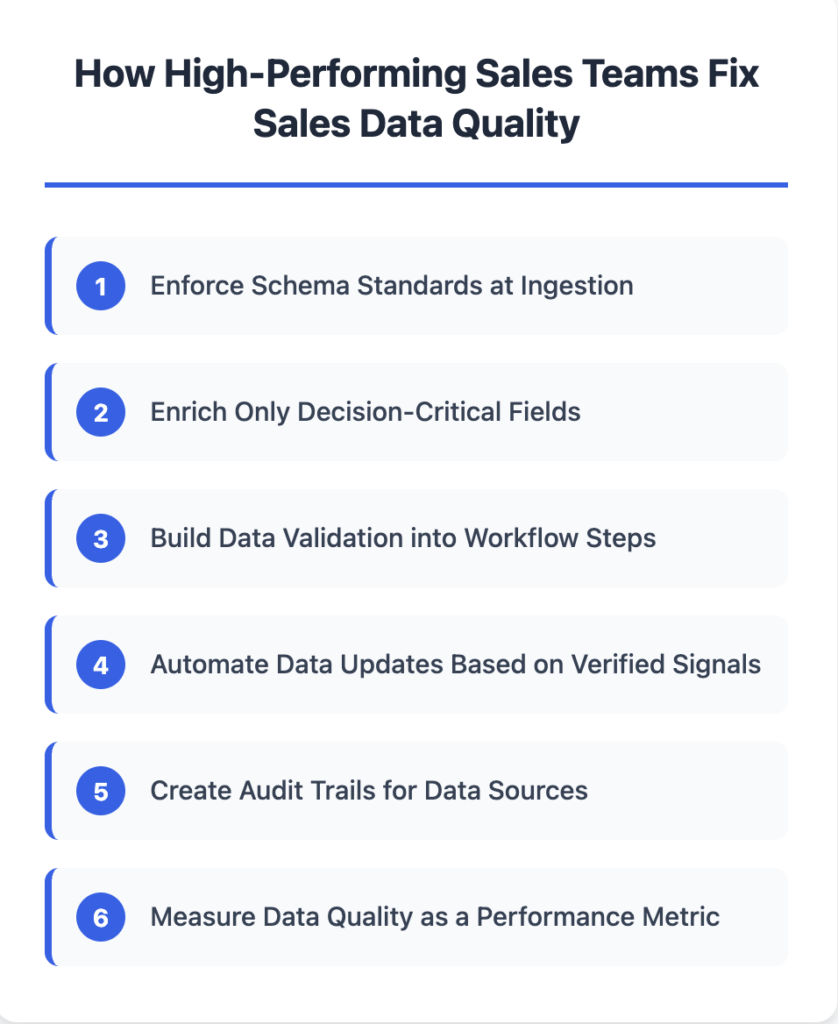
Enforce Schema Standards at Ingestion
Instead of letting data enter your CRM in any format, enforce standards before it touches your database.
When a lead comes in from a form fill, webinar, or enrichment tool, run it through a normalization layer that maps job titles to a controlled taxonomy, standardizes company names to a canonical record, and classifies seniority levels consistently.
This prevents the “same data, different formats” problem from ever starting.
Enrich Only Decision-Critical Fields
Most teams over-enrich. They pull 40+ fields from their enrichment provider because “more data is better,” then realize 80% of those fields are never used, half are outdated within six months, and the rest are formatted inconsistently.
High-performing teams identify the 8–10 fields that actually matter for qualification criteria and targeting—title, seniority, department, company size, tech stack—and only enrich those. This keeps the database lean, reduces costs, and makes consistency easier to maintain.
Build Data Validation into Workflow Steps
The best place to catch bad data is the moment someone tries to use it.
Require specific fields before an opportunity can move to certain stages:
- Can’t mark “Stage 2: Discovery Complete” without confirming the contact’s current role and decision-making authority
- Can’t mark “Stage 3: Proposal Sent” without verifying timeline and budget
- Can’t mark “Stage 4: Negotiation” without confirming the buying committee
This doesn’t slow reps down—it prevents them from advancing deals based on incomplete information, which would slow them down later when the deal stalls because key details were missing.
Real-world example: A Series B SaaS company implemented stage-gate validation rules requiring AEs to confirm contact employment status before marking deals as “Proposal Sent.” Within one quarter, their forecast accuracy improved from 68% to 89% because deals with outdated contacts couldn’t advance to late stages. AEs initially resisted the change, but within weeks they reported that validation rules helped them identify dead deals earlier—saving time they would have wasted on follow-up.
Automate Data Updates Based on Verified Signals
Instead of relying on reps to manually update CRM fields, automate updates when reliable signals indicate a change:
- When a contact changes jobs (detected via LinkedIn), automatically flag the record and re-route if necessary
- When a company announces funding, layoffs, or an acquisition, update firmographics automatically
- When a contact hasn’t responded to 10+ emails, flag the record as potentially outdated
This maintains CRM data accuracy without requiring reps to manually verify every field.
Create Audit Trails for Data Sources
When your SDR sees “recently hired 15 SDRs” in a lead profile, they need to know where that data came from and when it was verified.
High-performing teams attribute every data point to a source and timestamp:
- “Company size: 200 employees (ZoomInfo, updated 2024-12-15)”
- “Recent hiring: 15 SDR roles posted (LinkedIn Jobs, detected 2024-12-10)”
- “Tech stack: Uses Salesforce (Builtwith, confirmed 2024-12-01)”
When reps can verify data, they use it. When they can’t, they ignore it—which defeats the purpose of enrichment. CRM trustworthiness depends on visible, verifiable data sources.
Measure Data Quality as a Performance Metric
Most sales teams measure activity and outcomes. High-performing teams also measure CRM data quality:
- What percentage of routed leads have complete data for all decision-critical fields?
- What percentage of opportunities in Stage 3+ have verified contact information?
- How often do reps mark leads as “bad data” or “not a fit” after routing?
These metrics tell you whether your sales data quality is improving or degrading. If 30% of routed leads get marked “bad data,” you have a data problem. If that drops to 5% after implementing schema enforcement, you’ve fixed it.
When you implement these fixes systematically, the performance impact shows up across your entire GTM motion—from SDR productivity to forecast accuracy.
What This Means for Sales Performance
When sales data quality improves, performance improvements show up across every part of your GTM motion:
SDRs spend less time researching and more time selling. Research time drops from 10 minutes to 2 minutes per lead. A rep working 50 leads per day saves 6+ hours per week—6 hours of additional selling capacity without hiring another rep.
Segmentation and targeting become reliable. Your segments return the accounts they’re supposed to return. Your lead routing logic works as designed. Your AEs don’t waste time on accounts that don’t fit your ICP.
Pipeline reviews become trustworthy. Your forecast is based on accurate opportunity data, verified timelines, and real deal sizes—not inflated projections and stale contacts.
RevOps can actually measure what works. You can analyze which personas convert best, which industries have the highest win rates, which campaigns drive pipeline—because underlying data is consistent and accurate.
The compounding effect: your entire GTM motion becomes more predictable. Marketing generates leads that are actually qualified. Sales works accounts that actually fit your ICP. RevOps forecasts accurately. Everyone operates from the same clean, complete, stable data.
Now that you understand why sales data quality matters and how teams fix it, here’s how to start improving your own CRM data quality.
Where to Start
If you suspect sales data quality is affecting performance, audit your current data against the workflows that depend on it.
Pick one workflow—lead routing, account segmentation, or pipeline forecasting—and trace it back to the data:
- What fields does this workflow depend on?
- How consistent is that data across your CRM?
- When was it last updated?
- How often do reps report that the data is wrong?
If 30%+ of your records have incomplete or inconsistent data for fields your workflow depends on, you have a data quality problem directly affecting performance.
The fix isn’t a one-time cleanup. It’s implementing systems that prevent bad data in sales from entering your CRM: schema enforcement, selective enrichment, validation workflows, automated updates, and audit trails.
When data quality breaks workflows, fix the inputs, not the outputs. When reps validate data manually, your system architecture is broken—not your team’s discipline.
Once those systems are in place, your sales data quality improves by default—and your sales performance improves with it.
FAQs
1. How do you measure sales data quality in a CRM?
Sales data quality is measured by accuracy, completeness, and freshness of decision-critical fields, especially in routed leads and late-stage opportunities.
2. What is the difference between CRM data quality and sales data quality?
CRM data quality focuses on record hygiene, while sales data quality reflects how reliably that data supports targeting, routing, and forecasting in execution.
3. Can poor sales data quality affect outbound performance?
Yes. Poor sales data quality leads to bad routing, irrelevant outreach, and wasted SDR time, directly reducing outbound effectiveness.
4. How often should sales data be reviewed or refreshed?
High-performing teams review and refresh sales data continuously through automated updates, not quarterly or manual cleanups.
5. Is sales data quality a RevOps or Sales Ops responsibility?
Sales data quality is a RevOps responsibility because it depends on system design, schema enforcement, and workflow validation—not rep behavior.
6. Does improving sales data quality reduce SDR research time?
Yes. Accurate, standardized data reduces manual validation, allowing SDRs to spend more time selling instead of researching records.
7. What happens if sales teams ignore data quality issues?
Ignoring sales data quality causes compounding problems—broken segmentation, unreliable forecasts, and loss of trust in CRM systems.