Sales teams want to move faster from identifying contacts to sending outreach. But the path from a defined ICP to a list of outreach-ready contacts still involves spreadsheets, disconnected tools, and manual work. This is where AI tools for finding contacts become critical.
Most GTM teams adopt AI expecting efficiency gains, but instead end up with tool sprawl, one platform for discovery, another for enrichment, a third for research, and a fourth for message prep. Each handoff adds friction, inconsistency, and cleanup work that often falls on RevOps.
This guide focuses on how AI tools for finding contacts support contact discovery, enrichment, and outreach preparation, as well as the operational steps that happen before a sequence runs. It’s not a general comparison of AI platforms, but a practical breakdown of how AI-powered systems reduce manual work and help teams choose the right setup based on GTM maturity and workflow complexity.

What AI Does in Contact Finding and Outreach Preparation
AI tools for finding contacts surface people who match ICP criteria automatically and monitor accounts for changes. Instead of building lists from scratch each quarter, reps review net-new contacts as they join companies, get promoted, or become relevant based on role changes.
They do this by continuously pulling and reconciling data from multiple sources, rather than relying on a single static database. This allows systems to detect job changes, account shifts, and new buying committee members as they appear, not months later when databases refresh.
How AI Addresses Core Prospecting Bottlenecks
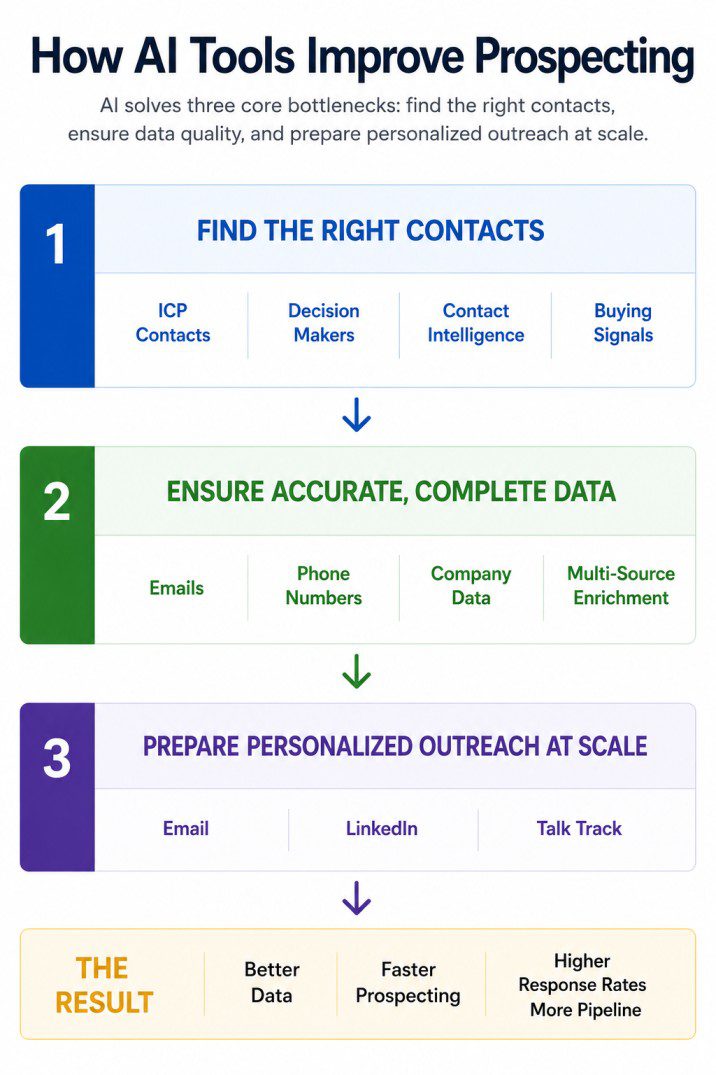
AI platforms address three core bottlenecks in outbound motion: finding the right contacts, ensuring data quality, and preparing personalized outreach at scale. Each stage has specific failure points that create manual work.
Contact Discovery and Contact Intelligence
The manual problem: Traditional contact discovery often involves searching LinkedIn Sales Navigator, exporting CSV files, manually verifying contacts, and cleaning incomplete records before outreach. This process quickly becomes difficult to scale across hundreds of target accounts.
How AI improves contact discovery: AI tools for finding contacts combine contact discovery with contact intelligence. Rather than returning a static list of contacts, they continuously identify new decision-makers, monitor job changes, validate contact information, and surface account signals that help revenue teams prioritize outreach.
How AI enriches contact data: To improve data quality, many AI platforms enrich records by combining data from multiple providers instead of relying on a single database. Using techniques such as waterfall enrichment, they automatically validate emails and phone numbers, fill missing fields, standardize job titles, and improve match rates by moving to secondary providers when primary sources cannot verify a record.
Why this matters: The result is more than a larger contact database. Revenue teams gain continuously updated contact intelligence that combines verified contact data, company information, and buying signals, reducing manual cleanup while improving segmentation and outreach.
Enrichment
The data quality problem: Enrichment fills missing fields, normalizes inconsistent data, and reduces the spreadsheet work that follows every data import. The problem isn’t just missing emails or phone numbers—it’s inconsistent formatting (Director of Sales vs Sales Director), outdated job titles, duplicate records, and partial data that makes segmentation unreliable.
How AI automates cleanup: AI platforms automate this by pulling data from multiple providers, applying normalization rules, and filling gaps without manual intervention. Waterfall enrichment—trying one data source, then falling back to others if the first fails—ensures higher match rates across regions. This matters for teams prospecting globally where US-focused databases have poor coverage in EMEA or APAC.
The segmentation impact: Better enrichment means better segmentation. If job titles are standardized and seniority fields are accurate, reps can segment by persona and send relevant messaging instead of generic outreach. RevOps spends less time cleaning data and more time defining ICP logic that actually gets enforced.
Personalized Outreach Preparation
The manual challenge: Preparing personalized outreach often requires reps to research every account by reviewing LinkedIn profiles, company websites, recent news, funding announcements, hiring activity, leadership changes, and technology stacks. They then need to turn those insights into personalized emails, LinkedIn messages, and call talk tracks. While this works for a handful of accounts, it becomes difficult to scale across hundreds of prospects.
How AI prepares personalized outreach: AI platforms personalize outreach by combining account intelligence, buying signals, contact attributes, firmographic and technographic data, and recent business events to generate messaging tailored to each prospect’s role, company, and current priorities. Instead of starting with a blank page, sales teams receive outreach that reflects the prospect’s business context and likely pain points.
- Talk track: Generate call talking points and conversation starters using relevant buying signals and business insights.
- Email: Generate personalized cold emails tailored to the prospect and account.
- LinkedIn: Create personalized connection requests and follow-up messages based on account context.
How buying signals improve personalization: Modern AI tools monitor signals such as funding announcements, hiring trends, technology adoption, leadership changes, product launches, and other business events that indicate when an account may be more receptive to outreach. The best platforms prioritize the signals that align with your ICP and use them to generate messaging that reflects the prospect’s current business context.
Why this matters: Personalized outreach becomes a repeatable process rather than relying on individual reps to conduct manual research and write every message from scratch. By combining account intelligence, buying signals, and AI-assisted content generation, sales teams can deliver more relevant emails, LinkedIn outreach, and sales conversations while maintaining consistency at scale.
How Different AI Tools for Finding Contacts Fit the Workflow
Below are examples of platforms commonly used at different stages of the prospecting workflow—from finding sales contacts with AI through enrichment to outreach preparation. Each fits a different stage and GTM maturity level.
Understanding where each platform fits in the workflow helps GTM leaders avoid adopting systems that solve adjacent problems instead of the actual bottleneck. These aren’t presented as a ranked comparison, but as working examples of how different teams operationalize contact discovery and outreach prep.
Pintel.AI
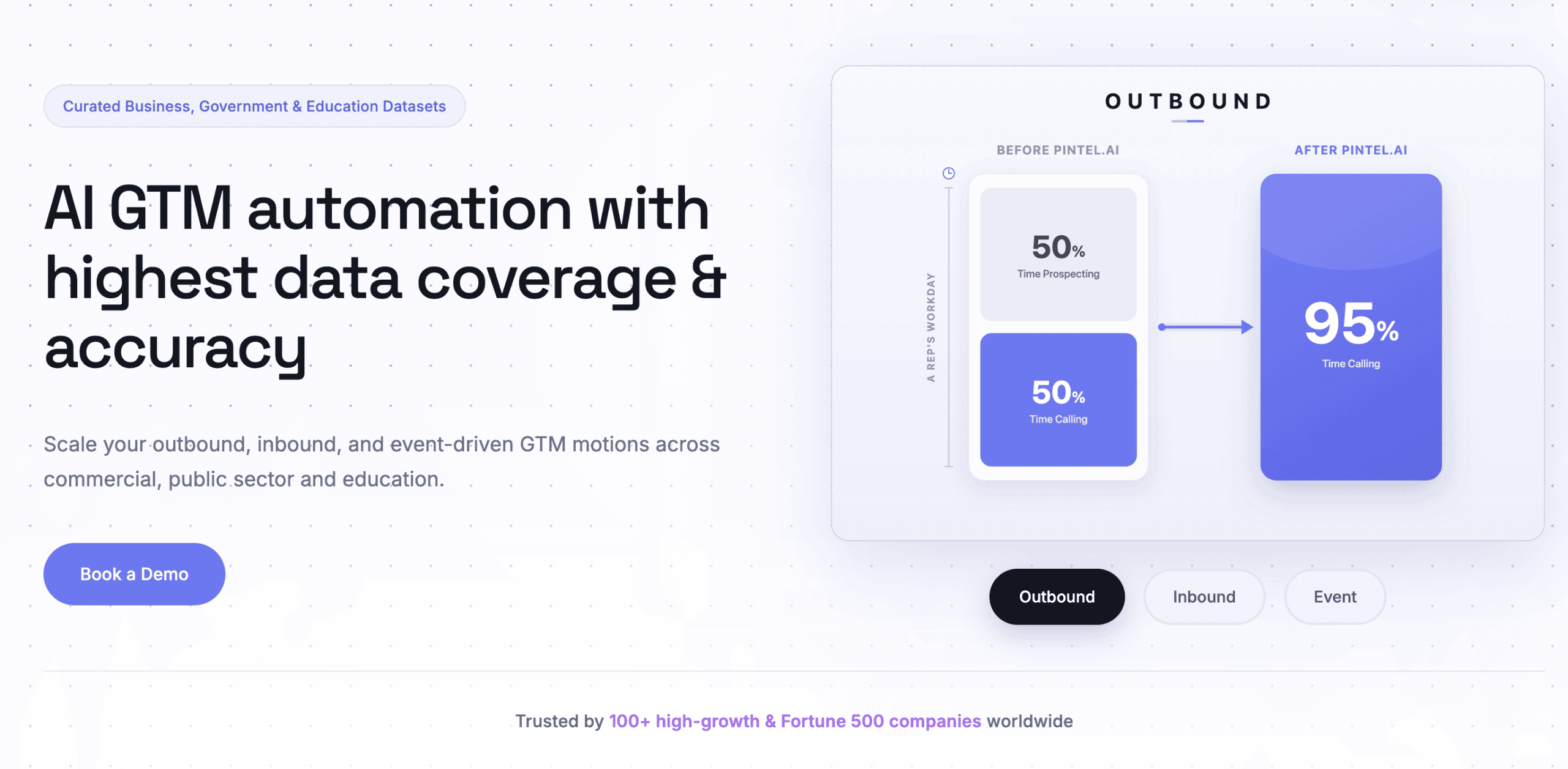
Pintel.AI is an AI sales intelligence platform that helps revenue teams identify their ideal customer profile (ICP), discover high-fit companies and contacts, enrich contact and company data, generate contact intelligence, uncover buying signals, research accounts, and prepare personalized outreach from a single platform. Instead of stitching together multiple point solutions, teams can manage the entire prospecting workflow in one place.
Best suited for:
Sales and RevOps teams that want to automate prospecting, improve data quality, and standardize outbound execution across the organization.
What it helps with
ICP-based contact discovery: Define your ideal customer profile using natural language or filters, then automatically discover companies and contacts that match your targeting criteria. The platform continuously identifies new decision-makers as accounts evolve.
Contact intelligence: Build complete contact and account profiles by combining verified contact data, company information, buying signals, technographics, firmographics, and recent business activity, giving reps the context they need before outreach.
Contact enrichment: Enrich emails, phone numbers, firmographic and technographic data using waterfall enrichment across 150+ data providers, with confidence scores for every record.
Account research: Surface funding rounds, hiring activity, leadership changes, technology adoption, procurement events, and other buying signals to prioritize high-intent accounts.
Personalized outreach: Generate personalized emails, LinkedIn messages, and sales talk tracks using account context, buying signals, and prospect-specific insights.
Workflow automation: Describe your prospecting goal in natural language, and let AI build target lists, apply ICP filters, enrich contacts, research accounts, and prepare outreach automatically.
Tradeoffs / Context
- Earlier-stage platform with less market recognition than long-established competitors.
Apollo
Reader pain this tool addresses: Reps need a searchable database to find contacts and accounts without jumping between LinkedIn, ZoomInfo, and a CRM. Apollo consolidates contact discovery and basic enrichment in one interface.
Best suited for: Small to mid-sized sales teams that need a self-serve platform. Works well when reps own list building and outreach execution without heavy RevOps involvement.
What it helps with:
Contact discovery: Searchable B2B database with filters for title, seniority, industry, and company size
Enrichment: Fills email, phone, and LinkedIn profile data
Basic outreach: Built-in sequencing and email tracking
Tradeoffs / context:
- Data accuracy varies by region and company size. Enterprise contacts and non-US markets have lower coverage.
- ICP logic lives in saved searches, not enforced workflows. Reps can deviate from targeting criteria.
- Teams outgrow Apollo when they need deeper signal-based prospecting or when RevOps wants to centralize ICP definitions across tools.
Clay
Reader pain this tool addresses: RevOps and Sales Ops teams need flexibility to combine multiple data sources, run custom enrichment logic, and build complex workflows without engineering support. Clay is a spreadsheet-like interface for orchestrating AI sales workflow steps across vendors.
Best suited for: Teams with dedicated RevOps or Sales Ops headcount. Best for companies that already know their ICP well and need custom workflows to operationalize it.
What it helps with:
Enrichment: Pulls data from 50+ sources and applies conditional logic to prioritize the best result
Research and personalization: Chains AI prompts to summarize account context or generate message hooks
Custom workflows: Handles edge cases and multi-step processes that rigid platforms can’t support
Tradeoffs/context:
- Requires RevOps ownership. Reps won’t build Clay workflows themselves.
- No built-in contact discovery. You bring your own lists or connect to databases like Apollo.
- High flexibility means high maintenance. Workflows break when data sources change or APIs update.
- Teams outgrow Clay when they need a system that runs consistently without constant RevOps intervention.
Clearbit
Reader pain this tool addresses: Marketing and RevOps teams need real-time enrichment for inbound leads and CRM records without manual CSV uploads. Clearbit automates enrichment at the point of capture.
Best suited for: Inbound-heavy teams or companies where RevOps owns data quality. Works best when enrichment needs to happen automatically, not as a rep-initiated task.
What it helps with:
Enrichment: Appends firmographic, technographic, and contact data to CRM records in real time
Form enrichment: Captures additional data from inbound form fills without adding friction
Tradeoffs/context:
- Not built for outbound list building. Clearbit enriches records you already have, but doesn’t help reps discover new contacts.
- Teams using Clearbit still need a separate platform for contact discovery and prospecting.
- Pricing is based on API calls, so high-volume outbound motions can get expensive.
Choosing the Right Setup for Contact Discovery and Outreach Preparation
Most purchasing mistakes happen when teams evaluate platforms in isolation instead of mapping them to how their GTM motion actually runs. The decision isn’t which platform has the best features—it’s which one matches your ownership model, workflow complexity, and operational capacity.
1. Who Owns Prospecting: Reps vs RevOps
Ownership determines whether a platform gets adopted or becomes shelfware.
Rep-owned prospecting works when your ICP is simple, your market is well-defined, and reps have time to build their own lists. Self-serve platforms like Apollo fit here because reps can search, filter, and export without dependencies. The tradeoff: inconsistency. Each rep interprets ICP criteria differently, and there’s no enforcement layer.
RevOps-owned prospecting works when ICP definitions are complex, when you’re running account-based motions, or when data quality directly impacts conversion rates. Systems that enforce ICP logic and surface pre-qualified contacts reduce wasted rep time on out-of-scope accounts. The tradeoff: RevOps becomes a bottleneck if the system requires constant workflow adjustments.
The failure mode is adopting a platform that doesn’t match who does the work. If you buy a RevOps-heavy system but expect reps to operate it, adoption fails.
2. Workflow Complexity: Simple Outbound vs Multi-Step GTM
Simple outbound motions—one ICP, one persona, one message—don’t need complex AI platforms. Multi-step workflows—account research, signal-based prospecting, persona segmentation, custom messaging—break in simple systems.
Simple workflow example: “Find VPs at Series B SaaS companies and send a cold email.” A contact database with basic filters works. You don’t need multi-agent systems or automated research.
Complex workflow example: “Identify accounts showing buying intent, find multiple personas within the buying committee, surface account-specific pain points, segment by persona, and prep personalized messaging.” This needs a system that handles complexity without requiring RevOps to manually chain steps together.
The mistake teams make is underestimating workflow complexity when evaluating platforms. What feels like “just find me contacts” often involves hidden steps: verifying data accuracy, segmenting by persona, researching account context, and ensuring ICP compliance. If those steps aren’t accounted for in the platform decision, they become manual work.
3. Data Quality Requirements: When Accuracy Matters
Basic enrichment fills missing fields. High-accuracy enrichment validates data, scores confidence, and flags inconsistencies. The difference matters when bad data costs you deliverability or wastes rep time.
High-volume, low-touch outbound: A 70% contact accuracy rate is acceptable. Basic enrichment is enough. Volume compensates for inaccuracy.
Account-based sales or executive outreach: Each contact matters. Systems that provide confidence scores, validate emails before sending, and normalize data across sources reduce waste.
Data quality requirements should map to your outbound volume and deal size. High-volume, transactional sales can tolerate more inaccuracy. Low-volume, high-ACV sales cannot.
The operational cost of bad data isn’t just bounced emails. It’s reps researching contacts that don’t exist, RevOps cleaning lists after the fact, and sequences that burn through accounts without generating pipeline.
4. Scale and Maintenance Overhead
When evaluating AI platforms, small teams need systems that work out of the box. Scaling teams need systems that don’t break as volume increases.
For small teams without dedicated RevOps or Sales Ops: Maintenance overhead is the hidden cost. Platforms that require ongoing workflow adjustments, prompt tuning, or manual data validation create dependencies. If the system breaks and there’s no one to fix it, prospecting stops.
For scaling teams: Can the platform handle 10x the volume without 10x the maintenance? Can it process thousands of contacts per week without requiring manual review? Does it degrade as data sources change or as workflows get more complex?
Point solutions tend to scale vertically—they handle one task well but don’t reduce the number of tools in the stack. Unified systems scale horizontally—they handle more of the workflow but require upfront setup.
How All the Pieces Fit Together
Choosing the right setup for finding sales contacts with AI and preparing outreach comes down to three factors: who owns prospecting, how complex your workflows are, and whether your biggest bottleneck is functionality or execution.
Teams run into trouble when platforms are adopted without clarity on ownership or workflow design. The result is tool sprawl, manual handoffs, and RevOps spending more time maintaining integrations than improving strategy. The platforms themselves may work, but the prospecting motion does not improve.
GTM maturity plays a big role in platform fit. Early-stage teams benefit from self-serve systems that work immediately. Scaling teams need platforms that enforce ICP logic and reduce manual work. Enterprise teams need systems that can handle complexity without requiring constant operational intervention.
Evaluate AI platforms based on whether they reduce handoffs, match how your team actually works, and scale without adding maintenance overhead. The goal is not to assemble the largest stack, but to build a prospecting workflow that runs consistently and supports pipeline growth.
Frequently Asked Questions
How do I know if my current setup is actually helping or just adding complexity?
If your team still exports CSVs, manually checks data accuracy, or moves information between tools before outreach, the platforms are likely adding complexity. A useful signal is handoffs. The more times data changes systems before a rep can send outreach, the more friction your stack is creating instead of removing. Effective AI tools for finding contacts should reduce these handoffs, not create new ones.
Can AI tools for finding contacts work if our ICP is still evolving?
Yes, but only platforms that allow ICP logic to be adjusted without rebuilding workflows. When ICPs change frequently, rigid systems create rework. The best AI tools for finding contacts separate targeting logic from execution, making it easier to update criteria without breaking prospecting processes.
What is the biggest mistake teams make when adopting AI platforms for prospecting?
The most common mistake is evaluating platforms in isolation instead of mapping them to the full prospecting workflow. Teams often buy systems to solve symptoms like slow list building without addressing upstream problems like unclear ownership, inconsistent data standards, or lack of enforced ICP rules.
Do AI tools for finding contacts require clean data to work well?
AI tools for finding contacts do not require perfect data, but they do require consistent data. Inconsistent fields, mismatched job titles, or unclear source priority reduce effectiveness. Systems that validate, normalize, and flag low-confidence data perform better than those that simply append fields.
How much setup time should teams realistically expect?
Setup time varies widely. Self-serve platforms can be used the same day but often require ongoing manual effort. More structured systems may take a few weeks to define ICP logic and workflows, but typically reduce daily manual work afterward. The key is whether setup reduces or shifts effort.
Will AI platforms for contact discovery change how SDRs and BDRs are measured?
Over time, yes. As AI tools for finding contacts eliminate manual research and list building, activity-based metrics become less meaningful. Teams often shift toward measuring conversion quality, response rates, and meeting relevance instead of volume-based KPIs.
How should teams think about replacing versus layering AI platforms?
If a new platform requires copying data from existing systems, it is layering. Replacement happens when a platform removes an entire step or vendor from the workflow. Replacement reduces cognitive load, while layering increases it even if individual platforms are powerful.
Are AI platforms for finding contacts more useful for early-stage or scaling teams?
Scaling teams tend to benefit more from AI tools for finding contacts because workflow complexity increases with volume, regions, and personas. Early-stage teams can succeed with simpler platforms, but often adopt AI systems later to enforce consistency and reduce manual effort as they grow.
What should teams clarify internally before evaluating platforms?
Teams should agree on who owns prospecting, how strict ICP enforcement needs to be, and how much manual maintenance they can support. Without alignment on these questions, even strong platforms fail to deliver value.
How do I explain the ROI of AI tools for finding contacts to leadership?
ROI is best framed in terms of reduced wasted effort rather than increased output. When evaluating AI tools for finding contacts, focus on time saved on manual research, fewer bad contacts entering sequences, and more consistent targeting. These improvements often deliver more value than raw activity increases.